

Roles and permissions
How roles are created and given permissions on the Roles screen, how a role reaches a person, and what the administrator role can always do.
What each person can do inside the application is decided by their roles, and what a role can do is decided by the permissions ticked on it. This guide explains the Roles screen of the admin panel, how a role reaches a person, and which roles exist from the start.
The roles that exist from the start
| Role | Who has it | What it can do |
|---|---|---|
| Admin | The product's owners, from the moment the product is installed. | Everything. It cannot be edited or deleted. |
| Client | Every account that registers. | Nothing beyond what any signed-in person can do, until you tick permissions on it. |
Your product may also ship a starting role meant for you to hand out. That role cannot be deleted.
The Roles screen
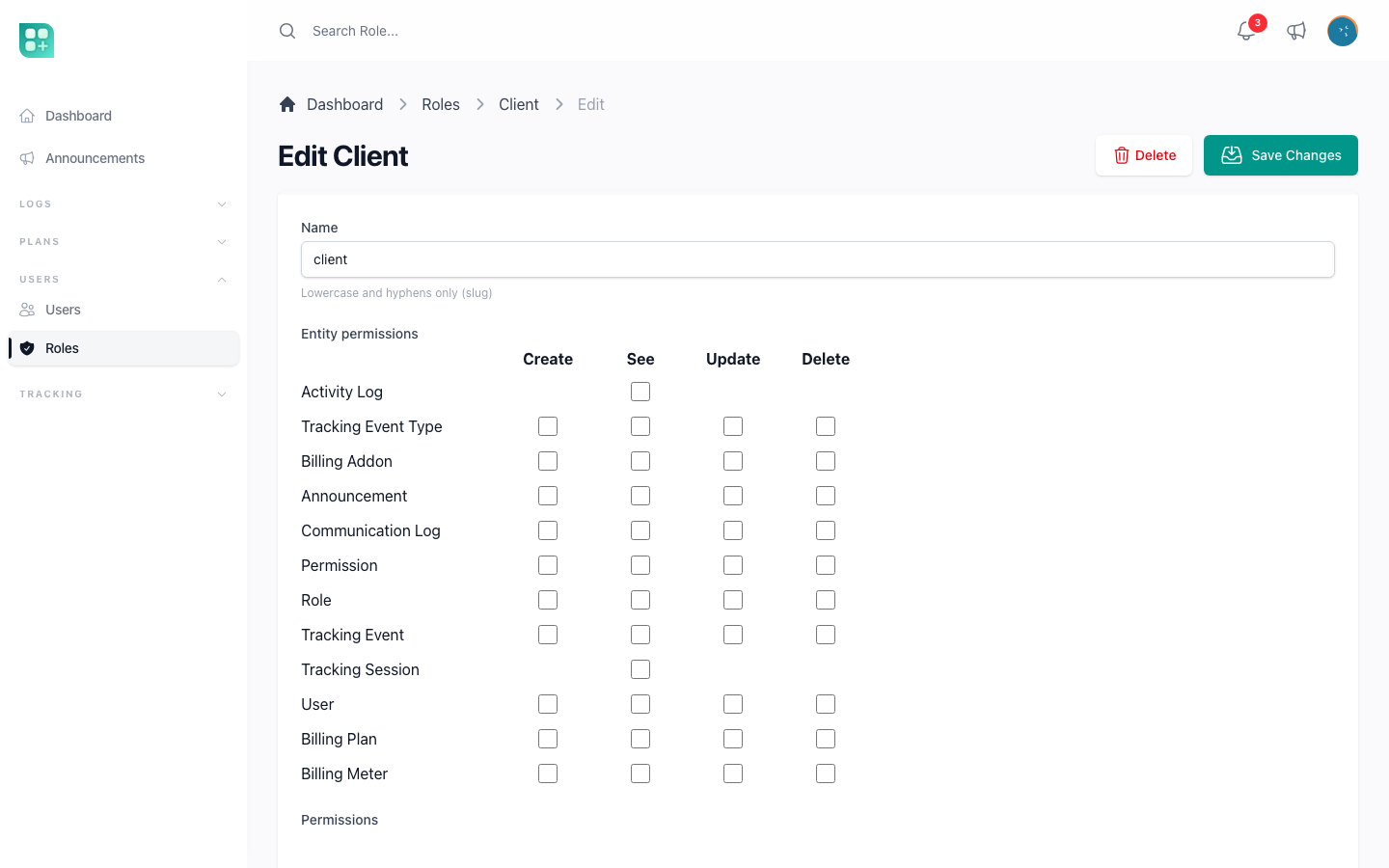
Open Users → Roles in the admin panel. The list shows every role by its name. Create asks for a name: lowercase letters and hyphens, such as "support-team", which the screen shows as "Support Team". Once the role exists, Edit shows its permissions:
- A grid with one row per kind of record — User, Role, Announcement, Communication Log and the rest — and the columns Create, See, Update and Delete. Tick a box to give that action on that kind of record. Click a column header to tick the whole column, or a row's name to tick the whole row.
- Under it, the Permissions list, with the switches that do not fit the grid, such as Answer Ticket or Browse Media Folder, and any your product adds.
- A module that is switched off for the product does not appear in the grid or the list, so a role cannot be given something that does not exist. The rows of plans, add-ons and meters are the exception: they stay while those modules are off, and ticking them changes nothing until the module is on.
The Clone action on a role copies it with all its permissions under the same name followed by "-copia" (then "-copia-2", and so on) and opens the copy for editing.
Some boxes have no effect, because some records cannot be created or changed by anyone: permissions can only be looked at, and a communication log can only be looked at or deleted.
What each column does
| Column | What it lets the role do with that kind of record |
|---|---|
| Create | Add new ones. |
| See | Open the list and each record's page. |
| Update | Edit them. |
| Delete | Delete them, see the deleted ones and restore them. |
The admin panel itself opens only for people who hold the Admin role, except its support screens: Answer Ticket opens the support inbox and the team's chats, and Use Assistant the assistant, for any role. Someone who reaches them without the Admin role sees only the Support group of the panel's menu. Inside the panel, a few screens ask for more than a permission: the activity history can be opened only by the product's owners, and the Tracking Event records only by the Admin role.
Giving a role to a person
Roles are given to accounts in Users → Users: the Role field of the user form takes one or more roles, and only an editor who holds the Admin role sees it. On save, the person receives a Role Update Notification naming the roles added and removed.
An account of one of the product's owners cannot be deleted from that screen.
The product's owners
The product's owners are a short list of accounts written into the product itself, not a role. They receive the Admin role when the product is installed, which is what gives them their access; being on the list adds only a few extras — the Dev Zone, the Design screen, the activity history, acting as another of the owners, and protection against being deleted. Taking an account off that list removes the extras but leaves the Admin role in place. See Sudo and super administrators.
For developers
The pieces
Roles and permissions are built on Spatie's laravel-permission package. The models are App\Models\Role and App\Models\Permission, swapped in through the models block of config/permission.php. Both extend the Spatie models, both soft-delete, and both record their changes in the activity log. The tables are the package defaults (roles, permissions, model_has_roles, model_has_permissions, role_has_permissions), configured in config/permission.php. Every permission belongs to the web guard. A role's name is stored as a slug — Support Team becomes support-team — and the panel shows it as a headline, Support Team, passed through the translator.
Permission checks are cached for 24 hours. The package flushes the cache when a role or permission is saved through its own methods, and the panel flushes it again after editing or cloning a role.
The naming convention
Every permission is two words: {action} {resource}. The action is one of create, retrieve, update, delete; the resource is the singular of the model's table. The panel splits a permission on its space: the first word picks the column of the grid, the second word the row, and each checkbox shows the exact permission name on hover. A permission whose first word is not one of those four actions, such as answer ticket or browse media_folder, goes to the Permissions list. The permissions a fresh install carries:
| Resource | Permissions |
|---|---|
user |
create user, retrieve user, update user, delete user |
role |
create role, retrieve role, update role, delete role |
permission |
all four, though the policy only ever allows reading |
announcement |
all four |
communication_log |
retrieve communication_log, delete communication_log and the create/update pair, which the policy never grants |
activity_log |
retrieve activity_log |
tracking_event_type |
all four |
tracking_session |
retrieve tracking_session |
tracking_event |
all four |
media |
all four, though the policy decides seeing, editing and deleting one file by its folder, see below |
media_folder |
all four, plus browse media_folder, which lets the role open and manage every account's folders and files |
ticket |
answer ticket: open the support inbox and answer tickets and chats |
assistant |
use assistant: talk to the support assistant |
billing_plan, billing_addon, billing_meter |
all four, while Billing Core is loaded |
The first block and the billing rows come from the resources of the admin panel; the media, folder, ticket and assistant permissions come from the permissions key below. Those eleven are also created by a migration, which gives them to the admin role, so a deploy that runs php artisan migrate without the seeders still has them.
What the seeder creates
php artisan db:seed runs, in order, PermissionSeeder, RoleSeeder, AdminSeeder (the sudo accounts), UserSeeder (the default_users accounts), and the three billing catalogue seeders AddOnSeeder, PlanSeeder and MeterSeeder. You can run each on its own:
php artisan db:seed --class=PermissionSeeder
php artisan db:seed --class=RoleSeeder
PermissionSeeder builds its list from two sources, both configured in the Permissions block of config/app.php:
| Key | Default | What it does |
|---|---|---|
discover_front_permissions |
true |
Reads every resource of the admin panel — the classes in app/Front/Resources/ and the ones a package registers, such as Billing Core's plans, add-ons and meters — and derives its permissions from the $actions the resource declares: create when the list has create or store, retrieve when it has show or index, update when it has edit or update, delete when it has destroy. A read-only resource with $actions = ['index', 'show'] gets retrieve only. |
permissions |
The eleven media, folder, ticket and assistant permissions | Permissions no resource declares, as 'permission name' => 'guard': create, retrieve, update and delete for media and for media_folder, browse media_folder, answer ticket and use assistant. Add your own to the list, and keep the ones it ships with: with deletion on, a permission you remove from it is soft-deleted on the next seed. Any name works; the two-word shape is a convention, not a rule. |
allow_permisisons_deletion |
true |
Yes, with the misspelling — that is the real key. When true, a permission in the database that is in neither source is soft-deleted on the next seed. Set it to false if you insert permissions outside the seeder and want them to survive. |
Permissions are upserted by name and guard, and a soft-deleted permission that reappears in the sources is restored. Discovery reads Composer's class map, so run composer dump-autoload after adding a resource and before seeding.
// config/app.php
'permissions' => [
    'retrieve media' => 'web',
    // ... the rest of the permissions the kit ships with
    'use assistant' => 'web',
    'export reports' => 'web',
],
RoleSeeder then ensures three roles exist:
| Key | Default | What it does |
|---|---|---|
admin_role |
'admin' |
The top role. It is created if missing and, on every run, receives every permission in the table. The /admin middleware, billing screens included, checks the role this key names. |
default_role |
null |
When set, the role is created if missing and, only at creation, receives the permissions listed in default_role_permissions. Nothing in the kit assigns it to new accounts: it exists so a starting role is ready for you to hand out, and RolePolicy refuses to delete it. |
default_role_permissions |
[] |
Permission names granted to default_role the first time it is created. Later edits to this list do not touch an existing role; grant them from the panel instead. |
| — | 'client' |
A client role is always created. Registration assigns it to every new account. It carries no permissions unless you grant some. |
AdminSeeder assigns admin_role to every email in config('app.sudo'). Re-run the seeders whenever you add a resource or a custom permission; they are idempotent.
The Roles screen
The screen is /admin/roles; roles are assigned at /admin/users. A permission is left out of the grid and of the list when its resource, the second word, has a policy in app/Policies/ whose required configuration is currently off. The billing policies live in the package, not in app/Policies/, so their rows always show. RolePolicy keeps the admin role from being edited or deleted and the default_role from being deleted; everything else follows the role permissions. UserPolicy forbids deleting a sudo account.
Policies
Every resource is guarded by a policy in app/Policies/ that extends App\Policies\BasePolicy. The base class needs one property and maps the standard policy methods to permissions:
class PlanPolicy extends BasePolicy
{
    protected string $name = 'plan';
    protected $requiredConfig = 'features.plans_enabled';
}
| Policy method | Permission checked |
|---|---|
viewAny, view |
retrieve {name} |
create |
create {name} |
update |
update {name} |
delete, restore, forceDelete, viewDeleted |
delete {name} |
Two hooks refine that:
$requiredConfignames a config key. When it is falsy,before()returnsfalseand every check fails, for the admin role too.AnnouncementPolicyusesfeatures.announcements; the tracking policies usefeatures.tracking_enabled.extraValidation()is ANDed with every check. Override it to add a condition that applies to the whole resource.
Laravel resolves the policy by convention: App\Models\Plan is guarded by App\Policies\PlanPolicy. A model that lives elsewhere is registered by hand in AppServiceProvider::boot() with Gate::policy(Model::class, ModelPolicy::class), as the activity log model is.
The shipped policies and where they depart from the table:
| Policy | Departure |
|---|---|
UserPolicy |
delete also requires that the target is not sudo. |
RolePolicy |
update denies the admin role; delete denies the admin and default roles. |
PermissionPolicy |
viewAny and view are always true; every write is false. |
CommunicationLogPolicy |
create and update are false. |
AnnouncementPolicy |
$requiredConfig = 'features.announcements'. |
TrackingEventTypePolicy, TrackingSessionPolicy |
$requiredConfig = 'features.tracking_enabled'. |
TrackingEventPolicy |
Same flag; viewAny, view and create require the admin role instead of a permission; update and delete are false. |
ActivityPolicy |
Does not extend BasePolicy. viewAny requires the admin role and a sudo email; view the admin role; every write is false. |
MediaPolicy |
view, update and delete of a file allow the owner of its folder, a team member who manages the team's media, or browse media_folder; the media permissions do not count for them. A file outside a folder is refused. |
MediaFolderPolicy |
viewAny is always true. view, create and update allow the folder's owner or a team member who manages the team's media, and otherwise need browse media_folder. delete never allows a root folder, and otherwise allows the owner, the team manager or delete media_folder. Adds browse(), which is browse media_folder. |
TicketPolicy |
Its resource is on while tickets or the live chat are on. viewAny needs answer ticket; view allows the ticket's owner or answer ticket; create is always true. Adds answer(). |
AssistantPolicy |
$requiredConfig = 'features.assistant.enabled'. Adds use(), which needs use assistant; view allows only the person's own conversation, with use assistant. |
Billing Core's BillingPlanPolicy, BillingAddonPolicy, BillingMeterPolicy |
Live in the package and extend its own Policy, which maps the same four permissions without restore, forceDelete or viewDeleted. Off with features.plans_enabled (plans also need services.stripe.secret) or features.addons_enabled. view of one add-on or one meter is false, and a plan, add-on or meter that cannot be deleted any more refuses delete. |
Protecting your own code
Anything you build outside Laravel Front uses the same permissions. Pick the layer that fits:
A Livewire screen. Authorize in mount(); the failure becomes a 403.
public function mount(?Plan $plan)
{
    $this->authorize($plan?->exists ? 'update' : 'create', $plan ?? Plan::class);
}
A route. bootstrap/app.php registers the Spatie middleware under the aliases role, permission and role_or_permission, next to Laravel's own can:
Route::middleware('permission:export reports')->group(function () {
    Route::livewire('/reports', App\Reports::class)->name('reports');
});

Route::middleware('role_or_permission:admin|retrieve plan')->group(function () {
    // ...
});
A view. Hide what the person cannot do rather than letting them hit a 403.
@can('create plan')
    <x-button href="{{ route('admin.front.plans.create') }}">
        {{ __('New plan') }}
    </x-button>
@endcan

@can('update', $plan)
    <x-button href="{{ route('admin.front.plans.edit', $plan) }}">
        {{ __('Edit') }}
    </x-button>
@endcan
Plain PHP. $user->can('delete plan'), Gate::allows('update', $plan), or $user->hasPermissionTo('export reports') for a permission with no policy behind it. Reserve $user->hasRole(config('app.admin_role')) for presentation decisions, such as whether to draw the admin link; authorization goes through permissions so a role you create later can be granted the same ability.
Where sudo fits
sudo is not a role and holds no permissions. It is a computed attribute on the user, true when the email is in config('app.sudo'). The seeder gives those accounts the admin role, which is what actually grants access; the attribute itself is consulted only where the code names it — the Dev Zone and the Design screen with their sidebar entries, the activity log, the protection against deleting a sudo user, acting as another sudo user (an administrator can act as anyone else, but only a sudo account can act as a sudo account), and moving files between disks in the media library when MULTIMEDIA_DISK_CHANGE is sudo. Removing an email from the list removes those extras but leaves the role in place.