

Send notifications
One class, three channels, and the user decides which of them reach them.
This guide covers how a notification is written, how the kit decides which channels carry it, and where the user reads it. You need it the first time your product has to tell someone that something happened.
The three channels
Every notification is a Laravel notification that extends App\Notifications\Notification. That base class asks the recipient which channels to use, and the recipient answers from App\Traits\UserBase::channelNotifications():
| Channel | When it is used | Who controls it | Where it lands |
|---|---|---|---|
database |
Always | Nobody: it is always on | The bell in the top bar and the notification centre |
mail |
When the user has email notifications on | The user, from their profile (send_mail column on users) |
Their inbox, through the default mailer |
| Web push | When the user has at least one browser subscribed | The user, by allowing push in a browser | A system notification on that device, site open or not |
Nothing you configure changes this list. A notification you send with $user->notify(...) goes to the database always, to email if the user wants email, and to every browser they have subscribed. The web push half needs the PWA and VAPID keys, which /help/web-push-and-the-pwa covers; without them the third channel is simply never in the list because nobody can subscribe.
There is a fourth channel, App\Channels\SmsChannel, which sends through App\Services\SnsService and is used only by the phone verification code. It is not part of the base class and no user preference reaches it.
Create a notification
The project ships its own stub, so the generator gives you a class that already extends the base:
php artisan make:notification Orders/OrderShipped
Fill in the three methods and, when the notification points somewhere, the fourth:
<?php

namespace App\Notifications\Orders;

use App\Models\Order;
use App\Notifications\Notification;

class OrderShipped extends Notification
{
    public function __construct(public Order $order) {}

    protected function subject(): string
    {
        return __('Your order :number is on its way', ['number' => $this->order->number]);
    }

    protected function description(): string
    {
        return __('It left our warehouse today. Track it from your account.');
    }

    protected function image(): string
    {
        return $this->order->product->photo;
    }

    protected function url(): ?string
    {
        return route('app.orders.show', $this->order);
    }
}
Send it like any Laravel notification:
$order->user->notify(new OrderShipped($order));
| Method | Required | What it feeds |
|---|---|---|
subject() |
Yes | Mail subject and greeting, push title, title in the database row |
description() |
Yes | Mail body line, push body, description in the database row |
image() |
Recommended | Avatar shown in the bell and the centre, push icon. Default: the signed-in user's avatar, or config('app.icon') when nobody is signed in |
url() |
Optional | Link of the row in the bell and the centre, "View more" button in the mail, URL opened when the push is tapped. Default null: no link anywhere |
button() |
Optional | Label of the mail button. Default __('View more') |
Write every string through __(); the kit translates lang/*.json from English.
Mind image(). The default reads auth()->user(), which is right when a signed-in person triggers a notification about themselves and wrong when a queued job or a command sends it: there is no signed-in user there, so it falls back to the app icon. Pass the model in the constructor and return its picture, as the example does.
What the base class does for you
You never write via(), toMail(), toArray() or toWebPush() for the common case. The base class builds all of them from your four methods:
via()returns$notifiable->channelNotifications():database, plusmailwhensend_mailis true, plusNotificationChannels\WebPush\WebPushChannelwhen the user has rows inpush_subscriptions.toMail()builds aMailMessagewithsubject()as subject and greeting,description()as the single line, and an action button labelledbutton()pointing aturl()when there is one. It uses the default Laravel mail template.toArray()storestitle,description,image,icon(inbox),color(bg-primary-700),urlandtarget(null) in thedatacolumn of thenotificationstable.toWebPush()builds aWebPushMessagewith title, body and icon, and putsurl()indata.url, which the service worker opens on tap.
Two things the base class does not do:
- It does not queue. It uses
Illuminate\Bus\Queueablebut does not implementShouldQueue, so the mail and the push requests go out during the request that callednotify(). Addimplements ShouldQueueto your own class when a notification is sent to many people or from a screen that should stay fast, and make sure a worker is running (/help/queues-and-scheduled-work). - It does not pick a locale. Laravel renders the notification in the application locale at the moment it is sent. To send in the recipient's language, call
$user->notify((new OrderShipped($order))->locale($user->locale)).
Adjust one notification
Override what you need and leave the rest to the base class.
Only some channels, whatever the user prefers:
public function via(object $notifiable): array
{
    return ['mail'];
}
The kit does this in CreatedUserNotification (mail only: a welcome email with the password has no business in the bell) and in TestWebPushNotification (push only: it exists to prove a browser subscription works).
A richer email, keeping the subject:
public function toMail(object $notifiable): MailMessage
{
    return parent::toMail($notifiable)
        ->line(__('Your tracking number is :number.', ['number' => $this->order->tracking]));
}
Or a Markdown template of your own, as RoleUpdateNotification and AnnouncementNotification do:
public function toMail(object $notifiable): MailMessage
{
    return (new MailMessage)
        ->subject($this->subject())
        ->markdown('emails.orders.shipped', ['order' => $this->order]);
}
What never changes: subject() and description() are defined on every notification, because every channel reads them, and image() is defined whenever the default would be wrong. Do not edit App\Notifications\Notification to special-case one notification. The base exists so that adding a channel is one change there and one in channelNotifications(), and every notification in the project gains it.
What the user sees
The bell in the top bar is the Livewire component App\Livewire\Auth\Notifications\Notification. It shows a red badge with the unread count (+9 past nine), a dropdown with the last ten notifications grouped by day, each with its image, icon, title and relative time, and a "Mark as Read" link that marks every unread one. Clicking a row marks it as read and follows its url.
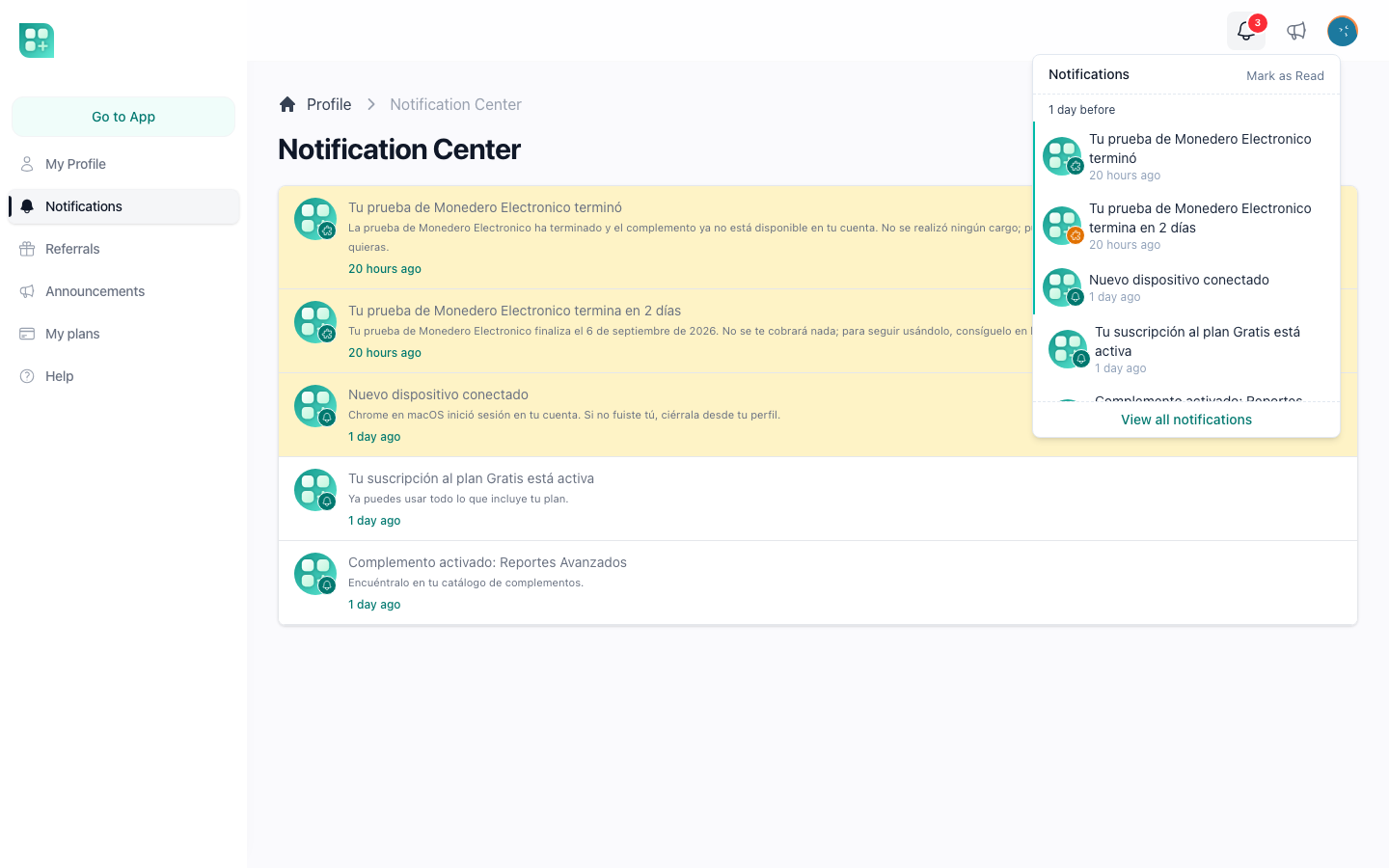
"View all notifications" opens the notification centre at /account/notifications (route auth.notifications.center, component App\Livewire\Auth\Notifications\Index): a paginated list of twenty per page, unread rows highlighted, each with title, description and date. User::notifications() orders unread first, then newest. The rest of the account area is described in /help/your-account-area.
A notification with no url() renders as a link to #: the row is readable but goes nowhere. The image stored in the row is resized through the project's thumbnail helper when displayed, except the app icon, which is shown as stored; when it is empty the app icon is used.
The user's preferences
The profile page (/account) has a "Notifications" card with one toggle, "Email notification", bound to the send_mail column. New users start with it on. There is no separate toggle for the bell: the database channel is always on so that a user who turns email off still finds everything in the centre.
Push is not a preference column. A user is "subscribed" when their browser has registered a subscription, and they turn it on or off per browser from the same card (the toggle appears only when the PWA and VAPID keys are configured). The migration 2026_06_01_180000_drop_send_webpush_from_users_table removed the old send_webpush column for that reason.
Which mailer sends the email
The mail channel uses the default mailer, MAIL_MAILER in .env. .env.example ships MAIL_MAILER=failover, and the failover mailer defined in config/mail.php tries mailgun first and ses second, so a notification email is not lost when one provider is down. The sender is MAIL_FROM_ADDRESS and MAIL_FROM_NAME. The mail_fallbacks list in config/auth.php is a different mechanism: it applies only to the email verification code, not to notifications. The transports, their keys and the SMS provider are in /help/email-and-sms-delivery.
Every email sent through the mail channel, and every SMS, is recorded by App\Listeners\LogNotificationSent and App\Listeners\LogNotificationFailed in the communication_logs table, with recipient, notification class, subject and outcome. Administrators read them at /admin/communication_logs; see /help/audit-trails-and-webhook-events.
Notifications the kit already sends
| Class | Channels | When |
|---|---|---|
App\Notifications\User\CreatedUserNotification |
Mail only | An administrator creates a user from the admin panel; includes the login email and the password when one was set |
App\Notifications\User\RoleUpdateNotification |
User's channels | An administrator changes a user's roles |
App\Notifications\Announcements\AnnouncementNotification |
Mail when the announcement has "send email" and the user wants email; push when subscribed; never the bell | An announcement is published (/help/announcements) |
App\Notifications\TestWebPushNotification |
Push only | The user presses "Test" next to the push toggle in their profile |
App\Notifications\Auth\VerificationCodeNotification |
SMS only | A phone verification code is requested |