

Verify email and phone
How the one-time codes travel, who sends them, and the fields that ask for them.
A person proves that an email or a phone number is theirs by typing a code the kit sent there. This guide covers when that happens, what each channel needs from .env, what the code looks like, and how to put the same verified fields in your own forms.
When a code is asked
| Moment | Channel | Condition |
|---|---|---|
| Registration, email field | AUTH_ENABLE_VALIDATION=true. "Sign up" refuses the form until the address is confirmed. Off, the field has no "Verify now" link and no code is asked. |
|
| Registration, phone field | SMS or call | The same switch, with the same refusal on "Sign up". |
| One-step sign-in with an unverified email | AUTH_APPROACH is CreationValidation or LoginValidation, and AUTH_ENABLE_VALIDATION=true. |
|
| Two-step sign-in, step one, unverified email | Always. | |
| Profile, changing the email | AUTH_ENABLE_VALIDATION=true. Saving refuses the new address until the code is confirmed. |
|
| Profile, changing the phone | SMS or call | The same switch, with the same refusal on saving. |
In the profile, an identity nobody touched is never asked to prove itself again, so saving the name or the timezone needs no code. Emptying an identity needs no code either: it is allowed, and it takes its verification with it, as long as another identity can still sign the person in.
Nothing is sent when the address or number already belongs to another account: the field shows the uniqueness error instead.
The code
- Email codes are ten characters, letters and digits, case-sensitive. The subject is "Email validation: " followed by your application name, and the body is a short message with the code.
- Phone codes are four digits. The message reads "Your app - Your verification code is: 1234".
Each request generates a fresh code, and each resend replaces the previous one. The code lives in the state of the screen that asked for it: it has no expiry of its own, and it disappears with that screen, so reloading the page starts over. It must be typed exactly; a wrong value answers "The verification code is incorrect."
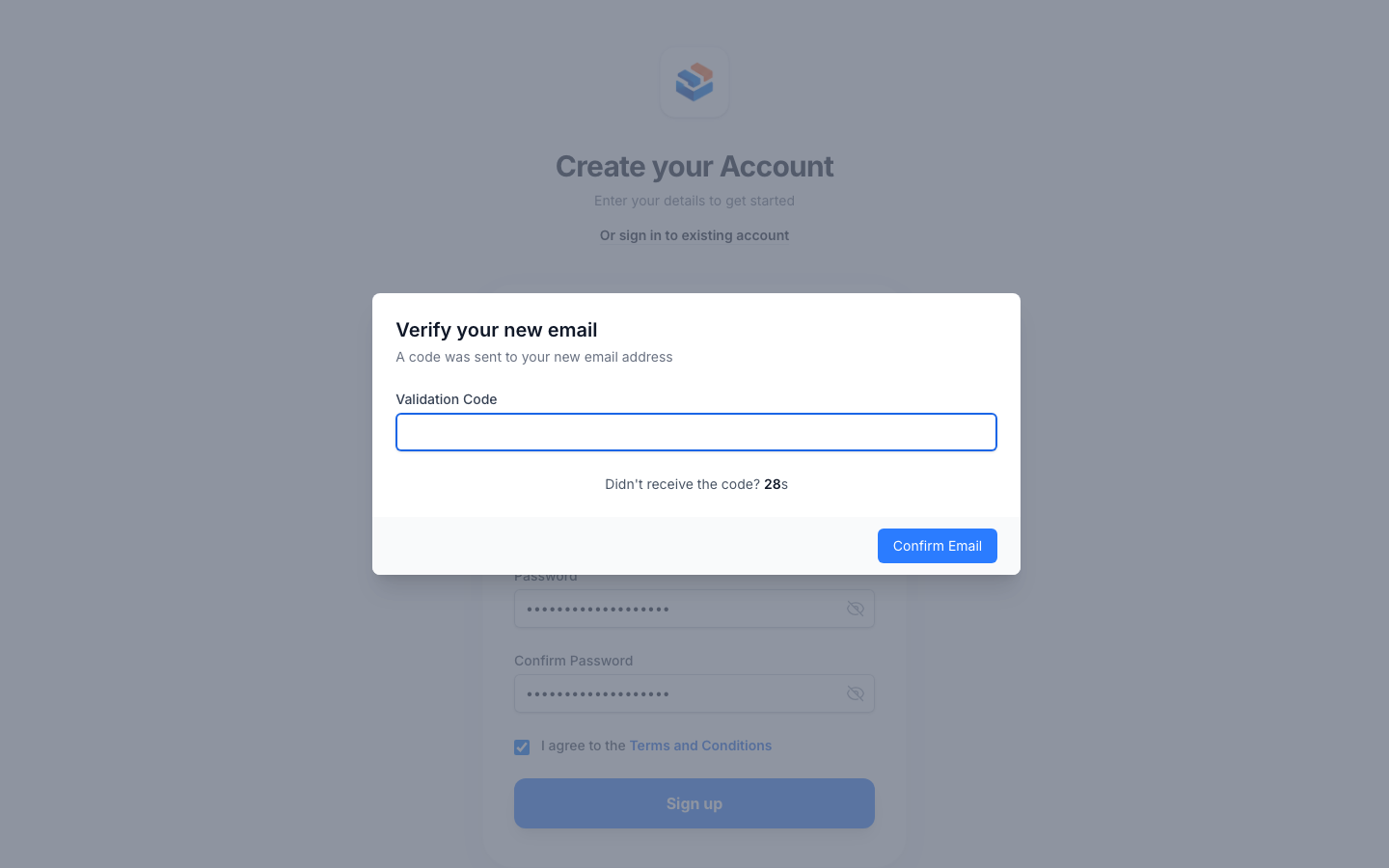
Under the code field a thirty-second countdown runs: "Didn't receive the code? 27s". When it ends, a "Resend code" link appears; on the phone screen, "Resend SMS" and "Receive a call". The countdown is the only throttle: there is no limit on the number of attempts against a code.
Email codes and the mailer
Email codes go through Laravel's mail system, synchronously, with the mailable App\Mail\Auth\ValidateEmail. The first send uses MAIL_MAILER. Every resend moves to the next mailer in mail_fallbacks of config/auth.php, which ships as:
'mail_fallbacks' => [
    'mailgun',
],
So with the default configuration a person can ask for the code twice: once through MAIL_MAILER, once through Mailgun. A third attempt finds no mailer left and shows "We could not send the verification code. Please try with another email address". Add names to the array to allow more resends; the same name may appear more than once. The mailer that finally delivered is recorded in the account's extra_data under mail_driver_used.
The mailers and their variables are the ones in config/mail.php: smtp, mailgun, ses, postmark, resend, log, and failover, which .env.example selects and which tries Mailgun, then SES. Their credentials and how to pick one are in /help/email-and-sms-delivery.
Phone codes and the provider
AUTH_VALIDATION_PROVIDER picks who carries the code to the phone.
aws, the default: Amazon SNS
The code goes out as a transactional SMS through Amazon SNS with these credentials:
AUTH_VALIDATION_PROVIDER=aws
AWS_ACCESS_KEY_ID=your-aws-access-key-id
AWS_SECRET_ACCESS_KEY=your-aws-secret-access-key
AWS_DEFAULT_REGION=us-west-1
The region falls back to us-west-1 when the variable is missing. These are the same keys the ses mailer and the S3 disk use, so one IAM user with SNS, SES and S3 permissions covers all three. SNS only sends text messages: the phone dialog sends the SMS as soon as it opens, and there is no call option. The number is normalised to international format before the dialog opens, so a local number reaches the provider in the shape it expects.
telnyx: Telnyx Verify
AUTH_VALIDATION_PROVIDER=telnyx
TELNYX_API_KEY=your-telnyx-api-key
TELNYX_VERIFY_PROFILE_ID=your-telnyx-verify-profile-id
TELNYX_TOKEN is accepted as an older name for the key. Create a Verify profile in the Telnyx portal and paste its id; the kit passes its own four-digit code to the profile, so the SMS and the call carry the code the screen expects. With Telnyx the dialog first asks "Choose how you want to receive the verification code" with two buttons, "Send SMS" and "Receive a call", and the call stays available under the countdown as an alternative. The number is normalised to international format before the request, and a number that cannot be normalised is refused.
With either provider, when a key or the profile is missing or the provider answers with an error, the person sees the dialog "Unable to send code. We could not send the verification code to your phone. Please try again." and the error is reported to your log. Account setup on each provider, and the SMS the kit sends outside verification, are covered in /help/email-and-sms-delivery.
What the person sees
At registration and sign-in the whole card is replaced: the title "Please confirm your email" or "Please confirm your phone", a line "A code was sent to your email address", a "Validation Code" field, a "Confirm Email" or "Confirm Code" button and the countdown. When the code is confirmed the flow resumes where it stopped: the account is created, or the session starts.
In the profile, and inside the registration form, the verification opens as a modal: "Verify your new email" or "Verify your new phone", the same field, button and countdown. When confirmed, the modal closes and the field shows the new value with a green "Verified" badge.
In the profile that confirmation saves the identity it verified, and only that one: the new email with its timestamp, or the new phone with its own. Anything else on the page waits for "Save" and goes through the usual validation, so a half-typed name or a field the person was still editing is never written by a verification.
The components <x-email-input> and <x-phone-input>
Both are Blade components that wrap a field with a verification badge and the "Verify now" link, and both are the fields the kit itself uses at registration and in the profile. Drop them into any Livewire form:
<x-email-input
    :label="__('Email address')"
    wire:model.live="user.email"
    :validation-required="config('auth.enable_validation')"
    :verified-at="$user->email === $user->getOriginal('email') ? $user->email_verified_at : null"
    dispatch-context="profile"
/>

<x-phone-input
    :label="__('Phone (Include country code)')"
    wire:model.live="user.phone"
    :validation-required="config('auth.enable_validation')"
    :verified-at="same_phone_number($user->phone, $user->getOriginal('phone')) ? $user->phone_verified_at : null"
    dispatch-context="profile"
/>
wire:model, or wire:model.live, is the one required attribute: it names the property of your component that holds the value. label and placeholder reach the field; any other attribute is accepted and ignored. The three optional attributes are the same on both components:
| Attribute | What it does |
|---|---|
validation-required |
true shows the verification row: the badge and the "Verify now" link. false leaves a plain field with nothing to verify. It defaults to true on the email and false on the phone, so pass config('auth.enable_validation') to have both follow the project switch, which is what the kit's own screens do. |
verified-at |
The timestamp that decides whether the value on screen starts as "Verified". Pass it only while that value is the one that was verified, and null otherwise: that is what the comparison in each example above is for. |
dispatch-context |
A string echoed back in the identity-verified event so your listener knows which form asked. Defaults to the wire:model path. |
Behaviour shared by both:
- Under the field, a badge reads "Verified" in green or "Not Verified" in amber. It answers whether this value was verified, not whether the box has something in it.
- Editing a verified value flips the badge to "Not Verified"; typing the verified value back flips it green again, with no new code. A phone is compared as a number, so the stored international number typed in local form is the same number.
- "Verify now" appears as soon as the field has content. The email waits for an address that is well-formed and shows "Invalid Email Format" until then; the phone is converted to international format when the link is pressed, and a number that cannot be converted is refused with "Invalid Phone" instead of opening the dialog.
- Before sending, the component checks that no other account has the value and shows the uniqueness error if one does. A phone is compared as a number here too, so the same line already registered with its prefix is found.
- Your bound property receives what the person types, as they type it, and keeps it across the round trips of the form: nothing is emptied and no keystroke costs a request. Verification is therefore a check of your own when the form is submitted, not a
requiredrule; that is how the registration form and the profile refuse a value that still needs its code. - A phone is stored in international format. A number typed without its prefix is completed with the country of the signed-in account, or, when nobody is signed in, with the country detected for the visitor and then
COUNTRY_CODE_FALLBACK.
Reacting to a verification
When a code is confirmed the modal dispatches identity-verified with type, either email or phone, value, verified_at, context and column, the wire:model path. Both channels send the same payload. Listen for it when you need to store the timestamp:
use Livewire\Attributes\On;

#[On('identity-verified')]
public function onIdentityVerified($data)
{
    if (($data['context'] ?? null) !== 'profile') {
        return;
    }

    if ($data['type'] === 'phone') {
        $stored = User::find($this->user->getKey());
        $stored->phone = normalize_phone_number($data['value']);
        $stored->phone_verified_at = $data['verified_at'];
        $stored->save();
    }
}
Check context first: the modal is shared, and a page can hold several of these fields. When you did not pass dispatch-context, the context is the wire:model path, so the listener compares against 'user.phone' rather than a name you chose.
Write the identity that was verified and nothing else, on a record read from the database, as the example does. Saving the whole model from here would persist every other field as it stands at that moment, without the validation and the checks your Save button runs: a half-typed address sitting in another field would be written over the stored one.
Local development
The kit does not log the codes anywhere, so give them somewhere to land:
- Email: set
MAIL_MAILER=log. The whole message, code included, is written tostorage/logs/laravel.log, or to the channel inMAIL_LOG_CHANNEL. Remember that a resend moves on tomail_fallbacks, which points at Mailgun: without Mailgun credentials the resend errors out, so either empty the array locally or ask for the code once. A local SMTP catcher such as Mailpit works the same way withMAIL_MAILER=smtp. - Phone: there is no local shortcut. SMS and calls go through the real provider, so use real credentials and your own number, or develop with an email identity and leave the phone for a later pass.
- The test suite runs with
MAIL_MAILER=array, set inphpunit.xml, so nothing leaves the machine during tests.