

Web push and the PWA
Make the site installable, generate its icons, and let a browser receive push notifications.
This guide covers the Progressive Web App layer: the manifest, the service worker, the icons, the VAPID keys behind web push, how a browser subscribes, and how the result is installed on a phone. You need it when notifications have to reach a user whose tab is closed, or when the product has to live on a home screen.
Turn it on
APP_PWA=true
config/app.php reads it into app.pwa, off by default. When it is on:
resources/views/layouts/base.blade.phprenders the@laravelPWAdirective in the<head>: the manifest link, the theme colour, the Android and iOS home-screen meta tags, the splash images, and a script that registers/sw.jsas the service worker with scope/. A view that must not carry it declares an emptyavoidPwasection.- The profile page shows the push toggle, provided the VAPID public key is also set.
App\Http\Middleware\IsPWABuilder, on the home route, sends a visitor who arrives from the installed mobile app straight to the dashboard instead of the landing page.- The session cookie changes shape when
APP_DEBUGis false:SESSION_SECURE_COOKIEdefaults to the value ofAPP_PWAandSESSION_SAME_SITEdefaults tonone, so the session survives inside the installed app. Both need HTTPS, which the PWA needs anyway. Set them explicitly if you want something else.
The package behind it is silviolleite/laravelpwa. It serves /manifest.json (route laravelpwa.manifest) from config/laravelpwa.php, and /offline, which renders resources/views/vendor/laravelpwa/offline.blade.php, a standalone page outside the app layout that shows only the logo and a message saying the device has no connection. It carries nothing of the person with the session, because the service worker stores it on the device and shows it to whoever opens the app next.
The manifest
config/laravelpwa.php is the manifest. The package copies the top-level keys as they are and every key under custom verbatim to the root of the JSON, so anything the manifest specification allows can go under custom. What you change:
| Key | Default | What it does |
|---|---|---|
manifest.name |
APP_NAME |
Full name, shown on the install prompt and the splash screen |
manifest.short_name |
APP_NAME |
Name under the home-screen icon; keep it under twelve characters |
manifest.start_url |
/ |
Page the installed app opens on |
manifest.display |
standalone |
standalone hides the browser chrome; minimal-ui keeps back and reload; browser installs nothing |
manifest.background_color |
#ffffff |
Colour behind the splash screen while the app loads |
manifest.theme_color |
#000000 |
Colour of the Android status bar and the window title bar |
manifest.orientation |
any |
Lock it with portrait or landscape |
manifest.status_bar |
black |
iOS status bar style: default, black or black-translucent |
manifest.icons |
eight sizes from 72 to 512 | One entry per size, path under public/; purpose is any or maskable |
manifest.splash |
ten iOS sizes | One image per device class, matched to devices by the meta tags |
manifest.shortcuts |
two placeholders | Long-press menu of the icon on Android. Replace the /shortcutlink1 entries with real routes or set the key to [] |
custom.id |
mx.weblabor.base |
Stable identity of the app across URL changes; also the Android package name PWABuilder proposes. Change it to your reverse domain |
custom.description |
empty | Text under the name in app stores and install dialogs |
custom.lang |
APP_LOCALE, default es |
Language of the manifest |
custom.dir |
ltr |
Text direction |
custom.scope |
APP_URL |
URLs the installed app owns; anything outside opens in the browser |
custom.scope_extensions |
*. plus the host of APP_URL |
Subdomains the app also owns |
custom.handle_links |
preferred |
Open links to your domain in the installed app |
custom.launch_handler.client_mode |
auto |
Whether a new launch focuses the existing window |
custom.display_override |
window-controls-overlay, minimal-ui |
Display modes tried before display, in order |
custom.categories |
[] |
Store categories, for example ['business', 'productivity'] |
custom.prefer_related_applications |
false |
Keep false or Android offers the store app instead of installing the PWA |
custom.related_applications |
the manifest itself | Native apps for the same product; add your Play Store entry once it exists |
custom.edge_side_panel.preferred_width |
400 |
Width when opened in the Edge side panel |
custom.screenshots |
one placeholder | Images of the install dialog on desktop Chrome and Android. The placeholder points at /images/screenshots/wide/1.jpeg, which does not exist: add your own files or the dialog shows a broken image. form_factor is wide for desktop or narrow for phones |
The manifest is a config file, so after editing it in production run php artisan config:cache again.
Icons and splash screens
Every path in manifest.icons and manifest.splash must exist under public/. The kit ships a full set in public/images/icons/ with the Weblabor Base icon. Replace them with one command:
php artisan pwa:generate-assets
It asks three questions:
- Where to load the base icon from. The default is
public/plusconfig('app.icon'), which isimages/icon.svg. The generator reads the file with the GD driver, which does not read SVG: answer with the path to a square PNG or JPG of at least 512×512 pixels. - The primary background colour of the splash screens, a hex value. Default
#fff. - The secondary background colour. Default
#f2f2f2.
It stops with an error, and writes nothing, when the file does not exist, is not square, is smaller than 512 pixels, or a colour is not three or six hex digits. Then it writes, overwriting what is there:
public/images/icons/icon-{size}.pngfor every key inmanifest.icons.public/images/icons/splash-{width}x{height}.pngfor every key inmanifest.splash: a vertical gradient from the primary to the secondary colour, with the icon centred at thirty-five percent of the shorter side.
It reads the sizes from the config, so adding a size to the config and running the command again is enough. The server or machine running it needs the PHP gd extension. Commit the generated files; they are static assets.
You can also drop your own files at those paths. Nothing regenerates them on its own.
A design layer that declares installed_app in resources/brand/{layer}.php takes over the installed app: the manifest then points at icon-{size}.png and splash-{width}x{height}.png inside the folder it names, and its theme_color and background_color replace those of the config. Weblabor Base does this with public/images/weblabor-base/icons/, so on its own layer the files the command writes to public/images/icons/ are not the ones in use: put yours in that layer's folder, or remove the key from your layer to go back to public/images/icons/.
The service worker
public/sw.js is a static file, not generated. The page registers it as /sw.js?v= followed by the hash of public/build/manifest.json, so every deploy with a new build installs a new worker, and &cache= followed by the files of the active design layer it must keep: the logo the offline page draws and every icon the installed app declares. On install it caches /offline, fetched past the browser's HTTP cache so a copy stored by an earlier worker is replaced, and does not finish until that page is stored; then it caches those logo and icon files, the icon font and every asset listed in the build manifest. The cache name is the host followed by that hash, so it stays the same until the build changes, and on activation only this app's caches from earlier builds are deleted. Requests are answered from the cache when present, otherwise fetched; a fetched file under /build/ is added to the cache. A request to another origin that is not one of the cached files, such as a direct upload to storage, is left to the browser, so its failure reaches the page unchanged. A page navigation with no network falls back to /offline, or to an empty 404 when that page is not in the cache; a file with no network gets a network error, not a made-up 404.
The same file handles push. On a push event it reads the JSON payload and shows a system notification with the title, body, icon and vibration pattern, or "Notification" as title when the payload is empty. On notificationclick it closes the notification and opens data.url, which is where the notification's url() ends up.
The browser only registers a service worker on a secure origin: HTTPS, or localhost. http://your-project.test is not one.
VAPID keys
Web push authenticates your server to the browsers' push services with a VAPID key pair. Generate it once per project:
php artisan webpush:vapid
The command writes VAPID_PUBLIC_KEY and VAPID_PRIVATE_KEY into .env, appending the lines when they are missing. When keys already exist and APP_ENV is production it asks before overwriting (--force skips the question); anywhere else it overwrites without asking, so run it once. --show prints the pair instead of touching the file, which is what you want on a server where .env is managed elsewhere.
config/webpush.php reads:
| Variable | Default | Purpose |
|---|---|---|
VAPID_PUBLIC_KEY |
none | Sent to the browser when it subscribes. Without it the push toggle is hidden and the "Test" button warns that push is not configured |
VAPID_PRIVATE_KEY |
none | Signs every push request. Never rotate it casually: every existing subscription was made against the public half |
VAPID_SUBJECT |
APP_URL |
A mailto: or URL the push services can contact about abuse. The default is fine |
VAPID_PEM_FILE |
none | Path to a PEM file holding the same private key, for setups that keep keys in files. It is only read when the two keys above are also set; a path starting with storage is resolved from the project root |
WEBPUSH_DB_TABLE |
push_subscriptions |
Table that stores browser subscriptions |
WEBPUSH_DB_CONNECTION |
DB_CONNECTION |
Database connection of that table |
WEBPUSH_AUTOMATIC_PADDING |
true |
Pads every payload to the same length so its size reveals nothing. Set false only if you must support Firefox on Android with a v1 endpoint |
The keys are the same in every environment where the same users subscribe: a staging server with its own keys cannot push to a browser that subscribed in production, and the other way round.
How a browser subscribes
The user does it from their profile (/account), in the "Notifications" card, with the "Push notification" toggle. It is an Alpine component defined in resources/views/livewire/auth/my-profile.blade.php and it runs this sequence:
- Check
window.isSecureContext. If false, the toggle is disabled with "Open this site with HTTPS to enable push notifications". - Check that the browser has
serviceWorker,PushManagerandNotification. If not: "This browser does not support push notifications". - If
Notification.permissionisdenied, the user blocked the site earlier and only the browser's site settings can undo it: "Notifications are blocked in this browser". - Wait for the service worker to be ready and read
pushManager.getSubscription()to know whether this browser is already subscribed.
Turning the toggle on calls Notification.requestPermission(), then pushManager.subscribe({ userVisibleOnly: true, applicationServerKey }), where the key is the VAPID public key decoded to bytes by the pwa_public_key() helper. The resulting subscription is posted to POST /webpush/subscribe (route pwa.webpush, signed-in users only). App\Http\Controllers\WebPushController::subscribe() validates endpoint, keys.auth and keys.p256dh and calls $user->updatePushSubscription($endpoint, $key, $token).
Turning it off unsubscribes in the browser, then sends DELETE /webpush/subscribe with the endpoint, and deletePushSubscription() removes the row.
The row lives in push_subscriptions: the owning model (subscribable_type, subscribable_id), a unique endpoint up to 500 characters, public_key, auth_token, content_encoding and timestamps. The model is NotificationChannels\WebPush\PushSubscription, and App\Models\User gets pushSubscriptions(), updatePushSubscription() and deletePushSubscription() from the HasPushSubscriptions trait. One user has one row per browser, so a phone and a laptop both receive the push.
When a push service answers that a subscription expired, the channel deletes its row. A browser that was reinstalled or revoked permission cleans itself up on the next send.
Sending
Nothing changes on your side. A notification that extends App\Notifications\Notification reaches every subscribed browser of the recipient because channelNotifications() adds the web push channel when pushSubscriptions() has rows (/help/send-notifications). The push is sent during the same request as the rest of the notification unless your notification implements ShouldQueue.
Test a push locally
- Set
APP_PWA=truein.envand runphp artisan webpush:vapid. - Open the site on a secure origin.
php artisan serveonhttp://localhost:8000counts; a.testdomain does not unless you serve it over HTTPS. SetAPP_URLto the origin you use so routes and the manifest agree. - Sign in, open
/account, and turn on "Push notification". Accept the browser prompt. The status line reads "Push notifications are enabled in this browser". - Press the "Test" button that appears next to the toggle. It sends
App\Notifications\TestWebPushNotification, push only, titled "Notifications are working". The button warns instead when the public key is missing or this user has no subscription.
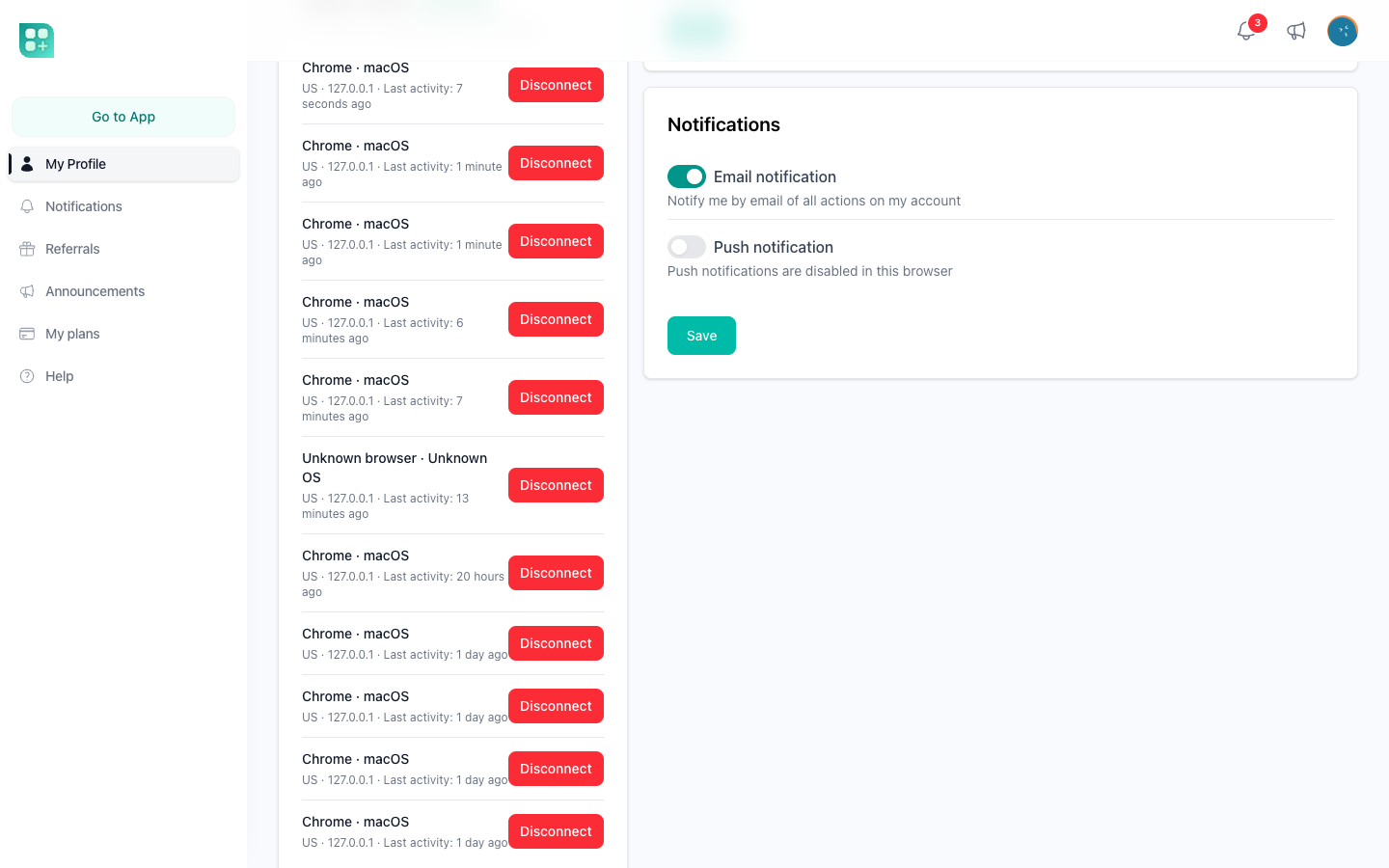
Administrators have the same test in the DevZone (/help/the-devzone) as "Test WebPush Notification", next to the "Test as iOS" and "Test as Android" buttons: those set a platform_override in the session so is_ios() and is_android() return true and you can see what the installed app sees without a phone.
Install on iOS
Safari does not prompt. The user opens the site, taps Share, then "Add to Home Screen". The icon is the largest entry of manifest.icons (the apple-touch-icon meta tag), the title is short_name, the splash image is picked from manifest.splash by device size, and the status bar follows status_bar.
The limits are Apple's. Push works only for the copy on the home screen, not in a Safari tab, and only on iOS 16.4 or later. The user has to subscribe from inside that installed copy: a subscription made in Safari does not carry over.
When the product ships to the App Store through PWABuilder, the wrapper sets an app-platform cookie, and is_ios() reads it. The kit uses that to hide the pricing links on the landing page inside the iOS app, since Apple does not allow selling a subscription there outside its own payment system.
Install on Android
Chrome offers "Install app" on its own once the site is served over HTTPS, has a registered service worker, and the manifest has a name, a 192 and a 512 icon, a start_url and a display other than browser. All of that is in place once APP_PWA=true and the icons exist.
For a Play Store package:
- Deploy to production with the final icons, splash screens and screenshots.
- Go to pwabuilder.com and enter your production URL. It reads
/manifest.jsonand reports what is missing. - Generate the Android package. The package id defaults to
custom.id. In its options enable notification delegation, so the wrapper hands push permission to the web layer. - The download includes an
assetlinks.json. Copy it topublic/.well-known/assetlinks.jsonand deploy again.public/.well-known/already exists with an.htaccessthat makes Apache serve.jsonfiles there with the right type. Without this file Android does not trust the app for your domain and shows the browser bar inside it.
The Android wrapper opens your site with an android-app:// referer, which is what is_android() checks.
For iOS through PWABuilder, download the Xcode project, edit the permission texts in its Info.plist, and remove the background audio capability before submitting.