

Announcements
Publish a notice to every user by megaphone, email and web push.
Announcements are notices an administrator publishes for everyone: a maintenance window, a new feature, a change of terms. Each one is a page inside the application, an entry in a megaphone dropdown, and optionally an email. This guide covers publishing, what users see, how reading is tracked, and what is sent.
Turn it on
Announcements are off until whoever runs the product turns them on; For developers says how. While they are on, Announcements appears in the admin panel, the megaphone appears in the top bar of the application, and each account has its list of announcements. While they are off, none of that shows.
Publish one
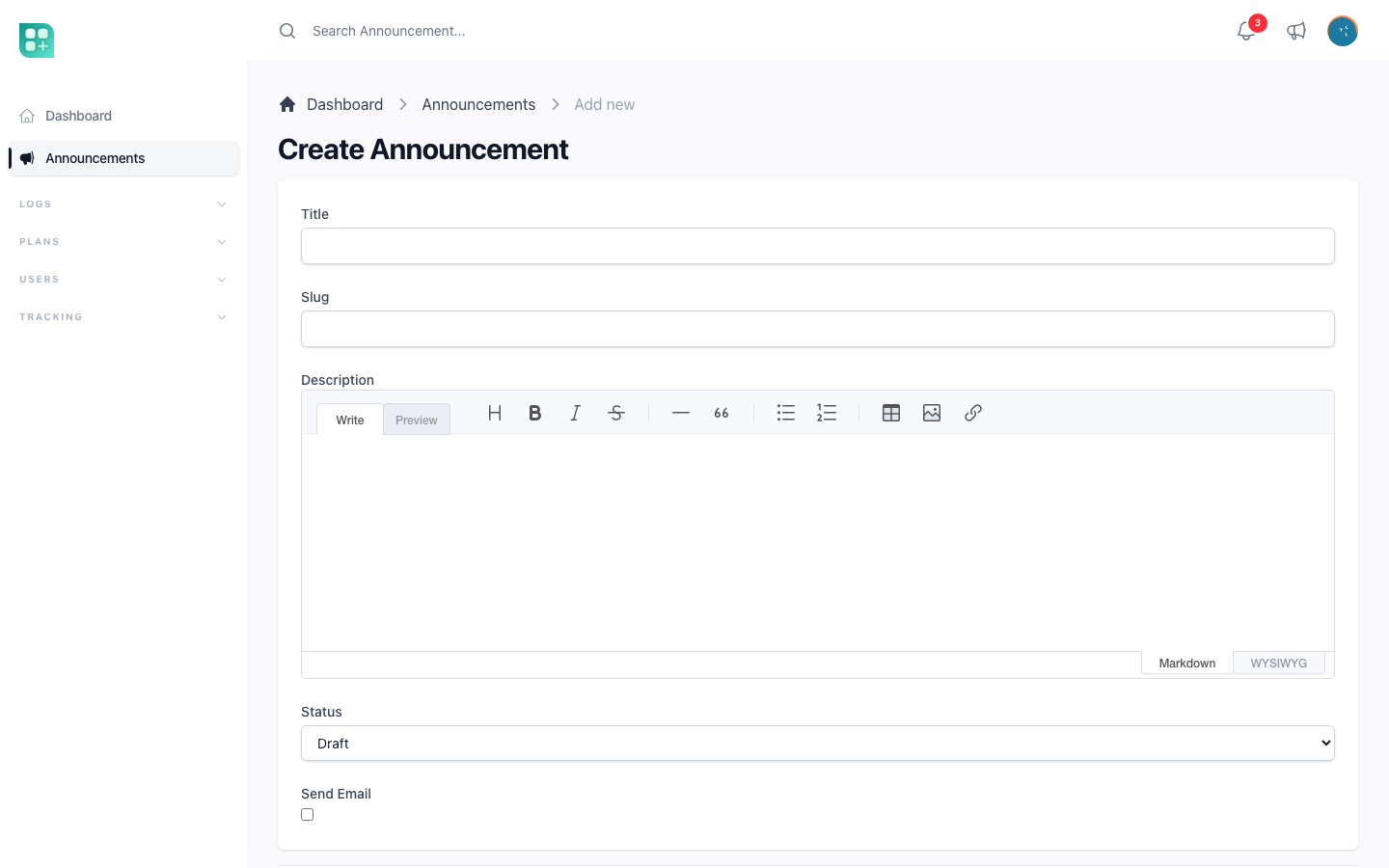
Open Announcements in the admin panel and click Create. The form:
| Field | Rules | Notes |
|---|---|---|
| Title | required, up to 255 characters | Shown in the dropdown, the list, the page and the email subject. |
| Slug | optional, unique | Left empty, it is made from the title. It is the last part of the announcement's web address. |
| Description | required | A text editor with formatting: headings, bold, lists, links. It has no image button. Shown formatted on the page and in the email. |
| Status | required, default Draft | Draft or Published. Only published announcements are visible to users. |
| Send Email | default off | Whether the publication also sends an email. Hidden on the list and the detail page. |
Two more fields, Published At and Created At, are read-only on the detail page.
There is no audience selector and no scheduled publication: every published announcement reaches every account at the moment you save it with the status Published. Publish drafts when you mean it.
What happens on save:
- Saving with status Published for the first time fills Published At with the current time. Switching back to Draft clears it; publishing again stamps a new time, so the announcement comes back on top as unread for everyone.
- Every time the status becomes Published — on creation or after a change — the emails and pushes start going out. Editing the title or body of an announcement that is already published sends nothing.
A deleted announcement goes to the Trash view of the list, from where it can be restored. Who can create, see, edit and delete announcements is set in the Announcement row of the Roles screen; see Roles and permissions.
What users see
The megaphone. The top bar of the application shows a megaphone icon next to the notifications bell. A red badge carries the number of unread announcements, up to "9+". Clicking it opens a dropdown with the ten most recent published announcements, newest first, each with its title and a short excerpt; unread ones carry a coloured left border. The dropdown has Mark as Read, which marks everything read at once, and View all announcements.
The list. Announcements, in the account sidebar, pages through published announcements, ten per page, with title, a longer excerpt and publication date.
The page. Each announcement opens on its own page, with the full text, the publication date and a link back to the list. Only published announcements open; a draft's page is not found.
How reading is tracked
Each account keeps one moment: the last time it read announcements. An announcement is unread when it was published after that moment, or when the account never read any. Two things move that moment to now: opening any announcement page, and Mark as Read in the dropdown. Both mark every announcement read, not just one.
There is no read record per announcement and no read count. The admin panel shows nothing about who read what; what it does keep is which emails went out, described below.
Email and web push
Every account receives the announcement except blocked ones; accounts that have not verified their email are included. Each account receives it through these channels:
| Channel | Sent when |
|---|---|
| Send Email is on for the announcement AND the account has Notify me by email of all actions on my account enabled in its profile. | |
| Web push | The account has turned on push notifications in at least one browser, whether or not Send Email is on. See Web push and the PWA. |
The announcement does not appear in the notifications centre; the megaphone is its place inside the application. An account with neither condition receives nothing beyond the megaphone badge.
The email uses the application's standard email design: the subject is the application's name followed by the title, the body is the announcement's text, and a Read announcement button opens the announcement page. Every email that is actually sent is recorded in Communication Logs in the admin panel with the recipient, the subject and the body; a failed send is recorded there too with its status. That log is the closest thing to a delivery report the panel offers.
Emails and pushes are sent in the background, a moment after you publish: the announcement is published and visible in the megaphone immediately. Before turning Send Email on for a large user base, make sure email sending works: one publication sends one email per account.
For developers
| Option | Env variable | Default | What changes |
|---|---|---|---|
features.announcements |
FEATURE_ANNOUNCEMENTS |
false |
On: the Announcements resource appears at /admin/announcements, the megaphone dropdown appears in the top bar of the application, and /account/announcements opens. Off: the resource is hidden and its routes return 403, the account pages return 404, the dropdown is not rendered. |
FEATURE_ANNOUNCEMENTS is not listed in .env.example; add it yourself.
FEATURE_ANNOUNCEMENTS=true
The flag is read from config/features.php, so it takes effect after php artisan config:clear when configuration is cached.
-
The form. The slug is the last segment of
/account/announcements/{slug}. The description is a Markdown editor (Toast UI), stored as Markdown and rendered as HTML. The status isdraftorpublished, the cases ofApp\Enums\AnnouncementStatus. -
On save,
App\Observers\AnnouncementObserverstamps Published At and, every time the status becomes Published, dispatchesApp\Jobs\SendAnnouncementEmailsJobto the queue. Announcements soft-delete. The permissions arecreate announcement,retrieve announcement,update announcementanddelete announcement. -
The reader side is three Livewire components in
app/Livewire/Auth/Announcements/:Dropdown,IndexandShow. The dropdown's excerpt is 60 characters and the list's 150; a draft's slug returns 404. -
Read state is
users.last_announcement_read_at. -
Sending. The job runs
User::whereNull('blocked_at')in chunks of 100 and sends each accountApp\Notifications\Announcements\AnnouncementNotification, which does not use the database channel. Web push needs a push subscription. The email view isresources/views/emails/announcements/announcement.blade.php, with the subject{app name} — {title}. Communication Logs is/admin/communication_logs, and it records the notification class as well. -
The job and the notification both implement
ShouldQueue, so nothing is sent until a worker runs:php artisan queue:workWithout a worker only the emails and pushes wait. Set up the worker as a service in production, as described in /help/queues-and-scheduled-work, and make sure the mailer in
.envworks.