

Roles and permissions
How permissions are named, seeded and granted, and how to guard your own screens.
Access inside the application is decided by permissions grouped into roles, on top of Spatie's laravel-permission package. This guide explains the naming convention, what the seeder creates on its own, the keys you can change in config/app.php, how roles are managed from the panel, and how to protect code you write.
The pieces
The models are App\Models\Role and App\Models\Permission, swapped in through the models block of config/permission.php. Both extend the Spatie models, both soft-delete, and both record their changes in the activity log. The tables are the package defaults (roles, permissions, model_has_roles, model_has_permissions, role_has_permissions), configured in config/permission.php. Every permission belongs to the web guard. A role's name is stored as a slug — Support Team becomes support-team — and the panel shows it as a headline, Support Team, passed through the translator.
Permission checks are cached for 24 hours. The package flushes the cache when a role or permission is saved through its own methods, and the panel flushes it again after editing or cloning a role.
The naming convention
Every permission is two words: {action} {resource}. The action is one of create, retrieve, update, delete; the resource is the singular of the model's table. The permissions a fresh install carries:
| Resource | Permissions |
|---|---|
user |
create user, retrieve user, update user, delete user |
role |
create role, retrieve role, update role, delete role |
permission |
all four, though the policy only ever allows reading |
announcement |
all four |
communication_log |
retrieve communication_log, delete communication_log and the create/update pair, which the policy never grants |
activity |
retrieve activity |
tracking_event_type |
all four |
tracking_session |
retrieve tracking_session |
tracking_event |
all four |
The panel splits a permission on its space: the first word picks the column of the role screen's matrix, the second word the row.
What the seeder creates
php artisan db:seed runs, in order, PermissionSeeder, RoleSeeder, AdminSeeder (the sudo accounts), UserSeeder (the default_users accounts) and AddOnSeeder (billing). You can run each on its own:
php artisan db:seed --class=PermissionSeeder
php artisan db:seed --class=RoleSeeder
PermissionSeeder builds its list from two sources, both configured in the Permissions block of config/app.php:
| Key | Default | What it does |
|---|---|---|
discover_front_permissions |
true |
Reads every resource class in app/Front/Resources/ and derives its permissions from the $actions the resource declares: create when the list has create or store, retrieve when it has show or index, update when it has edit or update, delete when it has destroy. A read-only resource with $actions = ['index', 'show'] gets retrieve only. |
permissions |
[] |
Extra permissions of your own, as 'permission name' => 'guard'. Any name works; the two-word shape is a convention, not a rule. |
allow_permisisons_deletion |
true |
Yes, with the misspelling — that is the real key. When true, a permission in the database that is in neither source is soft-deleted on the next seed. Set it to false if you insert permissions outside the seeder and want them to survive. |
Permissions are upserted by name and guard, and a soft-deleted permission that reappears in the sources is restored. Discovery reads Composer's class map, so run composer dump-autoload after adding a resource and before seeding.
// config/app.php
'permissions' => [
    'export reports' => 'web',
    'dashboard user' => 'web',
],
RoleSeeder then ensures three roles exist:
| Key | Default | What it does |
|---|---|---|
admin_role |
'admin' |
The top role. It is created if missing and, on every run, receives every permission in the table. The /admin middleware checks this role by its literal name admin, so changing the key alone locks the panel. |
default_role |
null |
When set, the role is created if missing and, only at creation, receives the permissions listed in default_role_permissions. Nothing in the kit assigns it to new accounts: it exists so a starting role is ready for you to hand out, and RolePolicy refuses to delete it. |
default_role_permissions |
[] |
Permission names granted to default_role the first time it is created. Later edits to this list do not touch an existing role; grant them from the panel instead. |
| — | 'client' |
A client role is always created. Registration assigns it to every new account. It carries no permissions unless you grant some. |
AdminSeeder assigns admin_role to every email in config('app.sudo'). Re-run the seeders whenever you add a resource or a custom permission; they are idempotent.
Managing roles from the panel
/admin/roles lists the roles. Create asks for a name and, once the role exists, Edit shows the permission selector:
- A matrix with one row per resource and the columns Create, See, Update, Delete. Click a column header to toggle the whole column, click a row's name to toggle the whole row. Each checkbox shows the exact permission name on hover.
- A Permissions list under it with every permission that does not follow the two-word shape, such as the ones you added in
config/app.php. - Resources whose policy declares a
$requiredConfigthat is currently off are left out of the matrix, so a role cannot be granted a module that does not exist.
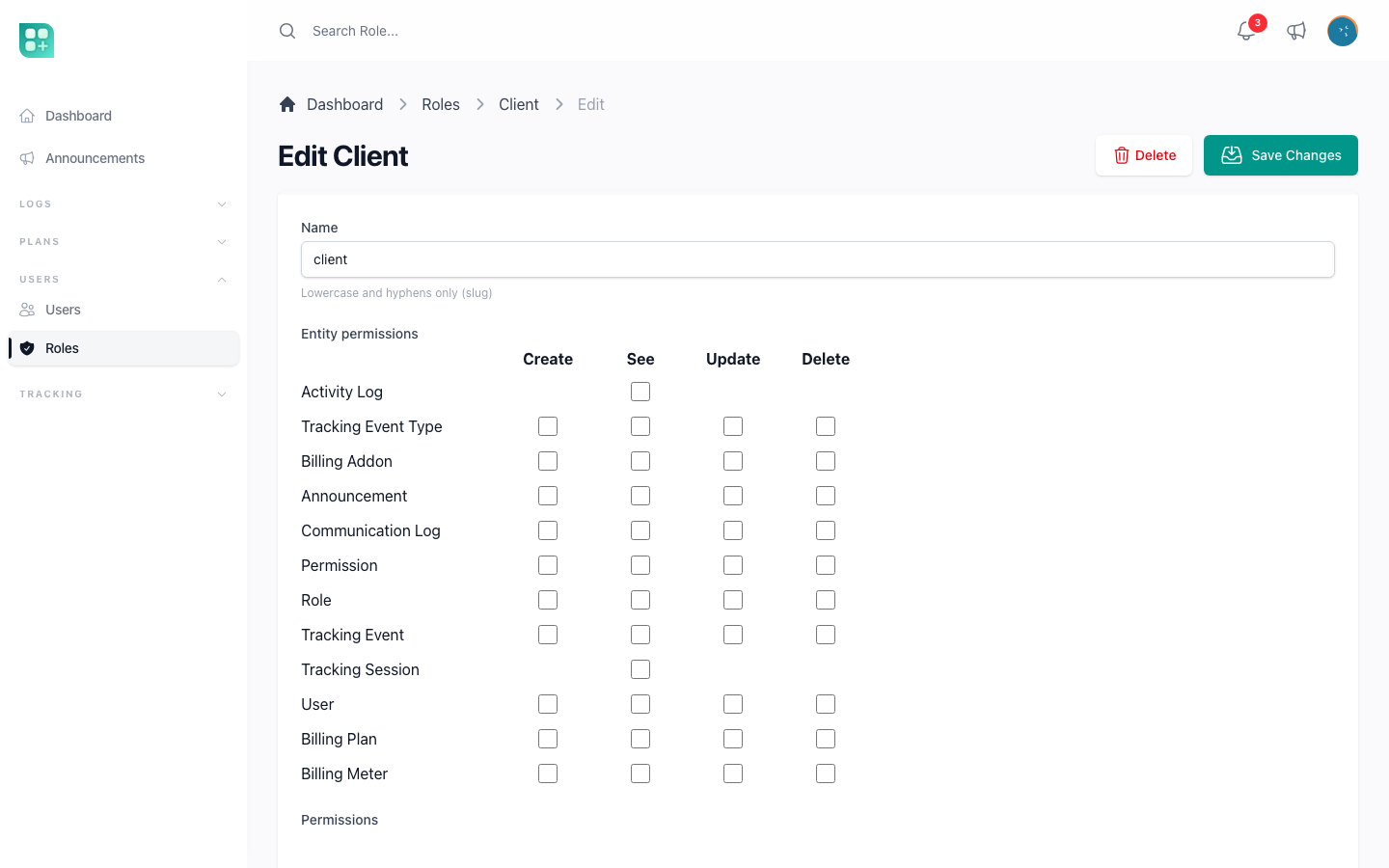
The Clone action on a role copies it with all its permissions under the name {name}-copia (then -copia-2, and so on) and opens the copy for editing.
Guards built into RolePolicy: the admin role cannot be edited or deleted, and the default_role cannot be deleted. Everything else follows the role permissions.
Roles are assigned to accounts at /admin/users: the Role field on the user form is a multiple select, visible only to editors who themselves hold the admin role. On save, the account receives a Role Update Notification naming the roles added and removed. UserPolicy forbids deleting a sudo account.
Policies
Every resource is guarded by a policy in app/Policies/ that extends App\Policies\BasePolicy. The base class needs one property and maps the standard policy methods to permissions:
class PlanPolicy extends BasePolicy
{
    protected string $name = 'plan';
    protected $requiredConfig = 'features.plans_enabled';
}
| Policy method | Permission checked |
|---|---|
viewAny, view |
retrieve {name} |
create |
create {name} |
update |
update {name} |
delete, restore, forceDelete, viewDeleted |
delete {name} |
Two hooks refine that:
$requiredConfignames a config key. When it is falsy,before()returnsfalseand every check fails, for the admin role too.AnnouncementPolicyusesfeatures.announcements; the tracking policies usefeatures.tracking_enabled.extraValidation()is ANDed with every check. Override it to add a condition that applies to the whole resource.
Laravel resolves the policy by convention: App\Models\Plan is guarded by App\Policies\PlanPolicy. A model that lives elsewhere is registered by hand in AppServiceProvider::boot() with Gate::policy(Model::class, ModelPolicy::class), as the activity log model is.
The shipped policies and where they depart from the table:
| Policy | Departure |
|---|---|
UserPolicy |
delete also requires that the target is not sudo. |
RolePolicy |
update denies the admin role; delete denies the admin and default roles. |
PermissionPolicy |
viewAny and view are always true; every write is false. |
CommunicationLogPolicy |
create and update are false. |
AnnouncementPolicy |
$requiredConfig = 'features.announcements'. |
TrackingEventTypePolicy, TrackingSessionPolicy |
$requiredConfig = 'features.tracking_enabled'. |
TrackingEventPolicy |
Same flag; viewAny, view and create require the admin role instead of a permission; update and delete are false. |
ActivityPolicy |
Does not extend BasePolicy. viewAny requires the admin role and a sudo email; view the admin role; every write is false. |
Protecting your own code
Anything you build outside Laravel Front uses the same permissions. Pick the layer that fits:
A Livewire screen. Authorize in mount(); the failure becomes a 403.
public function mount(?Plan $plan)
{
    $this->authorize($plan?->exists ? 'update' : 'create', $plan ?? Plan::class);
}
A route. bootstrap/app.php registers the Spatie middleware under the aliases role, permission and role_or_permission, next to Laravel's own can:
Route::middleware('permission:export reports')->group(function () {
    Route::livewire('/reports', App\Reports::class)->name('reports');
});

Route::middleware('role_or_permission:admin|retrieve plan')->group(function () {
    // ...
});
A view. Hide what the person cannot do rather than letting them hit a 403.
@can('create plan')
    <x-button href="{{ route('admin.front.plans.create') }}">
        {{ __('New plan') }}
    </x-button>
@endcan

@can('update', $plan)
    <x-button href="{{ route('admin.front.plans.edit', $plan) }}">
        {{ __('Edit') }}
    </x-button>
@endcan
Plain PHP. $user->can('delete plan'), Gate::allows('update', $plan), or $user->hasPermissionTo('export reports') for a permission with no policy behind it. Reserve $user->hasRole(config('app.admin_role')) for presentation decisions, such as whether to draw the admin link; authorization goes through permissions so a role you create later can be granted the same ability.
Where sudo fits
sudo is not a role and holds no permissions. It is a computed attribute on the user, true when the email is in config('app.sudo'). The seeder gives those accounts the admin role, which is what actually grants access; the attribute itself is consulted only where the code names it — the Dev Zone, the activity log, the protection against deleting a sudo user, and the sidebar entry for the Dev Zone. Removing an email from the list removes those extras but leaves the role in place. See /help/sudo-and-super-administrators.