

Timezones and dates
Every date is stored in UTC and shown in the person's timezone, without code on your side.
The rule is one line: store in UTC, show in the person's timezone. The kit applies it for you at the model, so a date read from a model is already in the timezone of the signed-in account and a date written to one is converted back to UTC. This guide covers the trait that does it, the two helpers for the cases it does not reach, how a timezone is found for a new account, and how to write a date input.
Where the timezone comes from
config/app.php keeps 'timezone' => 'UTC'. That is the timezone of the database and of anything shown to someone who has no account. Leave it.
Each account has a timezone column on users, a PHP identifier such as America/Mexico_City. Everything below reads it as auth()->user()?->timezone ?? config('app.timezone'): the signed-in account's timezone when there is one, UTC otherwise. A visitor without a session, a queued job and a console command therefore all see UTC.
The trait DatesToUser
App\Traits\DatesToUser overrides getAttribute() and setAttribute() on a model:
- Reading an attribute cast as
datetimeortimestamp, or one of the model's own timestamps,created_atandupdated_at, returns the Carbon instance converted to the person's timezone. - Writing a non-null value to such an attribute parses it in the person's timezone and stores it in UTC.
$post->published_at;                          // Carbon in the person's timezone
$post->published_at = '2026-06-01 10:00:00';  // read as their local time, saved in UTC
$post->published_at->format('d M Y H:i');     // no conversion to write
Only datetime and timestamp casts are converted. A column with a date cast or no cast at all comes back exactly as stored.
Which models have it
App\Models\Model uses the trait, and every model of the kit extends it: announcements, categories, notifications, referrals, roles, permissions, sessions, stats, tracking and webhook events. App\Models\User extends Laravel's Authenticatable instead, so it uses the trait directly. The billing models of the billing-core package carry their own variant, DatesToBillingOwner, which converts to the timezone of the account that owns the subscription rather than of whoever is signed in. When that account no longer has its owner, because the person was deleted or sits in the trash, it uses the application timezone.
Adding it to your models
Extend the base model and declare the cast:
namespace App\Models;

class Appointment extends Model
{
    protected $guarded = [];
    protected $casts = [
        'starts_at' => 'datetime',
        'ends_at' => 'datetime',
    ];
}
A model that cannot extend App\Models\Model adds use App\Traits\DatesToUser; to its class, as User does. Either way, a date column without a datetime or timestamp cast is not converted.
The Carbon macro toUserTimezone()
For a Carbon instance that did not come from a model attribute, such as now() or a date parsed from a request:
$date->toUserTimezone()->format('d M Y H:i');
It returns a copy in the person's timezone, UTC for a visitor, and leaves the original untouched. It is defined in App\Providers\AppServiceProvider.
The Blade directive @userDate
<span title="@userDate($notification->created_at)">…</span>
It takes one expression that evaluates to a Carbon instance and echoes it in the person's timezone in the fixed format Y-m-d H:i:s. It has no format option: for any other format, call ->toUserTimezone()->format(...) in a normal {{ }} echo. Passing an attribute the trait already converted is harmless; the timezone is set, not added.
How a new account gets its timezone
No JavaScript is involved and the registration form has no timezone field. When the account is created without a timezone and nobody is signed in, App\Observers\UserObserver asks App\Services\CountryDetectionService::detectTimezone(), which tries, in order:
- The timezone of the signed-in account, when there is one.
- A timezone already found for this visitor, kept in the session under
current_timezone. - The IP of the request, through
https://ipapi.co/{ip}/timezone/with a two-second timeout. A private IP, which is every request in local development, skips this step. - The timezone of the visitor's country, through the Weblabor World API, when
WEBLABOR_WORLD_TOKENis set. The country comes from the detection described in Detect the visitor's country.
A result is checked against PHP's list of identifiers before it is saved. When nothing answers, the column keeps its database default, which is UTC. A migration in the kit revisits accounts left at UTC that have a known country and fills their timezone from the World API when the token is set.
An account an administrator creates while signed in skips the detection, so it never takes the administrator's timezone, and keeps the default until the person changes it.
Where the person changes it
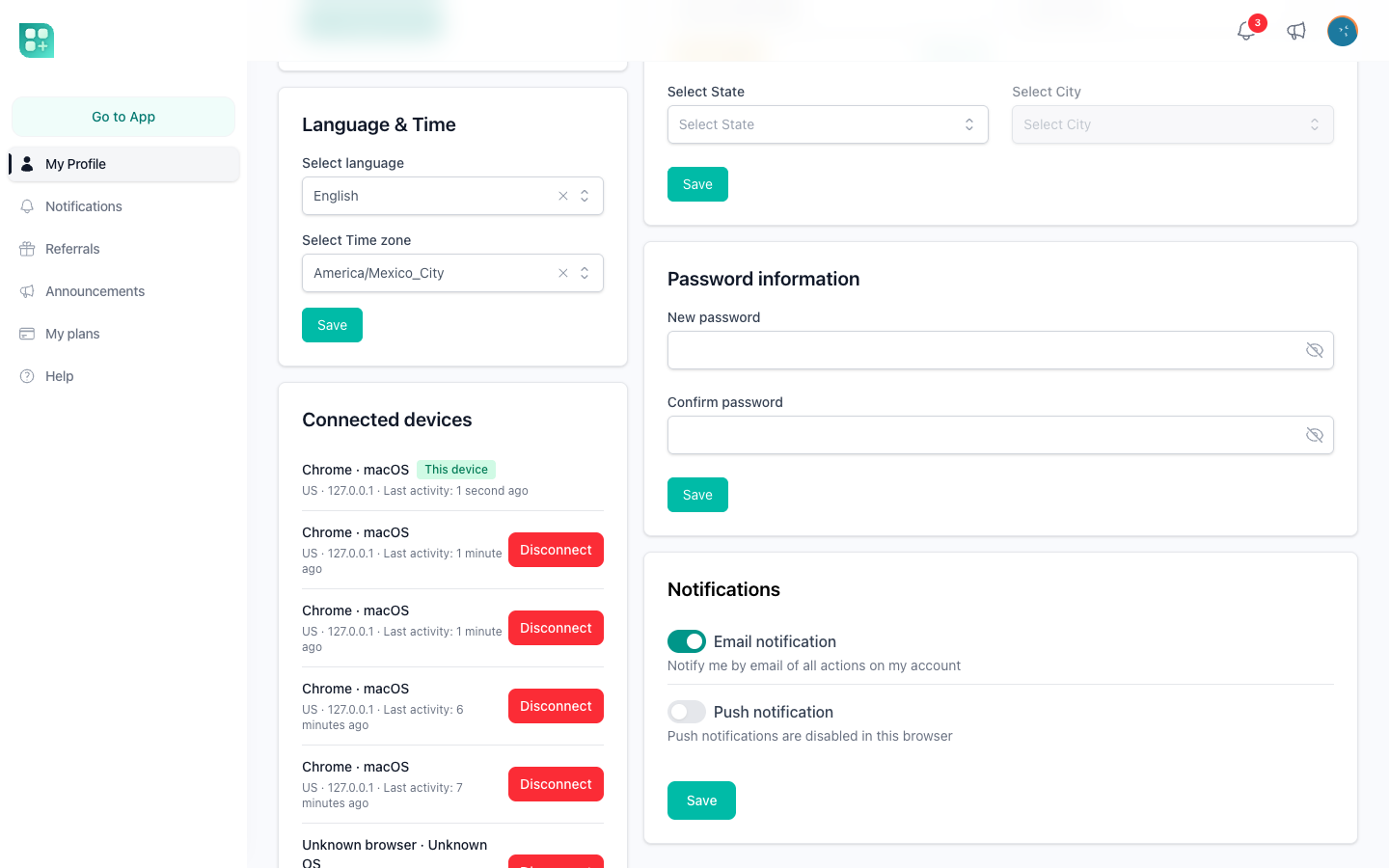
At /account, in the "Language and time" card, from a select listing every PHP timezone identifier. Both the language and the timezone are required when that card is saved.
Writing a date input
Use the <x-date-input> component, never a raw <input type="date">. Its value flows through wire:model into the model attribute, where the trait converts it from the person's timezone to UTC.
<x-date-input type="date" wire:model="from" :label="__('From')" />
With type="date" it renders the project's plain input for a date with no time. Without type, it renders a date and time picker whose defaults can be changed with attributes: without-time to drop the clock and store YYYY-MM-DD, time-format (12 by default, 24 for a 24-hour clock), interval between minutes (10), min and max, clearable (true), disable-past-dates, start-of-week (Sunday), and parse-format and display-format (YYYY-MM-DD HH:mm:ss). The picker's own timezone, user-timezone and without-timezone attributes are left at their defaults, which is without-timezone on, so the value reaches the model untouched and the model does the conversion. The other form components are in Brand and interface.
In the admin panel, a Inputs\DateTime::make('Published At') field on a resource reads and writes the model attribute, so it gets the same conversion without extra code.