

Plan limits and usage
Declare what a plan can switch on and how much of something it allows, set the numbers per plan, and enforce them in your own code.
A plan sells two kinds of thing: capabilities, which are on or off, and limits, which are numbers. Both are declared in code and priced in the admin panel. This guide covers the two classes you write, the screens they feed, how an account's total is computed, and the check you add before creating a record.
Three words
| Word | What it is | Where it lives |
|---|---|---|
| Capability (feature) | A yes or no: does this account have white_label? |
Declared as a method of App\Classes\PlanFeatures. Stored as feature_key on an add-on. Answered by the billing account. |
| Entitlement | One reason an account has a capability: it activated it for free, is on a trial, or bought it for life. | A row in billing_entitlements. Plan inclusion and subscription lines are not rows; they are read live. |
| Limit | A number: how many activities this account may have. |
Declared as a method of App\Classes\PlanLimits. Each plan and add-on carries a value for it in billing_limits. |
A capability is resolved from every way it could have arrived; a limit is a sum. Neither is enforced by the kit on your own records: you ask before you create.
Capabilities
Declare the first one
app/Classes/PlanFeatures.php extends App\Classes\BasePlanFeatures. One public method per capability. The method name is the feature key the admin picks when creating an add-on, and the return value says whether the capability is already released in code, so you can sell something in pre-sale that switches nothing on yet.
Weblabor Base ships the class with no methods on purpose: a clean install has no capabilities of its own, so the add-on form shows no Capability field and the catalogue is empty until your project declares one. Add the first one like this:
namespace App\Classes;

class PlanFeatures extends BasePlanFeatures
{
    public function advanced_reports()
    {
        return true;
    }

    public function white_label()
    {
        return false;   // sold in pre-sale, nothing reads it yet
    }
}
Use snake case: the key is stored as written, and the labels are derived from it.
BasePlanFeatures reads the class by reflection, so there is no list to maintain:
| Method | Returns |
|---|---|
PlanFeatures::availableFeatures() |
Every public, non-static method name except the constructor: ['advanced_reports', 'white_label']. |
PlanFeatures::featureOptions() |
Key to label through Str::headline: ['advanced_reports' => 'Advanced Reports', ...]. The options of the Capability select. |
PlanFeatures::isReleased('white_label') |
true only when the key is declared and its method returns a truthy value. |
The class is wired in config/billing-core.php under user_adapter.plan_features. You only change that key when you move the class.
Ask whether an account has one
The billing account is the only thing that knows every source, so ask it:
$account = $user->billingAccount;

$account->hasAddOn('advanced_reports');      // true or false
$account->addOnSource('advanced_reports');   // 'lifetime', 'plan', 'subscription', 'trial', 'free' or null
$account->addOnQuantity('extra_seats');      // units held, 0 when not held
The user asks the same question in one line, which is what application code normally writes:
$user->hasAddOn('advanced_reports');         // true or false
$user->addOnSource('advanced_reports');      // the strongest source, or null
There is one way to ask, and this is it. $user->hasLockedAddOn() is a different question: it answers false for a capability granted for free, because it exists to tell the admin panel when to draw a padlock, so gating a screen with it hides the screen from whoever was given the capability.
App\Traits\HasFeatures, used by App\Models\User, casts a features JSON column to an array and offers enableFeature($key) and disableFeature($key). It is the write side of a cache, not a place to read a decision from: the account rewrites it after every grant, revoke and Stripe webhook through refreshFeatureCache(), on billing_accounts.features and, when the owner's table has a features column, on the owner too. The users table of Weblabor Base has no such column, so nothing is written there. Add the column when your product needs the cache on the user. The five sources, the billing_entitlements columns and grantAddOn() are covered in Sell add-ons.
Limits
Declare a meter
app/Classes/PlanLimits.php extends App\Classes\BasePlanLimits. One public method per limit: the method name is the limit key and the method returns how much the signed-in user has used. A second method with the same name plus Daily, taking a from and a to date, returns the daily series the usage chart draws. The kit ships one worked example:
namespace App\Classes;

use Carbon\Carbon;

class PlanLimits extends BasePlanLimits
{
    public function activities()
    {
        return auth()->user()->activities()->count();
    }

    public function activitiesDaily(Carbon $from, Carbon $to)
    {
        return auth()->user()->activities()
            ->whereBetween('created_at', [$from, $to])
            ->selectRaw('DATE(created_at) as date, COUNT(*) as count')
            ->groupByRaw('DATE(created_at)')
            ->pluck('count', 'date');
    }
}
Two things to keep from the example. The meter receives no argument: for the user adapter the package calls it with none, so it measures auth()->user(). And the daily method returns a collection keyed by Y-m-d date with the count as value; days with no row are simply absent.
The method name is the key character for character, underscores included. The kit also ships devices and disk_space, and that second one is where the rule bites: a method named diskSpace is not the key disk_space, so the reflection below never lists it and the meter that carries that key never finds it. The limit reads zero for every account, nothing that depends on it ever fires, and nothing anywhere reports an error. Write the method name exactly as the key is written.
A method that measures somebody other than the signed-in user takes the owner as an optional argument, so an administrator reading a customer's sheet sees the customer's figure and not their own:
public function disk_space($owner = null)
{
    $owner = $owner ?? auth()->user();
    if (! $owner) {
        return 0;
    }
    return intdiv(app(SpaceUsage::class)->userFilesBytes($owner), static::diskSpaceUnitBytes());
}
That one also shows what to do when your figure and the quota are not in the same unit. The quota is captured in the disk space unit — gigabytes, or megabytes when your PlanLimits declares protected static string $diskSpaceUnit = 'megabyte'; —, the count arrives in bytes, and the comparison is made on whole numbers with >=, so the usage is rounded down. Rounding up would make a single byte count as a full unit and put an almost empty account one step from its ceiling.
BasePlanLimits reads the class by reflection:
| Method | Returns |
|---|---|
PlanLimits::availableLimits() |
Every public, non-static method except the constructor, dailyUsage, and any name ending in Daily: ['activities', 'devices', 'disk_space']. |
PlanLimits::limitOptions() |
The same keys as the options of the Limit Key select in the admin panel. The key is shown as written. |
PlanLimits::releasableLimits() |
The keys the customer can bring back down by themselves: ['devices', 'disk_space']. See below. |
PlanLimits::preciseUsage($key, $owner) |
The exact usage as a decimal when the key has one, null otherwise. See below. |
PlanLimits::limitModules() |
The module each limit belongs to, as limit key to add-on key. Empty by default. See below. |
PlanLimits::isVisibleFor($key, $owner) |
Whether the usage panel shows that limit to that owner: true when the key declares no module, otherwise whether the owner has the module. |
app(PlanLimits::class)->dailyUsage('activities', $from, $to) |
Calls activitiesDaily(). An empty collection when no Daily method exists, so the chart is flat, not broken. |
The class is wired in config/billing-core.php under user_adapter.plan_limits. A limit used by no plan is harmless: it shows as unlimited.
Say what the customer can free
A capacity meter measures a level that goes up and down, and the card tells the customer what to do when it is full. What it may offer depends on the key:
public static function releasableLimits(): array
{
    return ['devices', 'disk_space'];
}
A key listed there is one the customer can bring down without paying — a device is disconnected from their profile, a file is deleted from the media library — so the card offers them both ways out: free something up, or buy more capacity. A key left out is offered only the purchase. The default is the empty list, because measuring something that only grows and then telling somebody to free space up sends them looking for a control that does not exist. The kit ships activities, which only ever grows, deliberately outside it, and devices and disk_space, which do not, inside.
Capacity itself is described in /help/meter-usage-and-packages.
Tie a limit to its module
A limit that only means something with a module — branches for a product that sells branches as an add-on — would otherwise show a "0 / 1" card to every account, including those that never bought the module. Say which add-on key each such limit belongs to:
public static function limitModules(): array
{
    return ['branches' => 'branches'];
}
The usage panel then draws that card only for an account that has the module, asked the one way the kit asks it, $user->hasAddOn('branches'), so it counts whatever way the module arrived: lifetime, plan, subscription, trial or free. An account without it sees no card and no charts for that limit, even when the limit is selected directly. A module declared but not yet released in PlanFeatures follows the same answer.
A key left out is shown to everybody, as before, without asking anything about modules. The method is static, so it is not a limit itself: availableLimits(), the Limit Key select in the admin panel and the translation strings list the same keys as before, and the admin still sets every limit on every plan and add-on. Only the usage panel reads it; the check before creating a record is still yours.
When the whole number is too coarse
A limit compared on whole numbers loses everything below the unit, and that is fine for the ceiling but wrong for a warning: an account on a one-gigabyte quota rounds down to zero until the moment it is full, so a warning built on that figure would never appear. Declare the exact figure beside the rounded one:
public static function preciseUsage(string $key, $owner = null): ?float
{
    $owner = $owner ?? auth()->user();
    if ($key !== 'disk_space' || ! $owner) {
        return null;
    }
    return app(SpaceUsage::class)->userFilesBytes($owner) / static::diskSpaceUnitBytes();
}
The usage cards prefer it when a key answers and fall back to the ordinary count when it returns null, so declaring it for one key changes nothing for the others. The ceiling itself still uses the rounded number: the figure that blocks and the figure that warns are allowed to differ, and here they have to.
Set the value per plan
Every plan and every add-on has a Limits card in its form, at /admin/billing-plans/{id}/edit and /admin/billing-addons/{id}/edit. Add Limit adds a row:
| Field | Rule |
|---|---|
| Limit Key | A select over PlanLimits::limitOptions(). When the form's Context is User the options come from billing-core.user_adapter.plan_limits; Team from billing-team.plan_limits; Both merges them. Each key may appear once per plan: "Each limit key can only be used once." |
| Limit Value | An integer, at least 0. On a plan, at most 999999999. |
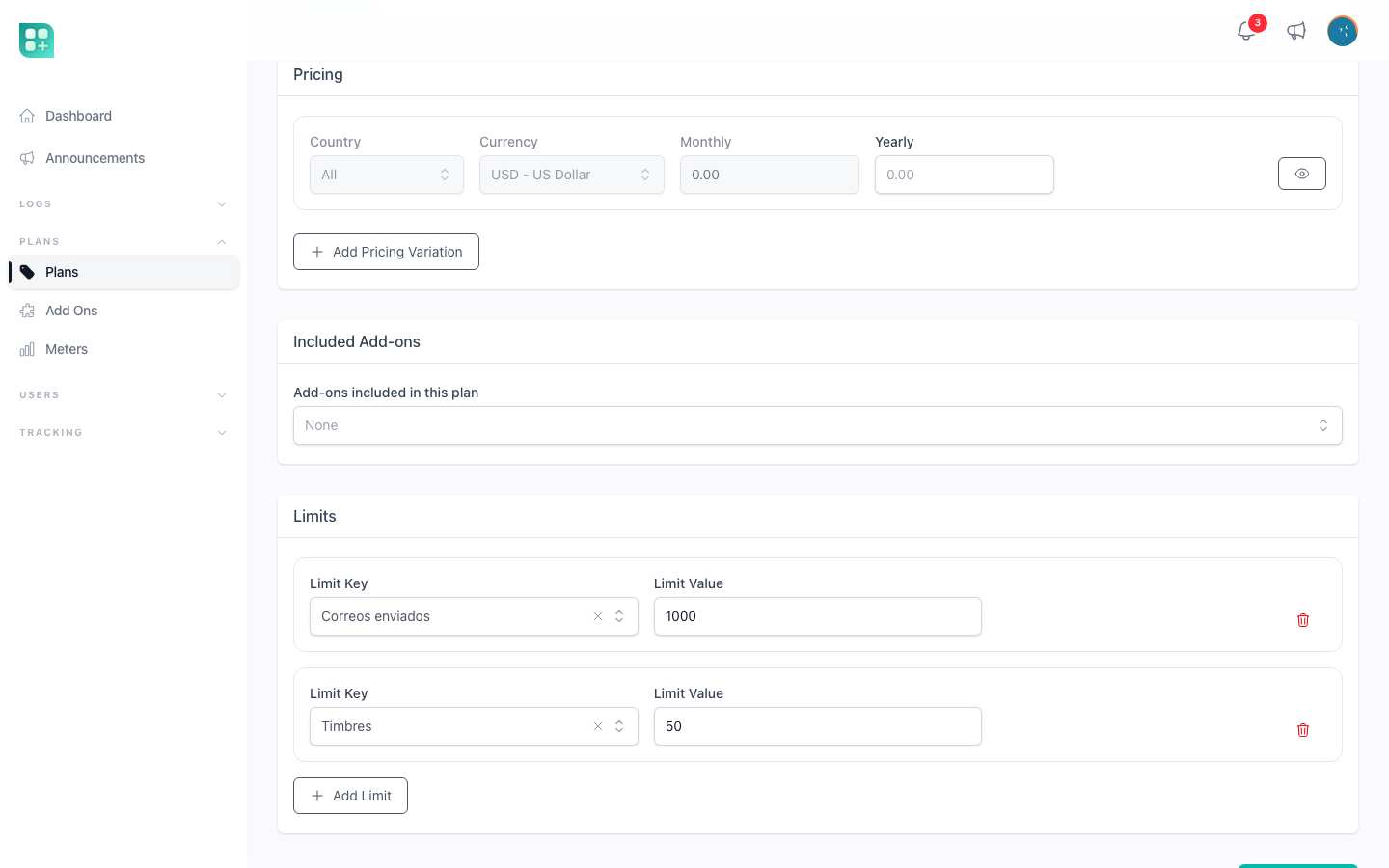
Saving writes the rows to billing_limits (limitable_type, limitable_id, limit_key, limit_value, soft deletes): rows you removed are deleted, existing ones updated, new ones created. Nothing is sent to Stripe for a limit; only prices are.
A value of 0 is a real limit of zero, not "unlimited". To leave a limit open, do not add the row.
What an account gets
$user->getLimitTotal('activities') walks the account's default subscription:
plan limit for the key
+ limits of add-ons that are lines on the subscription
+ limits of add-ons the plan includes and that are not already lines
It returns null when none of the three defines the key, and the screen shows ∞. Add-ons held as free, trial or lifetime entitlements do not add to a limit.
When plans are not live the answer is null for everybody, subscribed or not: the question "are plans live?" is asked before the subscription is even looked for, so a project with the flag off, without STRIPE_SECRET, or with no plan created yet has no limits at all rather than limits nobody can see. Note that the last two count as much as the flag: turning the flag on without a payment key still leaves every limit open.
While plans are live, an account without an active subscription — none at all, or one that has ended — answers 0, so it is over every limit and gets nothing, add-ons included. That is intended: registration subscribes everyone to the free plan, an account whose subscription ends is put back on it, and a user who is still not on any plan should be sent to /account/plans, which the ensure.subscribed middleware already does for the /app routes.
The total is resolved the moment it is asked, against the plan the subscription carries right then, and kept only for the request that asked it. Changing plan hands the account the new plan's quota straight away, without waiting for the cycle to turn, and a limit value changed in the admin panel is in force on the next screen the subscriber loads.
$user->getLimitUsed('activities') calls your PlanLimits::activities(); a key with no method counts as 0. $user->reachedLimit('activities') is true when the total is not null and used is greater than or equal to it.
What the user sees
The dashboard at /app shows a usage block when plans are live: one card per key in PlanLimits::availableLimits() that isVisibleFor() lets through, with the key as a headline (activities reads "Activities", translated through lang/), the used count, and the total or ∞. When a total exists the card draws a progress bar, amber with a line saying how much has been used from 80% of the total, and red with a line saying the limit was reached once it is. The bar reads the precise figure when the key declares one, so a warning appears on a small quota instead of jumping straight from empty to full.
Clicking a card opens two charts for that limit, from your <key>Daily() method: a column chart of daily usage and a line chart of cumulative usage, over a From and To range that starts as the current month and can be changed on the spot. Clicking the card again closes them. The component is App\Livewire\Shared\UsageLimits; the dashboard includes it as <livewire:shared.usage-limits />.
Plan cards on /account/plans show the plan's text bullets, not its limits. The add-on detail page, /account/add-ons/{id}, lists the add-on's limits under "What it includes", as the value followed by the key in lower case.
Enforce a limit in your code
The kit checks a limit in two places, both of them a change the account asks for itself. When a subscription moves to another plan (a plan change, or the free plan on registration), every limit of the target plan is compared with current usage and the move is refused with "You have exceeded the limit for :key (:current / :max)." when usage is above the value; add-on limits are not part of that comparison. When the quantity of an add-on sold per unit is lowered, the total the account would be left with — plan and add-ons together — is compared the same way, and the change is refused with the same sentence. Neither stops a user from creating the record that goes over.
disk_space is the one exception, because the kit owns the only action that raises it: an upload is refused when the account is at or above its quota, whichever screen it came from — a quota of 0 included, the profile picture too — and the user is told they are out of space and offered both ways out. The rule behind it: what a person does and can repeat is refused at the limit, while what would be lost if refused, such as an incoming webhook, is kept. Activities and devices keep being stored at their limit. Your own records are still yours to guard, below.
So the check before creating something is yours. Ask the user before you write:
use Livewire\Component;
use WireUi\Traits\WireUiActions;

class CreateActivity extends Component
{
    use WireUiActions;

    public function save()
    {
        if (auth()->user()->reachedLimit('activities')) {
            $this->notification()->error(
                title: __('Limit reached'),
                description: __('Your plan allows :max activities. Upgrade to add more.', [
                    'max' => auth()->user()->getLimitTotal('activities'),
                ])
            );
            return;
        }

        // create the record
    }
}
Use reachedLimit() rather than comparing the numbers yourself, so null stays unlimited. Show the total and a way to the plans page, /account/plans, rather than a bare refusal, and put the sentence in lang/ like every other text. When the record is created by something other than the signed-in user, a job or a webhook, remember that the meter reads auth()->user(): measure with your own query there instead of calling PlanLimits.