

Sell add-ons
Declare a capability in code, price it in the admin panel, and let people switch it on, buy it or receive it with their plan.
An add-on is a capability your project switches on for one account: a module, a paid extra, a quota. The code declares which capabilities exist; the admin panel, or the add-on seeder when you declare the add-on itself in code, decides how each one is sold; the billing account answers whether a given account has it. This guide covers the whole path, from the PlanFeatures method to the button the user clicks.
Turn it on
Add-ons live in the Billing Core package, so the package has to be on. Plans do not: a free add-on works with no plan, no subscription and no Stripe key.
| Option | Env variable | Default | What it changes |
|---|---|---|---|
| Add-ons module | FEATURE_ADDONS_ENABLED |
false |
Off: /account/add-ons is a 404, the admin resource refuses every action, the Add-ons panel disappears from the user's page and nothing is granted or sold. |
| Billing Core | BILLING_CORE_ENABLED |
true |
Off: the package does not load its models, migrations, routes or webhook. |
| User billing | BILLING_USER_ENABLED |
true |
Off: the /account/... billing routes are not registered, add-ons included. |
| Stripe | STRIPE_KEY, STRIPE_SECRET, STRIPE_WEBHOOK_SECRET |
empty | Needed to sell anything. Every save of an add-on or a price talks to Stripe. |
Two questions decide what is shown once the flag is on:
BillingAddon::hasVisibleCatalog()is true when the flag is on and the account of the active billing context can see at least one add-on — one on sale, or one it already holds. It, or the same question onBillingMeter, shows the Add-ons link in the account menu, and only where that context has its own add-ons screen: with user billing off there is no link. Stripe is not asked.BillingAddon::isActive()asks the same plusSTRIPE_SECRET. It decides whether the public home page shows the add-on catalogue to visitors.
The flag also schedules billing:sync-exchange-rates daily at 12:00, the same command plans schedule, plus billing:expire-trials at 08:00 and billing:close-meter-periods at 02:00. Installation of the package, keys and webhook are in Turn on plans and billing.
Declare the capability in code
PlanFeatures declares which capabilities exist. Open app/Classes/PlanFeatures.php and add one public method per capability. The method name is the feature key. The return value says whether the capability is already released in code, so you can sell something in pre-sale that switches nothing on yet.
namespace App\Classes;

class PlanFeatures extends BasePlanFeatures
{
    public function electronic_wallet()
    {
        return true;
    }

    public function white_label()
    {
        return false;   // sold in pre-sale, switches nothing on yet
    }
}
BasePlanFeatures reads the class by reflection:
| Method | Returns |
|---|---|
PlanFeatures::availableFeatures() |
The keys, one per public non-static method. |
PlanFeatures::featureOptions() |
['electronic_wallet' => 'Electronic Wallet', ...], the list the admin form offers. |
PlanFeatures::isReleased('white_label') |
true only when the key is declared and its method returns true. |
The class is wired through config/billing-core.php under user_adapter.plan_features. Weblabor Base ships with no methods, so a clean install shows no Capability field and no catalogue. A key stored on an add-on that the code no longer declares is kept and flagged in the form with "This capability is not declared in code, so the add-on will not switch anything on"; the add-on can still be sold. If you save an add-on without choosing a capability, the key is derived from the name (Extra Storage becomes extra_storage), with a number added when another add-on already uses it (extra_storage_2). Two add-ons never share a key: the form refuses a key that is taken.
Declaring the capability is enough to sell it from the admin panel. To declare the add-on itself — its name, prices, images and guides — see Declare the add-on in code.
Create it in the admin panel
Go to Plans → Add-ons in the admin panel, at /admin/billing-addons. The index lists name, key and whether it is on sale, and has a Categories button that opens /admin/categories/billing-addons, where you create the categories the catalogue filters by. Create opens /admin/billing-addons/create; edit is /admin/billing-addons/{id}/edit. The form shows a warning when STRIPE_SECRET is not set: set it first, because saving creates or updates the Stripe product.
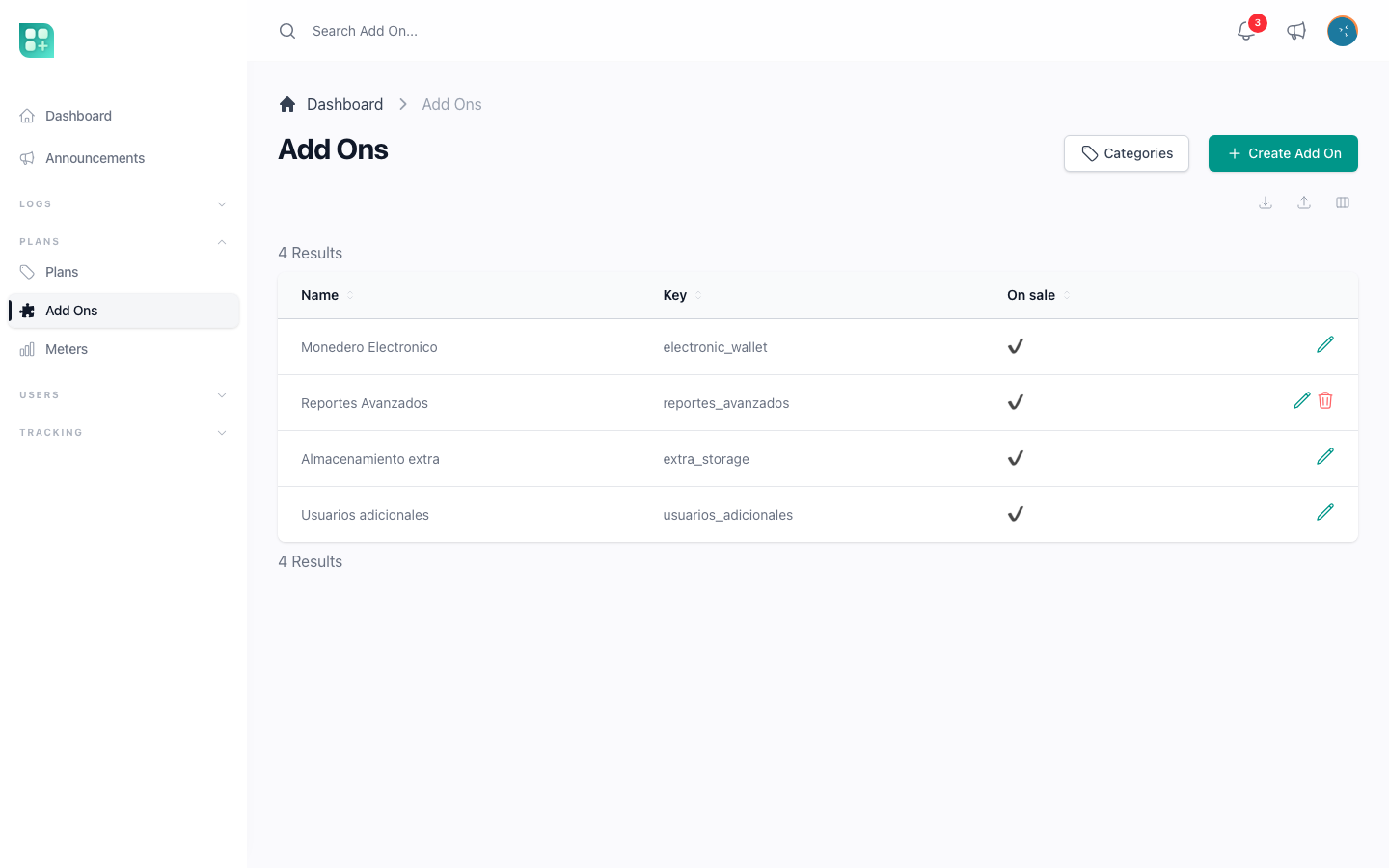
| Field | Required | What it does |
|---|---|---|
| Name | Yes | Card title. Also the Stripe product name. |
| Categories | No | Multiple, from the billing-addons category type. The catalogue filters by them. |
| Description | Yes | Short text on the card and in Stripe. |
| Capability | No | The declared key this add-on switches on. Only shown when the code declares at least one. |
| Depends on | No | Another add-on the account has to hold already. Until it does, this one cannot be activated, tried or bought. Empty means no dependency. |
| Full description | No | Shown on the detail page under "About this add-on". |
| Icon | No | Square image, up to 5 MB, stored in the media library under General/Add-ons. Shown on the card. |
| Screenshots | No | Up to six images, up to 5 MB each, stored in the media library under General/Add-ons; several can be chosen at once. Shown as a gallery on the detail page. |
| Guides | No | Help centre guides that explain the add-on, as many as you need. The catalogue card links to them. Only shown when the help centre has guides. |
| On sale | Yes | On by default. Off removes it from the catalogue for anybody who does not have it, and refuses new purchases. Whoever already holds it keeps seeing it in their catalogue and on its page, and can still cancel. |
| Context | Only with two adapters | Both, User or Team. Filters which billing owner sees it. Hidden when only the user adapter is registered. |
| Sold for life | No | Adds a Lifetime price table: one amount per country and currency, paid once through Stripe Checkout. |
| Trial days | No | Full access for that many days. The user saves a card to start it and is charged nothing until it ends, when the add-on is charged to that card. Zero offers no trial. Once per account, forever. |
| Sold per unit | No | The user picks how many; the price and the limits multiply. Needs at least one limit and cannot be combined with tiers. |
| Sold by tiers | No | The user picks one of several options. The subscription prices gain a Units column, one row per option. Needs at least one limit. |
| Subscription prices | No | One entry per country: country, currency, and one amount per interval from config/pricing.php (monthly and yearly by default). Leave empty for a free capability. |
| Limits | No | Limit key from App\Classes\PlanLimits and an integer value. The quota the add-on contributes. The select also lists the keys of the meters on sale, see Sell usage with meters and packages. |
Prices are Stripe prices and Stripe prices are immutable. Each amount you save creates a recurring Stripe price; an existing amount cannot be edited. To change a price, remove the interval and add it again with the new amount. An interval that has subscribers cannot be removed. An add-on that has prices cannot be deleted either, because subscriptions and invoices reference them: switch On sale off instead. Deleting an add-on with no prices archives its Stripe product.
An add-on is only sold in the currency the account already pays in, because Stripe keeps one currency per customer: an account subscribed in pesos is never offered a price in dollars, for a subscription or for life. When your prices leave out the currency of accounts that are already subscribed, the prices table shows Subscribers who cannot buy this add-on with the currency and the country missing, and the plan's edit screen lists the Add-ons its subscribers cannot buy. You can still save; those accounts cannot buy it until a price in their currency covers them.
Every save syncs with Stripe: creating the add-on creates a product with the add-on id in its metadata, updating it updates the name and description, and each price variation creates a price with unit_amount in cents, the currency and the interval and count from config/pricing.php.
Make one add-on need another
Some add-ons only make sense on top of another one. Pick that other one in Depends on and this add-on becomes obtainable only by accounts that already hold it. Until then its button reads Requires and the name of the missing one, the detail page says the same above the boxes, and nothing can be activated, tried or bought — the refusal is the same whether the button is pressed or the request is replayed.
Whoever already has the add-on is untouched: they can deactivate it, cancel its line or cancel its trial as they always could, even when the add-on it depends on is gone. Making somebody keep paying for something because a requirement lapsed would be a trap, not a rule.
The list offers every add-on that has a capability, except the one you are editing. Add-ons you have taken off sale are on the list on purpose: what is checked is whether the account holds the capability, not whether it is still being sold, so one you stopped selling still counts for everyone who already has it.
Only one step is checked, and nothing stops you from writing a loop. If A needs B and B needs C, an account with B can get A without ever having C; and two add-ons that name each other lock each other out, so do not.
Declare the add-on in code
Instead of capturing an add-on by hand in every environment, you can describe it once in database/seeders/AddOnSeeder.php. The deploy already runs the seeders (php artisan db:seed --force), so the add-on is created on the first deploy and kept up to date on every one after that. Weblabor Base ships the seeder empty.
Each entry is keyed by its capability, the same key PlanFeatures declares:
$addons = [
    'extra_storage' => [
        'name' => 'Extra storage',
        'description' => 'Short text shown on the catalog card.',
        'long_description' => 'What it does, shown on the detail page.',
        'prices' => [
            ['country' => 'default', 'currency' => 'usd', 'units' => null, 'intervals' => ['monthly' => 9.99, 'once' => 49]],
            ['country' => 'mx', 'currency' => 'mxn', 'units' => null, 'intervals' => ['monthly' => 179]],
        ],
        'icon' => 'resources/images/addons/extra-storage.png',
        'screenshots' => ['resources/images/addons/extra-storage-1.png'],
        'help_guides' => ['sell-add-ons'],
        'defaults' => ['is_active' => true],
    ],
];
| Key | What it sets |
|---|---|
name, description, long_description |
The card and the detail page. |
prices |
One row per country, currency and units. intervals holds one amount per interval; once is the lifetime price. units is the tier or package size, null for a plain price. |
icon, screenshots |
Paths to images inside your repository, uploaded to the media library under General/Add-ons. An image that did not change is not uploaded again. |
help_guides |
The slugs of the help centre guides to link from the card, in order. |
defaults |
Anything else the form captures, such as is_active, trial_days or sells_per_unit. Applied only when the add-on is created; after that it is yours to change in the panel. |
A key you leave out of the entry is left as it is. PlanSeeder works the same way for plans; see Create and price a plan.
What the panel lets you change
An add-on created by the seeder opens with a Managed by code notice. Its name, description, full description, capability, prices, icon, screenshots and guides are read-only there, and each deploy puts them back to what the code says. Everything else — categories, On sale, trial days, the modalities, the limits, Depends on — stays editable.
Prices follow the code without churning Stripe: an amount that did not change keeps its Stripe price, and a changed amount replaces it exactly as removing it and typing the new one in the panel would. The same limit applies too: an amount that has subscribers cannot be replaced, so it stays as it was until they move off it.
Release it from code
When you want to manage an add-on by hand from then on, press Release from code in the notice and confirm. Every field becomes editable and the seeder never touches that add-on again, even though its entry is still in the code. This cannot be undone from the panel.
What the seeder never touches
The seeder only updates what it created. An add-on that already existed, or that somebody created in the panel, is never taken over, even when an entry in the code uses its key: the seeder leaves it alone and prints a warning during the deploy. An add-on the seeder created and somebody then deleted is not brought back either.
The five ways a user gets an add-on
They can be combined on the same add-on. Access is resolved from the strongest one, in this order:
lifetime > plan > subscription > trial > free
| Source | How it is granted | Lost when | Catalogue flow |
|---|---|---|---|
free |
The user presses Activate | The user switches it off, or the admin uses Remove gift | Yes |
plan |
The plan includes the add-on | The subscription stops being active | Yes |
subscription |
The add-on is a line on the Stripe subscription | The line or the subscription is cancelled | Yes |
trial |
The user saves a card and presses Try N days, or the admin grants one | ends_at passes and the add-on is charged, or the user cancels the trial; the row is kept as expired |
Yes |
lifetime |
The user presses Buy for life and the webhook confirms the payment, or the admin grants it | Never, unless you revoke it | Yes |
Plan inclusion and subscription lines are read live from the plan pivot and the subscription items, so they cannot drift. Free activations, trials and lifetime purchases are rows in billing_entitlements:
| Column | Meaning |
|---|---|
billing_account_id |
The account that holds it. |
feature_key |
The capability. |
source |
free, trial or lifetime. One row per account, key and source. |
status |
active by default; pending while a lifetime payment is being confirmed; expired once a trial ended. Anything but active is ignored. |
quantity |
Units held, default 1. |
starts_at, ends_at |
Both optional. A row counts only between them. |
reference |
Free text for your own bookkeeping, such as a Stripe session id. |
granted_by, granted_at |
The admin who granted it by hand, and when. Empty for anything the user did. |
Free
An add-on with no price above zero is free. The catalogue shows Free and an Activate button. Activation writes a free entitlement and needs no card, no subscription, no plan and no Stripe key. Deactivate deletes only the free row, so a plan or a purchase that also grants the capability keeps granting it.
If you put a price on an add-on somebody already activated for free, they keep it and you stop offering it to them: their catalogue card shows Gift instead of the price and its button reads Activated and does nothing, and the detail page drops the subscription and lifetime boxes and shows No cost for you where the price was, next to the line saying they have it through a free activation and that the gift cannot be removed from their account. They can neither buy the paid version on top of it nor switch it off, because Deactivate is only shown on add-ons that are still free. Take it off them from the Add-ons panel of their user page if you need to: Remove gift beside it.
Included in a plan
The plan form has an Included Add-ons multi-select that writes the billing_plan_addon pivot. While the account's default subscription is active, every add-on of its plan is granted with source plan. Its catalogue card and its detail page show Included in your plan where the price was, and the card button says Included and does nothing. Both show the rate underneath only as a reference ("Outside the plan: $5.00 per month") when the add-on has one. The limits of included add-ons are added to the plan's limits.
Subscription
The catalogue shows the price for the interval the account already pays and a Buy button. What happens depends on the account:
- No subscription yet, or the account is on a free plan without a saved card: a Stripe Checkout opens with the free plan for that interval plus the add-on. Exactly one active free plan variation must exist for that interval, or the user sees "No free plan available for :interval billing. Please subscribe to a plan first." If free trials are on in
config/pricing.php, the trial covers plan and add-on. Success returns to the dashboard with?checkout=success; cancel returns to/account/add-ons?checkout=cancel. - A paid subscription, or a free plan with a card: the add-on's price is added to the subscription and invoiced immediately. The page polls every three seconds until the webhook records the new item, then reloads and shows Cancel. With real time switched on (/help/real-time-with-reverb) it does not poll: the webhook tells the page the moment it arrives.
Pressing Cancel removes the price from the subscription without proration. It is refused when the account would be left using more than its quota allows without the add-on; see "When a change would leave the account over its quota" below. The webhooks customer.subscription.updated, invoice.paid and customer.subscription.deleted recompute the access of every add-on with a feature key on that account. That recomputation asks every source, so a webhook that no longer sees an add-on among the items cannot switch off a capability a lifetime purchase or a free activation still grants.
Trial
Set Trial days on the add-on and the catalogue shows Try N days. The trial is how a purchase starts, so a card has to be on file before it is granted: an account with no card saved gets the card form right there on the page — on the detail page and on the catalogue card alike — nothing is charged, and the trial starts the moment the card is saved. On the detail page the form opens above both columns, wide enough for the card field, and the page scrolls up to it; the side column keeps its width. Asking for a card writes nothing, so a user who changes their mind at that point can still take the trial later. It writes a trial row with ends_at and the detail page shows the days left. One trial per account and add-on, forever: the row is kept as expired when it ends, and that row refuses a second one. The trial is refused too when the account already holds the capability by any way.
Three days before the end the user gets a notice saying the add-on will be charged to their card so they keep it. The day it ends, billing:expire-trials charges it — prorated for the days left in the billing period, adding the add-on to the subscription the account has, or opening one with the free plan when it has none — and the user gets a notice saying how much was charged and that the next regular charge already includes the add-on. If the charge is refused, or the card was deleted in the meantime, the access is withdrawn and the notice says the payment could not be made. Either way the trial is spent and cannot be taken again. See "By expiry" below.
While the trial runs, the detail page offers Cancel trial. It withdraws the access right away, charges nothing and sends no notice — and it uses the trial up, so it cannot be taken again afterwards.
The trial does not depend on any other modality. An add-on sold only for life can offer one, which is exactly trying it before buying — with no recurring price to charge, the trial simply ends on its day and nothing is charged.
Lifetime
Switch Sold for life on and fill the Lifetime price table, and the catalogue shows Buy for life. Pressing it opens a Stripe Checkout in payment mode and records the session before the user leaves, with a lifetime row in status pending. Access is not granted on the way back from Stripe: the detail page shows Payment in progress and polls until the checkout.session.completed webhook confirms the payment and turns the row active. A reload or a second click reuses the pending session, so nothing is paid twice.
A lifetime grant wins over every other source, so the catalogue shows Owned, the detail page shows Paid for life where the price was, the admin cannot switch it off and cancelling the plan does not touch it. When the account also pays for the same add-on as a subscription line, the detail page says so and offers Cancel the recurring line; nothing changes until the user presses it. The same Checkout mechanism, used for things that are not add-ons, is the subject of Charge once with Stripe Checkout.
Per unit and by tiers
Both sell quota, so both need at least one limit, and they cannot be combined. Sold per unit is the linear price: with storage_gb = 5 at 10 a month, the detail page shows a quantity selector, the summary recalculates the amount and the quota as it moves, and three units are fifteen gigabytes at 30. Sold by tiers is the non-linear price: the price table gains a Units column and the user picks one option, so ten gigabytes can cost 70 and not 100:
| Country | Currency | Units | Monthly | Yearly |
|---|---|---|---|---|
| default | mxn | 1 | 10.00 | 100.00 |
| default | mxn | 10 | 70.00 | 700.00 |
| default | mxn | 50 | 250.00 | 2,500.00 |
Changing the quantity (Update) or the tier (Change) adjusts the line that already exists; it never adds a second one. The gateway prorates the difference. Lowering the quantity or moving to a smaller tier is refused when the smaller quota would be below what the account already uses: the line stays as it was, and the message names each capability that would be over, with the usage and the new maximum. Raising either is never refused for the quota, but it charges the difference at once: when the card is refused, nothing changes, the line keeps its quantity or its tier, and the page shows the contracted one again. When the subscription has a payment still to be completed, a tier change is answered with that first. With a tier contracted, the detail page's price is that tier's, not the first option's; the catalogue card shows it too on the tab of the interval the account pays, and offers Cancel whichever tier it is. Recurring capacity is paid contracted, not consumed: whoever holds ten gigabytes pays ten whether they use three or all of them. For units that are spent and run out, see Sell usage with meters and packages.
When a change would leave the account over its quota
Every action that shrinks what an add-on gives is checked against what the account already uses, and refused when the usage would be over the new maximum:
- Lowering the quantity or the tier, on the detail page.
- Cancel on a paid add-on, on the detail page or the catalogue card.
- Deactivate on a free add-on, on the detail page or the catalogue card.
- Remove gift in the admin panel.
Nothing changes, and the message names each capability that would be over: "You have exceeded the limit for Disk Space (12 / 10)." Using exactly the new maximum is allowed. To go ahead, the account frees up what is over, or gets the quota another way first.
Only the add-on being cancelled or switched off is taken out of the count. The plan, the add-ons it includes, anything held for life or on trial, and the other add-ons on the subscription keep counting. If that add-on was the only thing giving the capability, the new maximum is 0, not unlimited. An add-on that gives no limit is never refused, and neither is a subscription cancelled automatically for an unpaid charge.
Activate and deactivate
From the catalogue
Free add-ons toggle with Activate and Deactivate. Paid ones with Buy and Cancel. The card also offers Try N days and Buy for life when the add-on has them. The detail page lists every way the add-on offers as its own box, with Subscribe (and the quantity or the tier), Update or Change on a line already held, Cancel, Cancel trial while a trial is running, and Cancel the recurring line when a lifetime purchase and a subscription line coexist.
Cancel asks for confirmation before it removes the add-on, on the card as on the detail page; Deactivate on a free add-on asks too on the detail page. A card shows Cancel for an add-on the account holds whichever tab is open: held monthly and seen on the yearly tab, it still reads Cancel, with the yearly price on that tab. An account that already pays for a plan or for an add-on has no second tab: add-ons join that same subscription, so its catalogue shows only the subscription's period. Everything that charges on the spot — Buy on the card, Subscribe, Update and Change on the detail page — is refused at once when the card is declined: the add-on is not added, the quantity or the tier stays as it was, no unpaid invoice is left behind, and the message says what the bank answered.
A card whose bank asks the buyer to approve the payment (3-D Secure) is not refused. The screen opens Confirm your payment inside the app, and Approve payment shows the bank's own authentication. Nothing is switched on until the payment is approved: approved, the add-on, the quantity or the tier is active at once and the screen reloads to say so; cancelled, rejected or failed, nothing is charged and nothing changes, and the message says the buyer can try again. A buyer who closes the tab with the payment still open finds "You have a payment waiting for your approval" with Confirm payment on the add-on's page and on Billing, until the bank's time runs out (about a day); then it disappears, with nothing charged. While one payment waits, any other purchase or change on the subscription is answered with that same notice. The same window serves a plan upgrade or a change of billing period. The charge at the end of a trial still happens with nobody in front of the screen, so it is refused at once when the bank asks for approval.
Your Stripe webhook needs customer.subscription.pending_update_applied and customer.subscription.pending_update_expired for this; see Turn on plans and billing.
Any of those that works reloads the screen and confirms it with a banner at the top, so whatever the add-on unlocks or withdraws — an entry in the account menu, a screen that was not there before — is in place without the user reloading anything. A purchase that is still waiting for the payment to be confirmed is the exception: that screen stays where it is and announces the outcome when the confirmation arrives.
From the admin panel
A user's page in the admin panel shows an Add-ons panel. It is a read-only list: you cannot switch an add-on on or off for an account from the admin panel. The panel lists the add-ons the account has, each with the way it has it, or "This account has no add-ons." It shows on the user's page, not on the edit form, and saving the form never grants or removes an add-on. A paid add-on the account holds only because it was switched on by hand for free — a gift — has a Remove gift link beside it. The link opens a short form with that add-on already chosen; confirming it takes the gift away and brings you back to the user's page, with "The gift was removed from the account." and the add-on gone from the list, unless the account would be left over its quota, in which case it is refused with the same message the account owner would see and you stay on the form. An add-on held any other way is not a gift and has no link: cancel it where it was bought.
To switch an add-on on for an account, sign in as that account and activate it from its Add-ons screen, or use one of the two actions below.
The same panel has two actions, Grant for life and Grant a trial (with the days, fifteen by default). They grant the add-on as if it had been bought or tried, recording which admin did it and when. A manual trial keeps the once-forever rule. The read-only Access history panel below lists every access the account ever held: add-on, source, status, dates and, when it was by hand, who granted it.
From code
Everything is a method of the billing account. Get it from the owner:
use WeblaborMx\BillingCore\BillingManager;

$account = $user->billingAccount;                                  // relation
$account = app(BillingManager::class)->context($user, 'user')->account;
| Method | What it does |
|---|---|
$account->grantAddOn($key, $source, $attributes = []) |
Creates or updates the entitlement for that key and source, sets status to active, refreshes the cache. $attributes may carry quantity, starts_at, ends_at, reference. |
$account->revokeAddOn($key, $source) |
Deletes a free row, or marks any other source expired, and refreshes the cache. Other sources are untouched. |
$account->startTrial($addon) |
Starts the trial the add-on offers. Returns ['success' => bool, 'message' => ...]; refused when the trial was already used or the capability is already held, and answers 'action' => 'capture_card' when the account has no card saved, which is what makes the screen ask for one. |
$account->grantManually($key, 'lifetime' or 'trial', $days, $admin) |
What the admin actions call. Records granted_by and granted_at. |
$account->confirmLifetime($reference) |
Turns the pending lifetime row with that reference active. Idempotent: an active one answers true and nothing is granted again. |
$account->toggleAddOn($variation) |
Buys or cancels a paid add-on, given a BillingPriceVariation. Returns ['success' => bool, 'message' => ..., 'action' => 'buy' or 'cancel'], or ['success' => true, 'url' => ...] when a Checkout must be opened. |
$user->toggleAddOn($variation) |
The same through the owner. |
By expiry
A trial or any entitlement with ends_at stops counting the moment the date passes, because hasAddOn() reads the rows when it is asked. The command billing:expire-trials, scheduled daily at 08:00 while the module is on, does the rest: it sends the notice for trials ending within three days, once, and for trials whose time is up it charges the add-on, marks the row expired, refreshes the features cache described below and sends the notice that matches what happened.
The charge takes the add-on's price for the interval the account already pays, or the monthly one when it pays for nothing yet, one unit. It checks the saved card first: an account that deleted it keeps the add-on charged to nothing, so the access is simply withdrawn and the notice says the payment could not be made. With a subscription running, the add-on is added to it as a line and the days left in the period are charged prorated; with no subscription at all, one is opened with the free plan plus the add-on and charged to the card directly, without a Stripe Checkout, because nobody is there to complete one. An add-on with no price for that interval — sold only for life, or free — has nothing to charge, so its trial ends as it always did.
The row ends as expired whichever way it went, including when the user cancelled the trial themselves, which is what keeps one trial per account and add-on forever. Between the moment a trial ends and the next run, hasAddOn() already says no while the features cache described below still says yes.
Check access in your code
Ask the account. It is the only thing that knows every source.
| Method | Returns |
|---|---|
$account->hasAddOn('electronic_wallet') |
true or false. |
$account->addOnSource('electronic_wallet') |
'lifetime', 'plan', 'subscription', 'trial', 'free' or null. |
$account->addOnQuantity('extra_storage') |
Units held: the largest of 1, the subscription item quantity and the entitlement quantity. 0 when not held. |
$account->entitlements() |
The billing_entitlements rows; ->granted() scopes to the ones counting now. |
$user->hasAddOn('electronic_wallet') |
The same answer, asked from the user. |
$user->addOnSource('electronic_wallet') |
The same source, asked from the user. |
$user->hasLockedAddOn('white_label') |
true when the source is anything but free. Padlock display only, see below. |
$user->getIncludedAddons() |
The add-ons of the current plan. |
Ask hasAddOn(), on the user or on the account. There is one way to ask, it reads the five sources as they stand right now, and it is what decides whether a screen, a menu or a guard lets somebody through.
hasLockedAddOn() is not that question. It answers false for a capability granted for free, because it exists to tell the admin panel when to draw a padlock. Gating a screen with it hides the screen from exactly the people who were given the capability.
The features json is only a cache. It lives on billing_accounts.features, and also on the owner's own table when that table has a features column, which is how a product that already stores the flag on its own table keeps that column in step. The users table of Weblabor Base has no such column. It is written by refreshFeatureCache() after every grant, revoke and webhook, so it lags on expiry: a trial that ran out an hour ago still reads as granted there. Never decide from it.
Limits: $user->getLimitTotal('activities') sums the plan limit, the limits of add-ons that are subscription items, the limits of add-ons included in the plan, and the limits of add-ons held as free, trial or lifetime. An add-on already counted as a line or as included is not counted again as a grant, so buying for life what the plan includes counts once. A line sold per unit contributes its limit times the quantity; a line sold by tiers contributes the units of the tier instead of the limit value.
What the user sees
The catalogue is /account/add-ons, reachable from the Add-ons entry of the account menu as soon as one add-on is on sale. It renders the same component the home page uses, so both look alike.
- A heading, "Enhance your plan", and a pill that switches the interval. Only intervals that some add-on actually prices, and that are active in
config/pricing.php, are offered. The interval starts on the one the account already pays, or monthly. An account paying for a plan, or for an add-on on the free plan, gets no pill: its catalogue stays on its subscription's period, and an add-on with no price there reads Not available. On the free plan with nothing paid, or with no plan, both periods stay on offer, and the one chosen when buying sets the period. - A search box over name and description, and a category select that only lists categories with at least one add-on on sale.
- One card per add-on on sale: icon or a puzzle-piece placeholder, name linking to the detail page, up to two categories, the description, the price for the interval, and the button. Prices are picked for the account's country and fall back to the
defaultcountry entry. The price carries its period: "$9.00 / month", "$90.00 / year". The "for life" price shows only on an add-on sold for life. - An add-on with prices but none for the selected interval, and not sold for life, stays in the catalogue when the user switches interval: no price, the button Not available, and the note "This add-on has no price for that billing period yet." An add-on priced only for other countries is not listed at all.
- View guide under the card when the add-on has one guide, going straight to it; View guides when it has several, opening a short list to pick from. Nothing when it has none. The same link shows on the public home page.
- The detail page,
/account/add-ons/{id}, adds the screenshot gallery, the full description, "What it includes", built from the add-on's limits (for an add-on sold per tier, the units of the contracted tier, or of the tier picked in the selector while the account does not hold it), and a side panel with one box per way to get it: free, included, subscription, trial and lifetime, each with its price and condition. It says which way the account already holds it through, the days left on a trial, and Payment in progress while a lifetime purchase waits for its webhook. Once the trial was used and the account does not hold the add-on another way, the trial box reads "The trial of this add-on was already used on this account." and explains that each account can take the trial only once; when the account holds it another way, the box says which instead.
The button says what the account can do:
| Label | When |
|---|---|
| Owned | Source is lifetime, or the account holds it through its subscription or a running trial and the selected interval has no price for it. Disabled. |
| Included | Source is plan. Disabled. |
| Activated | Source is free on an add-on that has a price. Disabled. |
| Coming soon | The capability is declared in code but not released yet, or the add-on has no price and no capability at all. Disabled, with the note "Coming soon. This add-on is not available yet." |
| Payment in progress | A lifetime purchase is waiting for its webhook. Disabled. |
| Activate / Deactivate | Free add-on, not or already activated. |
| Buy / Cancel | Paid add-on, not or already a subscription item. |
| Buy for life | Sold for life, with no recurring price for the selected interval. |
| Try N days | Offers a trial, not used yet, and the account holds nothing else. |
| Not available | Paid add-on with no price for the selected interval, and not sold for life. Disabled, with a note. |
| Requires ... | The account does not have the add-on this one depends on. Disabled, with the reason next to it. |
On the public home page the catalogue appears only when BillingAddon::isActive() is true and the visitor is not on iOS. There every button reads Get Add-On and sends the visitor to the registration page, and an add-on with no price for the selected interval is left out rather than shown as not available.
Not built
Refunds, disputes and chargebacks: a lifetime access is not revoked on its own when the payment is reversed later. Prorating an included quota when the plan changes mid-cycle. Units that are spent and run out, prepaid packages and usage billed at the close of the cycle are not add-ons: they are meters, in Sell usage with meters and packages.