

Turn on plans and billing
The keys, flags and webhook that make subscriptions exist, and what appears once they do.
Billing is off in a fresh install. This guide covers everything you set before a plan can be sold: the Stripe keys, the flags that make the screens exist, the Cashier variables, the webhook and how to test it. Creating the plans themselves is in Create and price a plan.
What it runs on
Subscriptions are Laravel Cashier 15 on Stripe. Stripe is the source of truth: the local tables mirror what Stripe reports through the webhook, and nothing is charged or subscribed outside Stripe. The code lives in the local package packages/billing-core (weblabormx/billing-core), which the host application requires by path.
The Cashier customer is not the user. Each user owns one BillingAccount row (table billing_accounts), and that account holds the Stripe customer id, the payment method summary and the subscriptions. App\Models\User reaches it through the App\Traits\HasPlans trait, so in your code you still write $user->subscription(), $user->currentPlan() or $user->reachedLimit('key'); the trait forwards to the account. The trait has no compiled dependency on the package, which is why the application boots with billing removed.
The switches
Nothing billing-related shows until these are set. .env.example lists the Stripe keys and the two feature flags; the BILLING_* variables are not in it because their default is already on.
| Variable | Default | What it gates |
|---|---|---|
STRIPE_KEY |
empty | Publishable key. Loaded by Stripe.js on the payment methods screen. |
STRIPE_SECRET |
empty | Secret key. Every Stripe call, and a condition for the admin Plans resource to exist at all. |
STRIPE_WEBHOOK_SECRET |
empty | Signing secret of the webhook endpoint. Requests that do not carry a valid signature are rejected. |
FEATURE_PLANS_ENABLED |
false |
Plans: the admin resource, /account/plans, /account/billing, /account/payment-methods, the subscription middleware, the plan column and filter on the users list. |
FEATURE_ADDONS_ENABLED |
false |
Add-ons: the admin Add-ons and Meters resources, /account/add-ons, the add-on panel on the user form. See Sell add-ons. |
BILLING_CORE_ENABLED |
true |
The whole package. When false the provider registers nothing: no migrations, routes, commands, policies, observers or Cashier configuration. |
BILLING_USER_ENABLED |
true |
Only the user adapter: the /account/* billing routes, the listener that subscribes a new user to the free plan, and the ensure.subscribed middleware alias. The shared tables and the admin resources stay available for another adapter. |
The two feature flags are read from config/features.php (plans_enabled, addons_enabled); the two BILLING_* variables from config/billing-core.php (enabled, user_adapter.enabled).
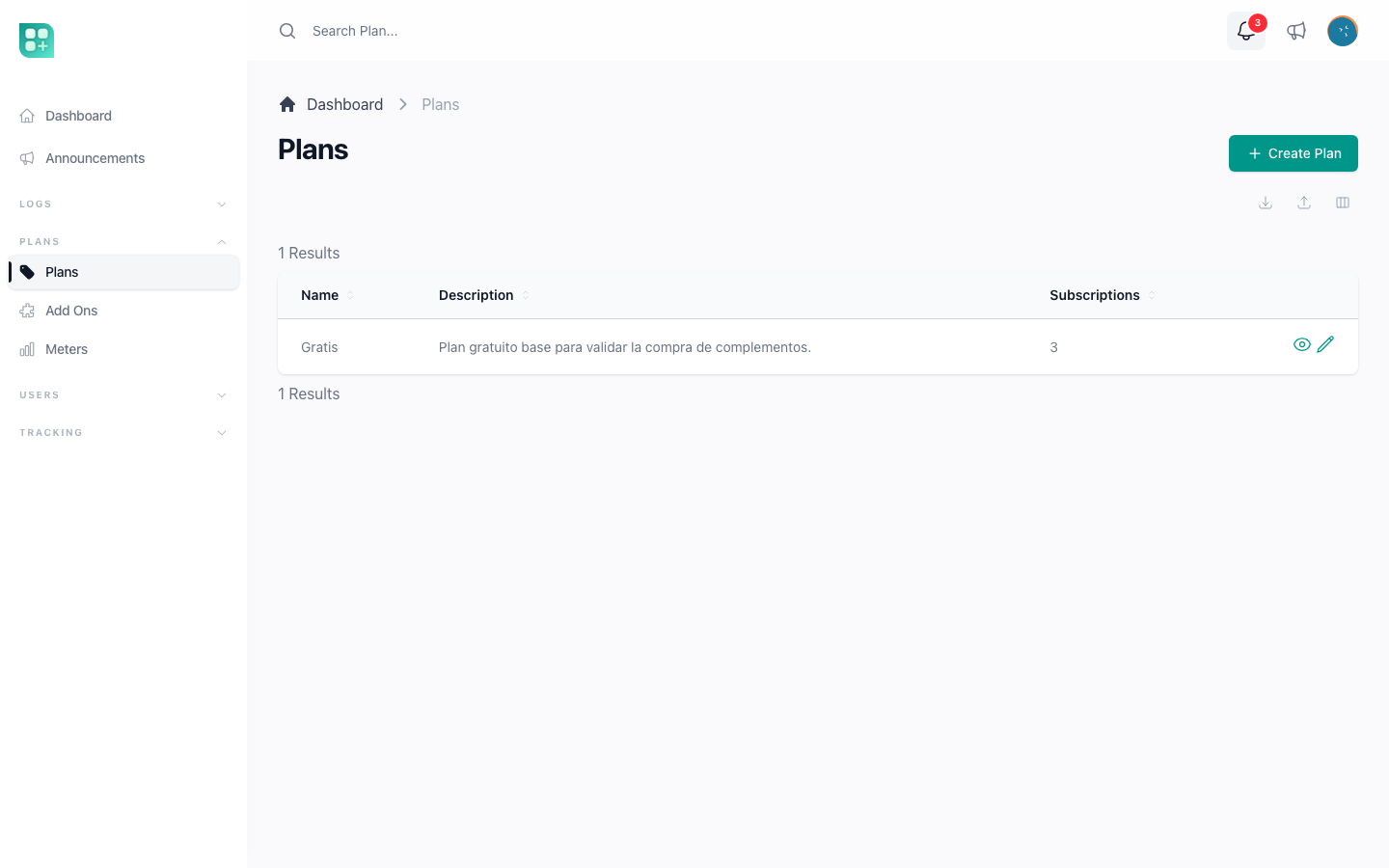
With FEATURE_PLANS_ENABLED and FEATURE_ADDONS_ENABLED off, the admin panel shows no Plans group at all: no Plans, no Add-ons, no Meters. This is the most common deployment mistake: the keys are set, the migration ran, and the sidebar still has nothing. Plans stays missing with its flag on and STRIPE_SECRET empty, because the plan policy refuses every action when the secret is missing; Add-ons and Meters only need FEATURE_ADDONS_ENABLED. Set the flags and the secret, clear the config cache, and each entry appears for anyone with its retrieve permission: billing_plan, billing_addon or billing_meter.
Plans are considered live for users only when three things are true at once: the flag is on, STRIPE_SECRET is set, and at least one plan exists. That is what BillingPlan::isActive() checks, and it is the condition behind every user-facing screen. Until you create the first plan the account menu shows nothing and the subscription middleware lets everyone through.
The Cashier variables
Cashier reads its own configuration from vendor/laravel/cashier/config/cashier.php, which the kit does not publish. These are the variables it reads and what each one does in this application.
| Variable | Default | What it does here |
|---|---|---|
CASHIER_CURRENCY |
usd |
Cashier's fallback currency: the one used when an amount is formatted or charged without a currency of its own. Subscription prices do not use it, because each Stripe Price carries its own currency. One-off charges do; see Charge once with Stripe Checkout. |
CASHIER_CURRENCY_LOCALE |
en |
Locale for formatting money, such as the invoice totals on /account/billing. Anything other than en needs the PHP intl extension. |
CASHIER_PATH |
stripe |
Prefix of the routes Cashier registers itself: /stripe/payment/{id} (the page where a customer confirms a payment that needs authentication) and /stripe/webhook. |
CASHIER_PAYMENT_NOTIFICATION |
empty | Notification class sent when Stripe reports invoice.payment_action_required. Set it to Laravel\Cashier\Notifications\ConfirmPayment to email the customer a link to the confirmation page. Empty means no email. |
CASHIER_LOGGER |
empty | Logging channel from config/logging.php for the Stripe SDK's own messages. |
CASHIER_INVOICE_RENDERER |
Dompdf renderer | PDF renderer for $invoice->download(). Available but not used by any feature of the kit: the payment detail on the billing screen links to the PDF Stripe itself generates, Download receipt, and renders none. |
CASHIER_PAPER |
letter |
Paper size for that PDF. Same status. |
CASHIER_REMOTE_ENABLED |
false |
Whether that PDF may load remote assets. Same status. |
STRIPE_WEBHOOK_TOLERANCE |
300 |
Seconds of clock drift accepted on the webhook signature. App\Providers\AppServiceProvider fixes it at 300, so changing the variable has no effect. |
AppServiceProvider also copies STRIPE_WEBHOOK_SECRET into cashier.webhook.secret, so you only set the three STRIPE_* variables once, in .env.
The package configuration
config/billing-core.php is the package's own file. You rarely change it; when you do, publish it first:
php artisan vendor:publish --tag=billing-core-config
| Key | Default | Purpose |
|---|---|---|
user_adapter.model |
App\Models\User |
The class that owns a user billing account. |
user_adapter.country_resolver |
App\Services\CountryDetectionService |
Where a visitor's country comes from when the user has none. See Detect the visitor's country. |
user_adapter.plan_limits |
App\Classes\PlanLimits |
The class whose public methods are the limit keys. See Plan limits and usage. |
user_adapter.plan_features |
App\Classes\PlanFeatures |
The class whose public methods are the add-on capabilities. |
adapters |
empty | Extra billing owners declared without a provider, each as ['class' => ..., 'enabled' => ...]. The file ships a commented example that reads BILLING_SUITE_ENABLED; nothing reads that variable until you uncomment it. |
models, morph_types, host |
package classes | The model classes, the polymorphic type names and the host classes (webhook event model, select filter, category model) the package talks to. Leave them. |
config/pricing.php holds the commercial settings: the billing intervals, the primary currency and the exchange-rate provider, covered in Currencies, intervals and exchange rates, and the trial and coupon switches, covered in Free trials and coupons.
The tables
php artisan migrate creates billing_accounts, subscriptions, subscription_items, billing_plans, billing_addons, billing_plan_addon, billing_prices, billing_price_variations, billing_limits, billing_entitlements, billing_checkouts, billing_meters, billing_meter_lots, billing_meter_movements, billing_meter_periods, billing_payments, billing_plan_segments and currency_exchange_rates. The migration is additive: on a database that already has Cashier data on users, it creates a billing account per user with Stripe data and links the existing subscriptions, without deleting anything. Rolling it back retains the tables on purpose.
Then seed the permissions the new resources need, retrieve, create, update and delete on billing_plan, billing_addon and billing_meter:
php artisan db:seed --class=PermissionSeeder
php artisan db:seed --class=RoleSeeder
The admin role receives every permission. Any other role needs them granted by hand; see Roles and permissions.
The webhook
Stripe tells the application what happened: a subscription was created, renewed, cancelled, a payment failed. Without the webhook nothing changes locally after Checkout, and the user who just paid keeps seeing "No plan".
Register one endpoint in the Stripe Dashboard, under Developers, Webhooks:
https://your-project.test/api/stripe/webhook
It must send these events:
| Event | What the application does with it |
|---|---|
customer.subscription.created |
Creates the local subscription and its items. |
customer.subscription.updated |
Updates status, items, trial end and cancellation date; then switches the add-on capabilities on or off to match the items. |
customer.subscription.deleted |
Marks the subscription cancelled, records the cancellation date and reason, and withdraws the capabilities the subscription was granting. |
customer.updated |
Refreshes the default payment method stored locally. |
customer.deleted |
Cancels the local subscriptions and clears the Stripe ids from the account. |
payment_method.automatically_updated |
Refreshes the card summary when the card network updates a card. |
invoice.payment_action_required |
Sends CASHIER_PAYMENT_NOTIFICATION if you set one. |
invoice.payment_succeeded |
Handled by Cashier's default; the kit adds nothing to it. |
invoice.paid |
Records the payment in the payment history (billing_payments), clears a payment the customer approved with their bank, fires SubscriptionPaid for paid amounts, which pays referral rewards and records tracking, syncs add-on capabilities, and is the source of the revenue chart and the exchange-rate snapshots. |
invoice.payment_failed |
Marks the subscription's payment as failed, which opens the grace period and sends the failed-payment notification. Skipped for the invoice of a change still waiting for the customer's approval. |
checkout.session.completed |
For a one-time Checkout (a lifetime add-on or a meter package), marks the purchase paid and delivers it. For a subscription Checkout, makes the card entered there the account's default payment method when it has none, since Stripe leaves it on the subscription only; the subscription itself is left to the subscription events. |
customer.subscription.pending_update_applied |
Clears the payment an add-on purchase or a plan change was waiting on, once the customer approved it with their bank. |
customer.subscription.pending_update_expired |
Voids the invoice of a payment nobody approved in time, so nothing is charged later, and lets the next screen tell the customer it expired. |
php artisan cashier:webhook --url=https://your-project.test/api/stripe/webhook creates the endpoint from the command line with the first eight events; add invoice.paid, invoice.payment_failed, checkout.session.completed and the two pending_update events to it in the Dashboard afterwards. Either way, copy the signing secret the Dashboard shows into STRIPE_WEBHOOK_SECRET.
Register /api/stripe/webhook, not /stripe/webhook. Cashier also registers the second one, with its stock controller, which knows nothing about add-ons, referrals or the event log.
Every request the endpoint receives is stored in webhook_events with its payload, the response and any error, and listed at /admin/webhook-events. That list is where you check that Stripe reaches you; see Audit trails and webhook events.
Testing it locally
Stripe cannot reach your-project.test, so forward the events with the Stripe CLI:
stripe login
stripe listen --forward-to your-project.test/api/stripe/webhook
The command prints a signing secret starting with whsec_. Put it in STRIPE_WEBHOOK_SECRET while the listener runs; it is not the one from the Dashboard. Then subscribe with a test card such as 4242 4242 4242 4242 and watch the events arrive in the terminal and at /admin/webhook-events. To replay one event:
stripe trigger customer.subscription.created
What the user sees
Once BillingPlan::isActive() is true, the signed-in user gets:
- My plans in the account menu, at
/account/plans: the plan cards with an interval switch, and two links, View payment history (/account/billing) and Payment methods (/account/payment-methods). When add-ons are on, the add-on catalogue renders below the plans. - A Plan block at the top of the application sidebar with the current plan name and an Upgrade link to
/account/plans. - Usage cards on the application dashboard, one per limit key, with the usage charts.
- A pricing section on the public landing page, whose buttons lead to registration.
- A free plan the moment they register, when a free plan exists for their country or for all countries. Registration fires Laravel's
Registeredevent, and the package's listener subscribes the new account to it, with no card. A free price for their own country wins over one for all countries, and among several the oldest is used; the admin plan list warns when there is more than one free plan. - The free plan again when their subscription ends, on its own, with a daily pass at 03:30 retrying the accounts still without one.
- The
ensure.subscribedmiddleware on every route under/app. Without an active subscription the user is sent to/account/planswith a message asking for one. An account with an outstanding balance is sent to/account/debtto settle it first.
On iOS, detected by the app-platform cookie of the wrapped app, /account/plans shows a notice instead of the plans, because in-app purchases outside the App Store are not allowed there.
There is no Stripe Customer Portal. Cards are added, made default and removed inside the application, through Stripe Elements and a SetupIntent, so the card number never touches your server.
What the administrator sees
- A Plans group in the admin sidebar with Plans (
/admin/billing-plans), Add-ons (/admin/billing-addons) and Meters (/admin/billing-meters). - A Current Plan column and a Plan filter on the users list, and an Add-ons panel on the user form when add-ons are on.
- Three metrics on the admin dashboard: Daily Revenue, in the primary currency, Subscriptions Created and Total Accumulated Subscriptions, the last two only while plans are live.
- The webhook log at
/admin/webhook-events.
Turning it off
BILLING_CORE_ENABLED=false disables every billing route, screen and command while the package stays installed. To remove the package for good, while its folder still exists:
composer remove weblabormx/billing-core
php artisan optimize:clear
Then delete the packages/billing-core path entry from the root composer.json and the folder itself, and run composer dump-autoload. Neither step drops the billing tables or the Stripe identifiers; that is a separate, deliberate decision.