

Audit trails and webhook events
What the kit records on its own — model changes, every email and SMS, every webhook — and where to read it.
Three things are written down without anyone asking: what changed on a record and who changed it, every email and SMS the application sent or failed to send, and every webhook a payment provider delivered. This guide says what each log captures, where you read it in the admin panel, how long it is kept, and how to make your own models and webhooks take part.
The activity log
Every model that opts in writes one row to the activity_log table each time it is created, updated or deleted, with the attributes that changed and the user who was signed in. The log is Spatie's laravel-activitylog, configured in config/activitylog.php:
| Key | Env variable | Default | What it does |
|---|---|---|---|
enabled |
ACTIVITY_LOGGER_ENABLED |
true |
false stops every write. The screens stay, the table stops growing. |
delete_records_older_than_days |
— | 365 |
The age activitylog:clean deletes past. |
activity_model |
— | WeblaborMx\TallUtils\Models\Activity |
The model the rows are read through. It adds search and a per-field diff. |
table_name |
— | activity_log |
|
database_connection |
ACTIVITY_LOGGER_DB_CONNECTION |
empty (the default connection) | Point the log at another database when the main one should not carry it. |
What a row holds
| Column | Content |
|---|---|
event and description |
created, updated or deleted; restored too for a model with SoftDeletes. |
subject_type, subject_id |
The record that changed. |
causer_type, causer_id |
The signed-in user. Empty when the change ran from a command, a job or a webhook. |
properties |
JSON. attributes holds the values after the change; on an update, old holds the values before it. |
The kit's trait WeblaborMx\TallUtils\Models\WithActivityLog fixes the options: every unguarded attribute is logged (the kit's models use $guarded = [], so that is every column), only the attributes that actually changed are written, an update that touched nothing is not written at all, and updated_at is never part of the diff. The models that ship with it are User, Role, Permission, Announcement, Category, and, when billing is installed, BillingPlan, BillingAddon, Subscription and SubscriptionItem.
Add it to a model of yours
use WeblaborMx\TallUtils\Models\WithActivityLog;

class Invoice extends Model
{
    use WithActivityLog;

    public $dont_log = ['viewed_at', 'notes'];
}
$dont_log is optional. The attributes it names are left out of properties, and a save that changed only those attributes writes no row. Nothing else is needed: the trait registers the model events itself.
Read it
The screen is /admin/activities, under Logs in the sidebar, index and detail only. The index shows event, subject and causer; the detail adds the description and the properties JSON. Filter by subject type, subject id, causer type, causer id or event. The search box matches description, subject type, causer type, event, id and the JSON itself.
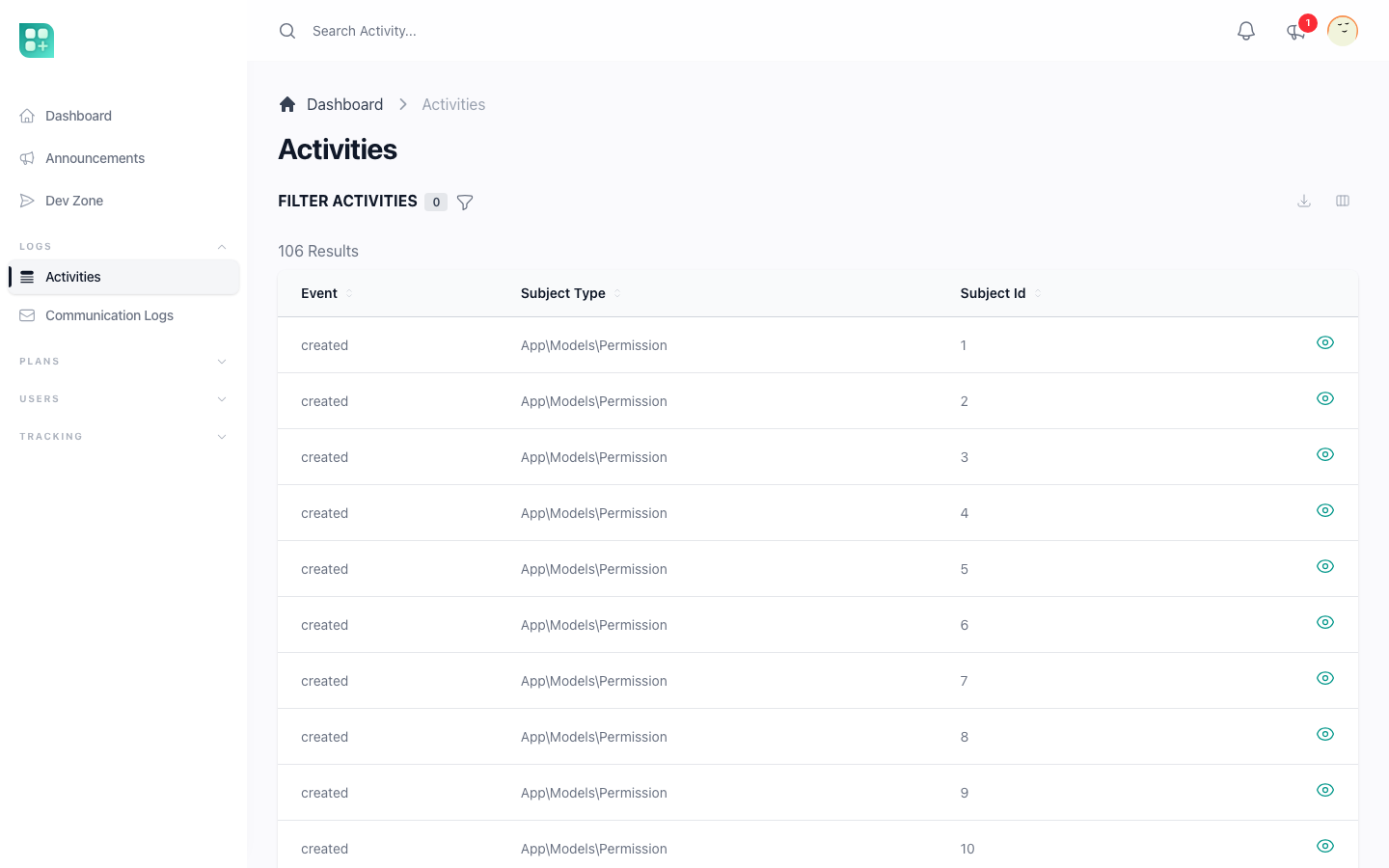
Its policy is stricter than the rest of the panel: the list opens only for an account that has the admin role and is on the sudo list of config/app.php, so the menu entry is invisible to every other administrator. See /help/sudo-and-super-administrators. The same rows feed the Activity Log Events metric of the dashboard, described in /help/dashboard-metrics-and-visitor-tracking.
Keep it from growing forever
php artisan activitylog:clean            # deletes rows older than 365 days
php artisan activitylog:clean --days=90  # or older than the number you give
The command is not scheduled: routes/console.php only schedules the daily stats. Add it yourself when the table should prune itself:
// routes/console.php
Schedule::command('activitylog:clean')->daily();
It runs through the scheduler, so the server needs php artisan schedule:run in its cron. See /help/queues-and-scheduled-work.
Communication logs
Every email and SMS sent through a Laravel notification leaves a row in communication_logs, whether it went out or failed. Two listeners do it, and Laravel discovers them on its own, so there is nothing to register:
App\Listeners\LogNotificationSentreacts toNotificationSentand writes asentrow.App\Listeners\LogNotificationFailedreacts toNotificationFailedand writes afailedrow.
Both act only on the mail channel and on App\Channels\SmsChannel. Database and web push notifications are not logged, and neither is mail sent with the Mail facade outside a notification, because that never fires the event.
| Column | Content |
|---|---|
user_id |
The recipient's account when the notifiable is a User; empty otherwise. |
type |
email or sms (App\Enums\CommunicationType). |
status |
sent or failed (App\Enums\CommunicationStatus). |
recipient |
The address the notifiable routes mail to, or its email; for SMS, its phone. |
notification_type |
The notification class. |
content |
The subject, read from the notification's toMail(). Email only. |
body |
The HTML body of the message that was actually sent. Email only. |
created_at |
When the notification was dispatched. |
A failed row carries no subject and no body. The two migrations that create the table, 2026_03_14_000001_create_communication_logs_table and 2026_03_15_000001_add_body_to_communication_logs_table, ship with the kit and run with php artisan migrate.
The screen is /admin/communication_logs, under Logs, newest first, with the recipient, type, status, notification class and sent date on the index and the subject and body on the detail. Filter by type and by status. Create and edit are denied by App\Policies\CommunicationLogPolicy; reading needs the retrieve communication_log permission. Each user's detail page at /admin/users/{id} also lists the messages sent to that user.
There is no environment variable for this log and no command that prunes it. When the table needs a limit, write the cleanup yourself.
Webhook events
Stripe delivers its events to POST /api/stripe/webhook, declared in routes/api.php with two middleware, in this order:
->middleware(['webhook', 'log.webhook:stripe']);
webhook is Cashier's VerifyWebhookSignature; log.webhook is App\Http\Middleware\LogWebhookEvent, and the parameter after the colon is the source the row is saved with. Both aliases are declared in bootstrap/app.php.
The signature is checked first, so a request Stripe did not sign is rejected with a 403 before anything is written: forged calls never reach the log. The secret and the tolerance come from App\Providers\AppServiceProvider::register(), which sets cashier.webhook.secret from services.stripe.webhook_secret and cashier.webhook.tolerance to 300 seconds:
| Env variable | Used for |
|---|---|
STRIPE_WEBHOOK_SECRET |
The signing secret of the endpoint you created in the Stripe dashboard. A request signed more than 300 seconds ago is rejected. |
When the billing package is not installed the route answers 204 and does nothing else; the row is still written.
What a row holds
| Column | Content |
|---|---|
source |
The middleware parameter: stripe. |
event_type |
The type key of the JSON body, or unknown when there is none. |
payload |
The whole body, as JSON. |
response |
{"status": 200}: the HTTP status the handler answered. Empty when it threw. |
status |
success, or failed when the status was 400 or higher or the handler threw (App\Enums\WebhookStatus). |
error |
HTTP 4xx, or the exception message and trace. |
An exception is logged and then re-thrown, so Stripe still receives an error and retries on its own schedule.
Read it
/admin/webhook-events is a Livewire screen (App\Livewire\Admin\WebhookEvents) inside the admin route group, so it needs the admin role. It is not in the sidebar: open it by URL. It lists 25 events per page, newest first, with a text filter on source and another on event type, both partial matches. Click a row to open the payload, the response and the error pretty-printed in a modal.
What reads the rows back
App\Models\WebhookEvent::scopePaidSubscriptionInvoices() selects the successful invoice.paid events from Stripe whose amount_paid is above zero and that belong to a subscription. The billing package uses that selection for the Daily Revenue dashboard metric and to decide which dates and currencies need an exchange rate. So the webhook table is the revenue record: an endpoint that was down for a day is a day with no revenue on the chart. See /help/currencies-intervals-and-exchange-rates and /help/turn-on-plans-and-billing.
Log a webhook from another provider
The middleware is generic. Give it another source name on any route:
Route::post('/paypal/webhook', PaypalWebhookController::class)
    ->middleware('log.webhook:paypal');
It reads event_type from a top-level type key, so a provider that names its events differently is logged as unknown until you adapt the middleware. It does not verify signatures: put the provider's own verification in front of it, as the Stripe route does.