

Sell usage with meters and packages
Create a meter in the admin panel, spend a unit with one line of code, and let people buy packages in advance or pay for what they used when the cycle closes.
A meter is a unit your project counts and charges: a stamp, a gigabyte, an email sent. It is not a capability that switches on, so it is not an add-on; it is something that runs out or adds up. A meter comes in three modes that never mix. A prepaid meter sells packages of units that are bought in advance and spent until they are gone. A postpaid meter counts what was used during the billing cycle and bills the overage on the next invoice. A capacity meter measures a level that is taken up right now — devices signed in, seats used, gigabytes stored — which rises when something is taken and falls when it is released, and is never charged for. This guide covers the whole path, from the form in the admin panel to the line on the invoice.
Turn it on
Meters live in the Billing Core package next to the add-ons, so they need the same flag. Plans are optional: a prepaid meter works with no plan and no subscription. Stripe is needed only to sell packages; balances and consumption work without it.
| Option | Env variable | Default | What it changes |
|---|---|---|---|
| Add-ons module | FEATURE_ADDONS_ENABLED |
false |
Off: /account/add-ons is a 404, the admin resource refuses every action and the two daily commands are not scheduled. |
| Stripe | STRIPE_KEY, STRIPE_SECRET, STRIPE_WEBHOOK_SECRET |
empty | Needed to sell packages and to bill postpaid usage. Every save of a meter or a price talks to Stripe. |
The Add-ons entry of the account menu appears as soon as one add-on or one meter is on sale, so a project that sells only meters gets the page too. The flag also schedules billing:close-meter-periods daily at 02:00 and billing:expire-trials at 08:00. Installation, keys and the webhook are in Turn on plans and billing.
A meter is created in the admin panel, not in code
There is nothing to declare in PlanFeatures or PlanLimits. A meter switches nothing on: it counts. The only thing your code writes for a meter is the call that spends a unit, and that call names the meter's key.
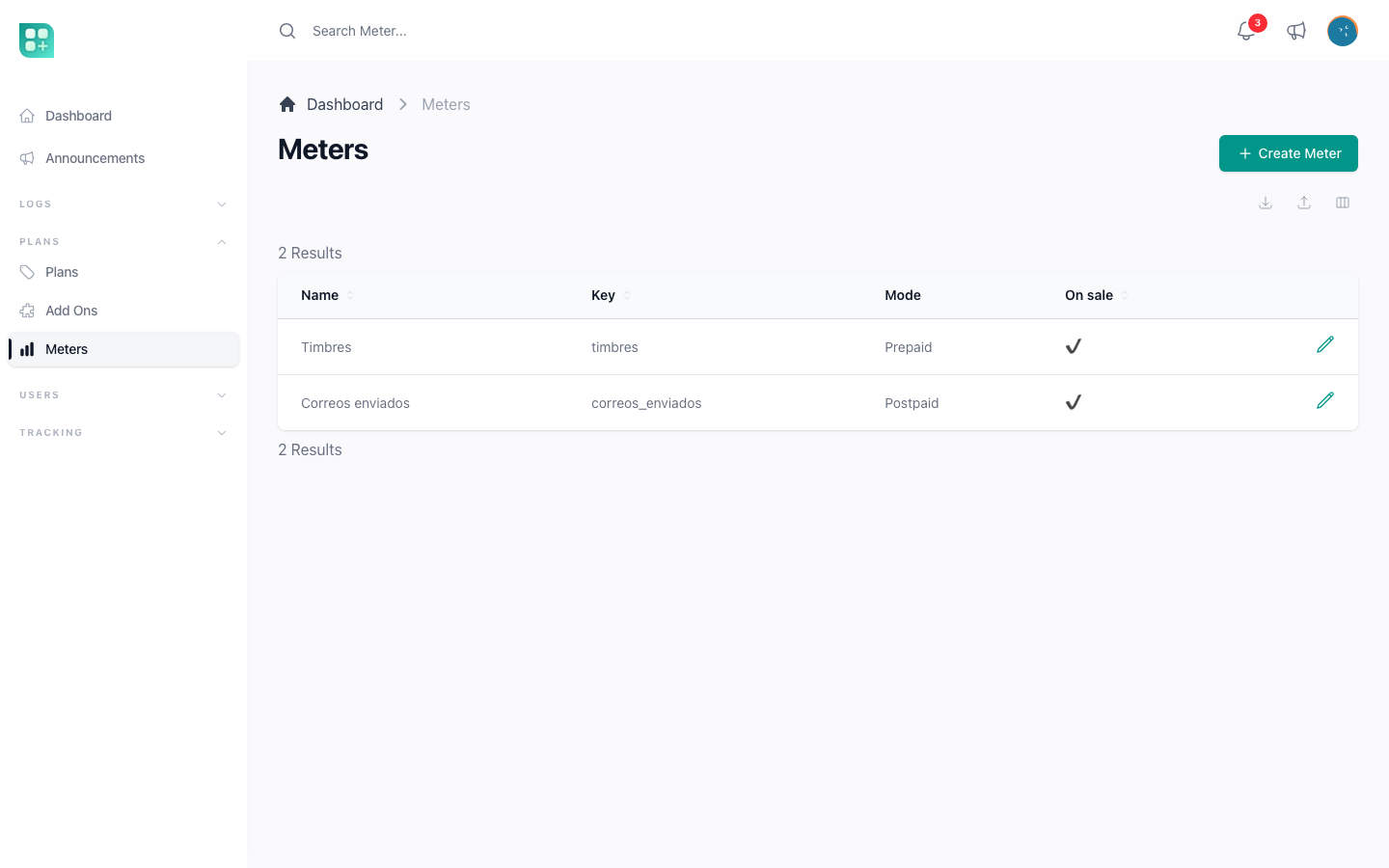
Go to Plans → Meter in the admin panel, at /admin/billing-meters. The index lists name, key, mode and whether it is on sale. Create opens /admin/billing-meters/create; edit is /admin/billing-meters/{id}/edit. The form warns when STRIPE_SECRET is not set: balances and consumption still work, but no package can be sold until the key is configured.
| Field | Required | What it does |
|---|---|---|
| Name | Yes | The title of the balance card. Also the Stripe product name. |
| Key | Yes | What your code names when it spends a unit. It follows the name while you create the meter (Stamps becomes stamps), you can edit it before saving, and it never changes afterwards: the field is disabled on edit and a changed key is refused. Lowercase letters, digits and underscores, unique. |
| Unit (singular), Unit (plural) | Yes | stamp / stamps. Every sentence about the balance uses them. Write them in English, as the note under each field says: the Spanish version comes from the language files, so add an entry for each name there. A name with no entry is still accepted and is shown as you wrote it. |
| Description | No | Shown to the user next to the balance. |
| Mode | Yes | Prepaid: packages of units bought in advance or Postpaid: usage billed when the period closes. One or the other, never both. Changing it changes the rest of the form. |
| On sale | Yes | On by default. Off withdraws the meter from the catalogue: nobody can buy it any more and it leaves the limit select. What was already bought is untouched, so an account with a balance keeps seeing the meter in its balance block and on its detail page, and keeps spending that balance with consume(). A postpaid meter has no bought balance to spend, so taking it off sale stops the metering: no new period opens and none is charged. Put it back on sale and it is offered again. |
| Context | Only with two adapters | Both, User or Team. Hidden when only the user adapter is registered. |
Prepaid: packages and what happens at zero
| Field | What it does |
|---|---|
| Packages | One row per country, currency and package: the units it grants and its price. Each row becomes a one-time Stripe price. |
| Blocks at zero | On: the operation stops until a package is bought or the plan quota resets. Off: the operation goes through and the balance only informs. |
| Country | Currency | Units | Price |
|---|---|---|---|
| default | mxn | 100 | 350.00 |
| default | mxn | 500 | 1,200.00 |
Postpaid: a price per unit and a notice
| Field | What it does |
|---|---|
| Price per unit | One row per country and currency. What every unit above the included quota costs. |
| Notify from | The estimated charge at which the user is told, once per period, that their usage is growing. Leave it empty to never notify. |
There are no packages, because nothing is bought in advance, and there is no cut-off day, because the period is the subscription cycle.
Retiring a meter
A meter can be deleted only while it has no prices and nobody was ever credited; deleting it archives its Stripe product. Once something was sold, switch On sale off instead.
Give a quota through the plan limits
Neither mode captures how much a plan includes. That is set where limits already are: in the Limits of the plan and in the Limits of an add-on, choosing the meter's key. The limit select of both forms lists the meter keys after the ones PlanLimits declares. A plan with stamps = 50 gives fifty stamps per cycle; an add-on with stamps = 100 adds a hundred while it is held. Plan and add-on limits under the same key add up, exactly as they do in Plan limits and usage.
Measure a capacity instead of a consumption
A capacity is the third kind of meter, and it behaves the opposite way round: it is not spent, it is occupied. Devices signed in, seats taken, gigabytes stored. The number goes up when your customer takes something and comes back down when they release it, and it is never charged for — the plan already sold the room.
So a capacity meter sells no packages, opens no period and refuses consume(). It has no prices of its own. What a plan or an add-on allows is a limit, written where every other limit is written.
The kit ships one already: disk_space, measured in gigabytes — or in megabytes when your PlanLimits declares $diskSpaceUnit = 'megabyte' —, created by MeterSeeder so a new project has it without anybody capturing it. It carries no price and no plan quota — what each plan includes, and what extra space costs, are yours to capture like every other commercial figure.
What a meter does need is somewhere to read the level from, and that part is yours. Add a public method to App\Classes\PlanLimits named exactly like the meter key:
class PlanLimits extends BasePlanLimits
{
    public function devices($owner = null)
    {
        $owner = $owner ?? auth()->user();
        return $owner ? Session::where('user_id', $owner->id)->count() : 0;
    }
}
Nothing is stored and nothing has to be kept in step: the method is read live every time a screen shows the number. A capacity nobody declares still shows the allowance the plan sold, but the usage beside it always reads zero, and the admin panel says so while you configure it.
Exactly like the key means underscores too. A meter keyed disk_space is measured by a method named disk_space; diskSpace is a different name, so the meter finds nothing, the usage reads zero for everybody, and no error is raised anywhere to say why. A one-word key hides this; your second meter will not.
Your own figure does not have to be in the meter's unit. Disk space is counted in bytes and sold in the unit your PlanLimits declares, gigabytes unless it says megabytes, so the method divides before it answers, rounding down so that a single byte is not charged as a whole unit. See Plan limits and usage for what to do when that rounding makes a warning impossible on a small quota.
One more line decides what your customer is told when the level is full:
public static function releasableLimits(): array
{
    return ['devices'];
}
A key listed there is one they can bring down themselves, so the card offers both ways out: free something up, or buy more capacity. A key left out is offered only the purchase. If you measure something that only grows — an activity log, a history — leave it out: telling somebody to free space up when there is no way to free it sends them looking for a button that does not exist, and leaves the one that costs money as the only thing that works.
Spend a unit from your code
$result = $account->consume('stamps', 1, "CFDI {$invoice->folio}");
if (! $result->success) {
    return $result->message;
}
$account is the billing account, $user->billingAccount. The signature is consume(string $key, float|int $units = 1, ?string $reason = null) and it never throws; it returns a result you read.
| Property | What it carries |
|---|---|
success |
Whether the units were spent, or recorded on a postpaid meter. |
message |
Empty on success. On failure, the text to show: why it was refused and what to do. |
remaining |
Prepaid: units left after the call. Postpaid: units left inside the included quota before the meter starts charging. |
meter |
The meter, or null when the key matched none. |
What happens depends on the meter:
- A key that matches no meter fails loudly: an error goes to the log with the account id and the key, and the message says the meter does not exist. Your code can never deduct in silence from a balance that does not exist. Off sale is not the same as gone: a meter taken off sale still answers to its key and its balance is still spent. A quantity of zero or less is refused too.
- A prepaid meter runs one locked transaction. It credits the plan quota of the cycle if it has not been yet, locks the lots that still have units, ordered so the ones that expire first come first and the bought ones last, and checks the total. If it is not enough and the meter blocks at zero, the call fails without deducting anything, with a message that says how much was used this cycle, when the plan quota resets and invites to buy a package. Otherwise the units are taken across the lots and one movement is recorded with the reason. The balance is never negative: with blocking off, the movement records the full quantity and the lots stop at zero. Two calls at the same time on the same balance are the everyday case of a stamping system, and the lock is what stops both from passing when only one fits.
- A postpaid meter always succeeds. It records the movement, keeps the current period open and sends the usage notice if this call made the estimate cross Notify from. Postpaid never blocks.
Count from where the thing is written, and say why
Call consume() from the place where the counted thing is created, once per thing, and never derive the balance from your own table. A meter that counted rows would go back up when rows are deleted or cancelled, and could not lock anything. The movement log the package keeps is the only source of consumption: the period close sums it, the screens list it, and a claim is settled by reading it.
The reason you send in each call is what later explains a charge to the customer. CFDI A-1042 tells them which invoice cost a stamp; Payment reminder tells them which emails made up the overage. An empty reason turns the history into a list of numbers, and the postpaid breakdown groups it under Other.
How the balance works
A prepaid balance is not a counter. Every credit creates a lot with the units granted, the units left, where it came from and, when it has one, its expiry:
| Source | Created by | Expires |
|---|---|---|
| Purchase | A paid package | Never |
| Plan | The quota the subscription includes | At the end of the cycle |
| Manual | creditMeter() from your code |
As you say |
Consumption spends the lot that expires soonest first, so the plan quota is used before anything that was paid for, and the user never loses a bought unit for not having spent the included ones first.
The plan quota is not credited by a job. It lands the first time the balance is read or consumed inside a new cycle, as one lot per cycle, and reading it again in the same cycle credits nothing more. The quota is getLimitTotal() for the meter key, so plan and add-on limits add up. An account with no active subscription has no cycle and receives no quota: it holds only what it bought.
A prepaid meter is independent of the subscription. An account on a free plan, or on none, buys packages, spends them and sees its balance exactly like a subscriber does. Cancelling the subscription does not touch bought units: they are already paid for.
| Method | Returns |
|---|---|
$account->meterBalance('stamps') |
available, purchased, plan, plan_resets_at, used_this_cycle. Credits the plan quota first. |
$account->meterUsage('emails') |
For a postpaid meter: used, included, billable, unit_price, amount, currency, remaining, breakdown by reason, charges_at, has_subscription. |
$account->meterMovements('stamps') |
A query of every credit and consumption, newest first. |
$account->creditMeter($key, $units, $source, $reference = null, $expiresAt = null) |
Adds a lot and a positive movement. The same source and reference twice returns the lot it already created. |
$account->meterExhaustedMessage('stamps') |
The message a blocking meter shows when it runs out. |
Sell packages
Packages are bought through the same one-time Checkout a lifetime add-on uses.
- The user presses Buy more stamps on the balance card and picks a package. A Stripe Checkout session in payment mode opens for that price, and the session is recorded before the user leaves. A pending session opened less than a day ago is reused, so a reload or a second click never opens another one.
- Stripe sends the user back to
/account/add-ons?meter=stamps&checkout=pending, where the block says the payment is being processed. Nothing is credited on the way back. - The
checkout.session.completedwebhook confirms the payment. The session is marked paid and the units land as a purchase lot that never expires, with the session id as reference.
A session already paid answers without delivering again, and a lot is unique by its reference, so a webhook that arrives twice credits once. Without STRIPE_SECRET, or on a package with no Stripe price, the button says purchases are not available yet.
Bill usage when the cycle closes
billing:close-meter-periods runs daily at 02:00, and you can run it by hand.
The period is the subscription cycle: whoever is billed on the 15th gets the usage on the following 15th, as one more line of the invoice they already expect. A yearly plan closes every month, on months anchored to the day the cycle started, because a year of usage billed at once is not defensible. One row per account, meter and period is kept, and a run that finds the row already charged leaves it alone: rerunning the command never bills twice.
What one run does with each period that ended:
- Computes the figures once: the units used, summed from the movements of the window; the units included, from the plan and add-on limits of the active subscription; the unit price for the account's country; and the amount. A row that already has an amount is never recomputed.
- No price that applies: the meter has prices, but none for the account's country and no default one, while units were used beyond what is included. The period is closed as unbilled.
- Amount zero: the period is closed with no charge.
- No Stripe customer on the account: there is nothing to bill it on, so the period is closed as unbilled. Closing it unbilled only writes that status: nobody is sent a notice, and the user is never blocked for it, because postpaid does not block.
- Yearly plan, or a subscription that has ended since the period started: the amount is billed on its own invoice. Any other cycle: it is added as a line to the subscription, so it rides the next invoice.
- A Stripe error marks the period as failed with the reason and starts a clock of its own. The next runs retry it with the amount it already holds, for as long as
BILLING_PAST_DUE_GRACE_DAYSallows — fifteen days from that failure, the same window a failed renewal gets. After that the period stops being retried: its amount moves to the account's outstanding balance and the user is told once. A period that closes with no subscription left to bill it on goes to the balance straight away, because there is nothing to wait for.
The invoice line reads Emails sent: 1,120 emails (1 September 2026 - 1 October 2026).
The usage notice. While the period is open, every consumption recomputes the estimated charge. The first time it reaches Notify from, the user receives a notification with the units used, the estimate and the date it will be billed. It goes once per period.
What the user sees
/account/add-ons opens with the block Your balance above the catalogue, one card per meter you can see: the ones on sale, plus the ones you still hold a balance on:
- A prepaid card shows the units available in large type, then
N bought, no expiry,N included in your plan, resets on {date}andN used this cycle. When the meter blocks and the balance is zero, a warning carries the exhausted message. Buy more stamps unfolds the packages with their price; View movements opens the detail. - A postpaid card shows
Used this cycle,Included in your plan, the overage line1,120 × $0.10 = $112.00 MXNandIt will be billed on {date} together with your subscription, or, with no active subscription,The period closes on {date}. There is no active subscription to bill it on. Below, Usage breakdown lists the units per reason.
/account/add-ons/meters/{key} shows the same card and the Movements table: date, units (negative for consumption), reason and kind (Consumption, Package purchase, Included in your plan, Manual credit), twenty per page. It is the page that settles a claim without opening the database.
In the admin panel, editing a user at /admin/users/{id}/edit shows a read-only Meters panel with one sentence per meter: the units available with what was bought and what the plan included, or the units used, included and billable with the amount and its date.
Three real examples
Stamps, prepaid. A meter stamps, units stamp / stamps, packages of 100 for 350 MXN and 500 for 1,200 MXN, blocking at zero. The Pro plan sets the limit stamps = 50. A subscriber holds fifty stamps that reset each cycle plus whatever they buy; someone with no plan buys a package and stamps until it runs out. When the stamp is issued, the line above runs, and the message on failure already says what was used, when the quota resets and that a package can be bought.
Disk space, a capacity the kit ships. The meter disk_space, units gigabyte / gigabytes, nothing spent and nothing sold on the meter itself. The plan captures disk_space = 100 under its included meters and the customer reads "100 gigabytes included". Extra room is an add-on sold by tiers — 1 GB, 5 GB, 20 GB — where the gigabytes of each option live in the Units column of its price row, not in the value of its limit row; the customer picks the size on the add-on's own page, not in the catalogue. That part is in Sell add-ons. Uploading is refused once the account is at its total, on every screen that uploads, and the card offers both ways out because disk_space is declared releasable: delete files, or buy more.
Emails, postpaid. A meter emails, 0.10 MXN per unit and a notice from 100 MXN. The plan may include a thousand or nothing at all. Each send calls $account->consume('emails', 1, 'Payment reminder') and nothing is refused. At the close, the units above the quota are billed at 0.10 as one line of the invoice, and the breakdown reads Payment reminder 1,340 · Welcome 420 · Invoice notification 360.
When something goes wrong
- A period charge failed. The period shows as failed with the Stripe error. Fix the cause, usually the card or the customer on Stripe, and the next run of
billing:close-meter-periodsretries it with the same amount. Each failed period carries its own deadline, counted from the day it first failed, so one that fails late gets the whole window and not what is left of another period's. Past it the amount is on the account's outstanding balance instead, and the period stops reading as a failed payment. Paying that balance settles every period behind it: they show as charged, against the invoice that paid them. - A period closed unbilled. When the period closed, the account had no Stripe customer, or the meter had no price for the account's country and no default one while the account used more than it included. The figures are kept and nobody was told: the period only carries that status, and the package does not bill it later on its own. An account gets a Stripe customer when it pays for a plan or saves a card; a missing price is added on the meter, for that country or as the default. Both fix the following periods, not the closed one.
- A meter nobody consumes. It can be configured and sold, but its balance never goes down, because a meter only counts what your code tells it. A call with a key that matches no meter fails and is logged, so it is found in the log and not in a silent zero.
- A webhook arrives twice. The session id finds the recorded checkout; one already paid delivers nothing again, and the lot behind it is unique by reference. Replaying the event from the Stripe dashboard is safe.
- You changed a meter from prepaid to postpaid. Do not do it with people who already bought, but nothing is lost if you do: bought lots keep being spent first, and only what goes past them is billed.