

Protect sensitive actions
Ask for the password or PIN again, force a password change, act as a user, block an account.
Some actions deserve more than a click: deleting an account, changing a payout destination, signing in on behalf of someone else. The kit ships five mechanisms for them: a confirmation modal you can wrap around any Livewire action, a password re-confirmation screen, a forced password change, impersonation from the admin panel, and account blocking. This guide says how each one works, who can trigger it, what the person on the other side sees, and how to attach it to actions of your own.
Ask for the password or PIN again
App\Traits\ConfirmsUserActions turns any method of a Livewire component into one that runs only after the user proves who they are. Add the trait, and instead of doing the work directly, ask for confirmation and name the method that does it:
use App\Traits\ConfirmsUserActions;
use Livewire\Component;

class DeleteAccount extends Component
{
    use ConfirmsUserActions;

    public function delete()
    {
        $this->requiresUserConfirmation('performDeletion', ['accountId' => 123]);
    }

    public function performDeletion($user, $accountId)
    {
        // Runs only after a correct PIN or password.
        // $user is the authenticated App\Models\User.
    }
}
requiresUserConfirmation($method, $params) opens the modal App\Livewire\App\Actions\ConfirmUserAction, titled "Confirm Action". What it asks for depends on the PIN setting:
| Situation | The modal asks for |
|---|---|
AUTH_ENABLE_PIN=true and the user has set a PIN |
The 4-digit PIN |
| Otherwise | The account password |
| Nobody is signed in | Also the identity (email, phone or username, per LOGIN_IDENTITIES) |
When the credential is right, the modal dispatches a userActionConfirmed event and closes. The trait listens for it, checks that the event was meant for this exact component class, loads the user, and calls your method with the user as the first argument followed by the parameters you passed, in order. A wrong PIN or password shows "Invalid credentials." under the field and the modal stays open; Cancel closes it and nothing runs.
Two details matter when you wire it. The component must extend Livewire\Component and must not override getListeners() without calling the trait's, because that is how the confirmation comes back. And the method name is checked with method_exists, so a typo runs nothing rather than erroring.
To open the same modal from Blade or Alpine instead of from PHP, the global helper confirmUserAction($component, $method, $params) returns the component and arguments pair the openModal event expects:
<x-button negative :label="__('Delete')"
    x-on:click="$dispatch('openModal', @js(confirmUserAction(\App\Livewire\App\DeleteAccount::class, 'performDeletion', ['accountId' => 123])))" />
The kit ships the mechanism but does not use it on any of its own screens today, so nothing changes until you wrap an action. How the PIN is set, stored and reset is in The security PIN.
The password confirmation screen
Separately from the modal, the kit has the classic re-confirmation page at /password/confirm, the password.confirm route, rendered by App\Livewire\Auth\Access\ConfirmPassword. It shows the icon, a "Confirm Password" title and one field; a correct password writes the current time into the session as auth.password_confirmed_at and sends the user back to the page they wanted.
The timestamp is what Laravel's password.confirm middleware reads. Put it on any route that should ask for the password again after a while:
Route::livewire('/billing/payout', Billing\Payout::class)
    ->middleware('password.confirm');
| Option | Env variable | Default | Effect |
|---|---|---|---|
password_timeout in config/auth.php |
AUTH_PASSWORD_TIMEOUT |
10800 (three hours) |
Seconds since the last confirmation before the middleware redirects to the screen |
Signing in also writes the timestamp, so a user is not asked twice within the window. No route of the kit applies the middleware, so the screen and the variable are available but idle until you add it to a route of your own.
Force a password change
An administrator, or your code, can require a user to choose a new password before doing anything else. The mechanism is App\Traits\EnforcesPasswordRequests on the User model and two timestamps:
| Column | Meaning |
|---|---|
requested_password_reset_at |
When the change was demanded |
password_reset_at |
When the user last changed their password through the forced screen |
shouldEnforcePasswordRequest() is true while the request is newer than the reset. Three things set the request:
- An administrator creates a user with a password in
/admin/users. The user gets an email with that password, andrequestForNewPassword()runs, so the first sign-in replaces it. php artisan db:seedfinds a super administrator still using the seeded password.- Your own code calls
$user->requestForNewPassword().
Enforcement is the security middleware described below. On the next request to a protected area it redirects to /password/request, a page titled "Change your password" that says "You've been requested to change your password". The user types the current password and presses Continue, then a new password and its confirmation and presses Confirm. The new password must pass the project's password rule and must differ from the current one; then password_reset_at is stamped, Laravel's PasswordReset event fires, and the user lands on the page they were heading to, or on home_route. Opening the page when no change is due answers 400.
The security middleware
App\Http\Middleware\Security is registered under the alias security and wraps the signed-in areas: every route under /app, every route under /admin, and the account pages under /account. On each request it does two things, in this order:
- If the user must change their password, redirect to the forced-change screen, unless the user is an administrator currently acting as someone else.
- If the user's
blocked_atis set, sign them out and send them to the sign-in page with "You are blocked, please contact support."
That is all it does. It sets no security headers and does not force HTTPS; the application trusts every proxy for the scheme and host, and the redirect to HTTPS and headers such as Strict-Transport-Security belong to your web server or CDN. Add it to any route group of your own that a signed-in user reaches:
Route::middleware(['web', 'auth', 'security'])->group(function () {
    // ...
});
A second middleware, App\Http\Middleware\SystemValidations, runs on every web request and flashes the warnings shown by <x-design::system-warnings /> at the top of the signed-in area. The security one is the PIN: when AUTH_ENABLE_PIN=true and the user has no PIN, an amber banner says "Need to configure a PIN for your account." with a Configure PIN link to the profile. The others, while billing is on, are about the account's payments: a failed payment, an outstanding balance, or an account left without a plan. Where each middleware group is defined is in Routes, layouts and middleware.
Act as another user
Impersonation lets an administrator see the product exactly as one user does, to reproduce a report without asking for a password. It is the App\Traits\CanActAsOthers trait on the User model, exposed as the "Act as" action on the users list and user detail in /admin/users.
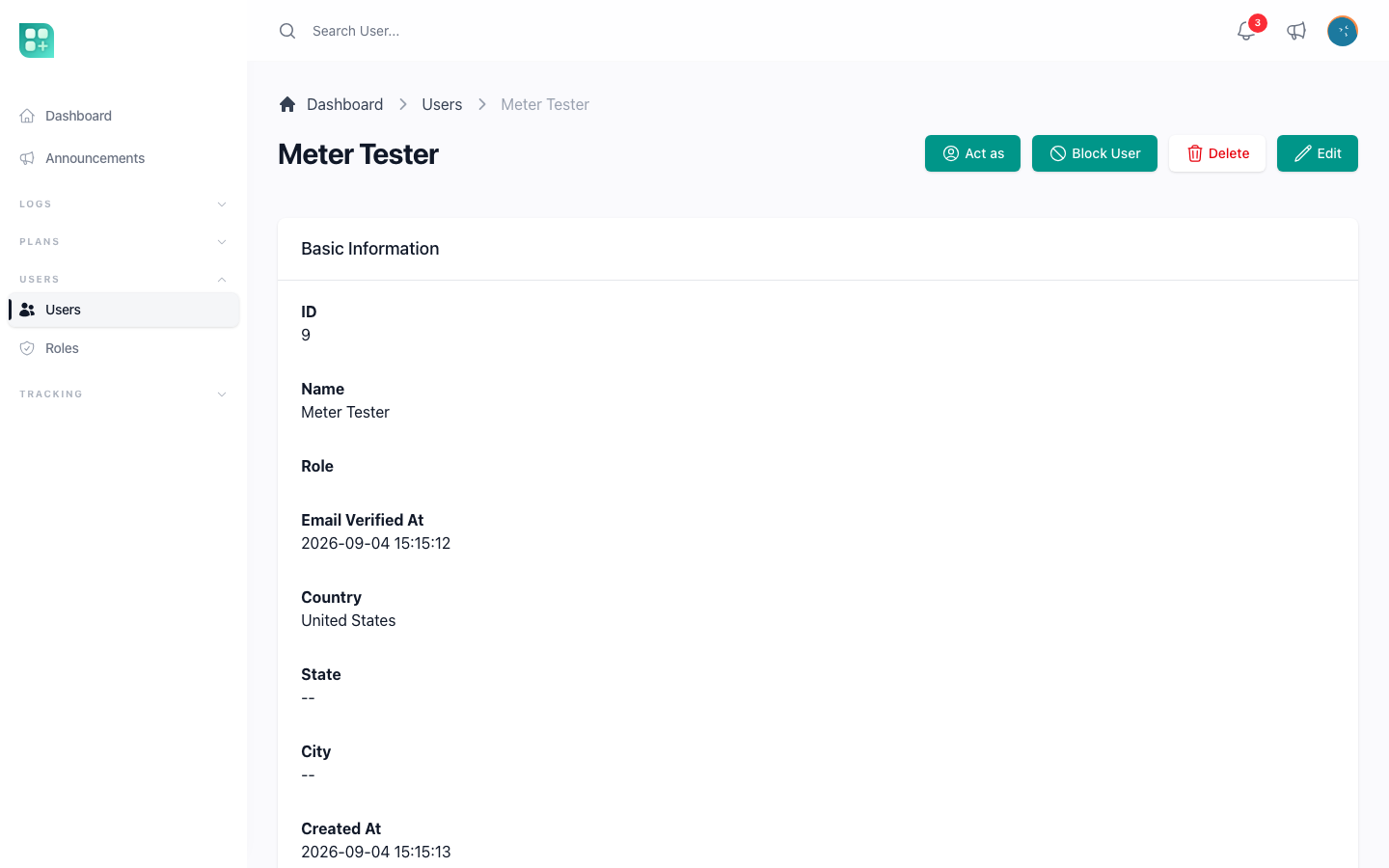
Who can: any signed-in administrator who can open /admin/users. The only check is that the target is a different account; being sudo is not required, and the target may be anyone, a super administrator included. Give the admin role to people you would trust with every account.
What happens:
actAs($target)saves the administrator's id, model class and remember-me state in the session undercurrentUserSimulating, signs the target in without remember-me, and redirects tohome_route.- While acting, the user menu shows "Stop acting" in place of "Sign out". The forced-password-change redirect is skipped, so an administrator can help a user who has one pending. Everything else behaves as it would for that user, and the activity log records what is done under the impersonated account, because that is who is signed in.
- "Stop acting" hits
/stop-acting, which signs the target out, removes the session key, signs the administrator back in with the remember-me state they had, and redirects tohome_route. If the administrator's account no longer exists the session simply ends signed out.
In code the trait offers canActAs($user), actAs($user), isActing() and stopActingAs(), all to be called on the currently signed-in user. Nothing writes to the activity log when acting starts or stops; the only trace is an alert in the application log if a session tries to return to an administrator who could not have started it.
Block an account
Blocking keeps an account and its data but stops the person from using it. It is a single nullable timestamp, blocked_at on the users table, and one admin action.
- In
/admin/users, open a user and choose "Block User". The same action unblocks a blocked account. It is not offered on users who hold the admin role, so an administrator cannot be locked out by another one. The detail page shows "Blocked At" once set. - From code:
$user->update(['blocked_at' => now()]), andnullto lift it.
A blocked user can still submit the sign-in form: the credentials are checked and the session is created. On the very next request to /app the security middleware signs them out and returns them to the sign-in page with "You are blocked, please contact support." A session that was already open is closed the same way on its next request. Announcement emails skip blocked accounts. Deleting a user from the admin panel is a soft delete, which also stops sign-in, but blocking is the reversible choice.
Two things the kit does not do: it never blocks an account on its own after failed sign-in attempts, and the sign-in form has no rate limiting. If your product needs either, add a RateLimiter check to the login component or a throttle middleware on the route.
The activity log
Changes to users, roles, permissions, announcements, categories and the billing models are recorded by spatie/laravel-activitylog and can be browsed by super administrators at /admin/activities, one row per event with the old and new values. ACTIVITY_LOGGER_ENABLED=false stops recording and ACTIVITY_LOGGER_DB_CONNECTION sends the table to another connection. What is logged, how to add a model and how to read the diff is in Audit trails and webhook events.