

The DevZone
The super-administrator page at /admin/dev, every tool on it, and how to add yours.
The DevZone is a page of the admin panel, at /admin/dev, that lets a super-administrator operate the installed application from the browser: edit the .env file, pull and deploy the latest code, read the logs, inspect webhook deliveries and test web push and the mobile detection. Read this when you want to know what each button does before you press it on a production server, or when you want to add a tool of your own.
It is a single Livewire component, App\Livewire\Admin\DevZone, with its view in resources/views/livewire/admin/dev-zone.blade.php. There is no separate package and no configuration file: everything it does is in those two files.
Who can enter
Two checks stand between a visitor and the page, and both have to pass.
| Check | Where it lives | What it requires |
|---|---|---|
| The admin group | bootstrap/app.php |
Every route in routes/admin.php runs behind web, auth, security and role:admin. The visitor must be signed in, not blocked, and hold the admin role, the one admin_role in config/app.php names and the seeder gives to every sudo account. |
| The sudo attribute | DevZone::mount() |
auth()->user()->sudo must be true. Otherwise the request is aborted with HTTP 405. |
sudo is not a role or a permission. It is a computed attribute on the user (in App\Traits\UserBase): true when the account's email, lowercased, appears in the sudo array of config/app.php. An administrator whose email is not in that list sees the rest of the admin panel but not this page, and the sidebar entry "Dev Zone" in resources/views/layouts/sidebars/admin.blade.php is hidden from them too ('show' => auth()->user()->sudo).
The page is not restricted to the local environment. It exists precisely so you can operate a deployed installation, which is also why the list of sudo emails is a committed value and not an environment variable. How the sudo accounts are seeded and what else they can do is in /help/sudo-and-super-administrators; the role behind the admin panel is in /help/roles-and-permissions.
The header
The title shows the application name and the commit the server is running: the output of git describe --all --dirty followed by the short hash, for example heads/master 4f2a9c1. It is read with a shell process from the project root and cached for one minute under the cache key currentCommit. When Git is not available on the server, or the folder is not a repository, it shows ??.
Three buttons sit next to the title.
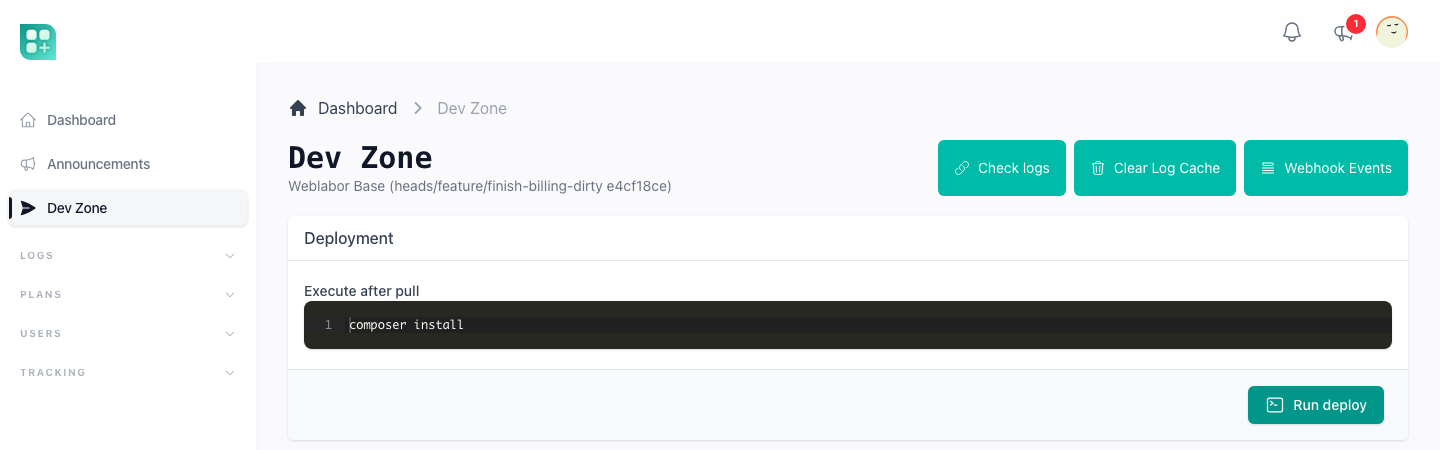
Check logs opens /logs in a new tab. That page is the rap2hpoutre/laravel-log-viewer package, which reads the files in storage/logs and lets you switch between them, filter by level and delete a file. Two environment variables adjust it, neither of them present in .env.example:
| Variable | Default | What it does |
|---|---|---|
LOGVIEWER_PATTERN |
*.log |
Which files in the storage path are listed. |
LOGVIEWER_STORAGE_PATH |
storage_path('logs') |
Where the viewer looks for files. |
The route is declared in routes/web.php as Route::get('logs', ...) with no middleware of its own, so it does not share the admin group's auth and role:admin checks. Add them to that line before you deploy if you keep the viewer.
Clear Log Cache empties the counters behind the exception throttle. Outside the local environment the application does not log every occurrence of an exception: bootstrap/app.php counts occurrences of each exception signature in the cache keys exception:{signature}:count and exception:{signature}:last_logged and only reports it at certain counts, never twice within five minutes. The rule in full is in /help/logs-and-debugging. The button deletes every cache row whose key starts with exception: and forgets the exception_times counter kept in the session, so the next occurrence is logged again as if it were the first. It only works when the cache store is database (CACHE_STORE=database): with any other store it shows a warning and deletes nothing. In the local environment every exception is logged and these counters are never consulted.
Webhook Events opens /admin/webhook-events, a list of the WebhookEvent records written by the log.webhook middleware. The kit attaches that middleware to POST /api/stripe/webhook in routes/api.php, so every Stripe delivery is stored with its source, event type, status (success or failed), the JSON payload, the HTTP status the application answered, and the error message and trace when the handler threw. The page filters by source and event type, shows 25 rows per page, and opens one event to read its payload. Use it when a Stripe event did not do what you expected: the row tells you whether it arrived at all and how the application answered.
Deployment
The card has one text area, "Execute after pull", pre-filled with composer install, and a button, "Run deploy". The button does two things in order, both as shell processes started from the project root with a 10 second timeout each.
git pullof the current branch from the current remote. The branch isgit rev-parse --abbrev-ref HEAD; the remote URL is read withgit remote get-urland rewritten from the SSH formgit@host:org/repo.gittohttps://host/org/repo, because authentication goes over HTTPS with a credential helper that answers with two environment variables.- The lines of the text area, trimmed, joined with
&&and run as one command. An empty text area skips this step.
The pull needs these two variables in the server's .env. Neither is in .env.example because they only matter on a server that deploys itself this way.
| Variable | Used for |
|---|---|
GIT_USER |
The user name given to the Git remote over HTTPS. |
GIT_PASSWORD |
The password or personal access token for that user. |
When either is missing the button stops with the notification "GIT_USER or GIT_PASSWORD environment variable is not set" and nothing runs. The processes also receive HOME, COMPOSER_HOME and GIT_TERMINAL_PROMPT=0 so Composer finds its cache and Git never waits for a prompt.
Each step notifies success or failure on screen. The combined standard output and error of both steps is written to the application log as a JSON entry prefixed [DevZone Deployment] on success or [DevZone Deployment Error] on failure, so the "Check logs" button is where you read what Composer said. A failure is also sent through the normal exception reporting.
The 10 second limit is fixed in the component. A composer install that has to download many packages, or an npm run build, can exceed it; the deploy then reports an error even though the process may still be running on the server. Keep the post-pull commands short, or run the long ones from the terminal as described in /help/deploy-your-project.
Env File
The card shows the current contents of .env in a code editor. "Apply changes" asks for confirmation, writes the editor's contents over the file and runs php artisan config:clear, then asks you to refresh the page.
Three consequences are worth knowing before you use it on a server:
- The write is the whole file, not a merge. What is in the editor is what the file becomes, including anything you deleted by accident.
config:clearremoves the configuration cache. From that request on the application reads.envdirectly, which is what you want for the new value to take effect, but it also means a release that ranconfig:cacheis now running uncached until the nextconfig:cache.- The change happens on this server only. Another server in the same deployment, and your repository, know nothing about it.
Testing
Test WebPush Notification sends App\Notifications\TestWebPushNotification to your own account through the WebPushChannel only, ignoring your notification preferences. It is the quickest way to prove that the browser you are using is subscribed and the VAPID keys are right: if the notification "Notifications are working" arrives, they are. Nothing arrives when this browser has no subscription; how to subscribe one is in /help/web-push-and-the-pwa.
Test as iOS and Test as Android make the application believe, for your session only, that the request comes from the native mobile app. They store platform_override in the session with the value ios or android; pressing the same button again ("Stop testing as iOS") forgets it. The helpers that every view can call read that value:
| Helper | True when |
|---|---|
is_ios() |
The request carries the cookie app-platform, or the session override is ios. |
is_android() |
The request's Referer header is exactly android-app://, or the override is android. |
is_mobile() |
Either of the above. |
They are defined in app/Helpers/base.php. In the kit itself they change two things: the landing hides the plan and add-on links when is_ios() is true, and the IsPWABuilder middleware on the home page redirects a mobile visitor to the app dashboard when APP_PWA=true. Use the override to see both behaviours from a desktop browser, and in your own views to show or hide anything that should differ inside the native app:
@if(is_ios())
    {{-- shown only inside the iOS app --}}
@endif
Add a tool of your own
There is no registry of tools. A tool is a public method on the component and a button in the view, exactly like the ones that ship.
- Add the method to
app/Livewire/Admin/DevZone.php. The component uses the WireUiWireUiActionstrait, so$this->notification()->success(),->warning(),->error()and$this->dialog()->confirm()are available to report the result or ask before acting, aschangeEnv()does. - Add a button to
resources/views/livewire/admin/dev-zone.blade.php, inside one of the existing<x-card>blocks or a new one, withwire:click="yourMethod". For anything destructive addwire:confirm="..."as the "Clear Log Cache" button does. - Keep every string a person reads inside
__()and add it tolang/en.json, as in the rest of the kit.
Because mount() already aborts for anyone who is not sudo, a method you add is protected by the same two checks as the page. If your tool is large enough to deserve its own page, register a Livewire route in routes/admin.php, check auth()->user()->sudo in its mount(), and add an entry to the items array of resources/views/layouts/sidebars/admin.blade.php with 'show' => auth()->user()->sudo so it appears only to the same people.