

The admin panel
What ships under /admin, who gets in, and how to add a screen of your own.
The admin panel is the back office of your project: users, roles, logs and the optional modules, each as a CRUD generated from a short PHP class. This guide covers what the panel ships with and how to register a resource of your own with Laravel Front, the package that renders it.
How to reach it
The panel lives at /admin. Its routes are in routes/admin.php, and bootstrap/app.php wraps that whole file in the middleware web, auth, security and role:admin, under the admin. route-name prefix. Signed-in users with the admin role see a Go To Admin Panel entry in the user menu at the top right of the application.
Three things follow from that middleware stack:
- You need a session. A visitor is sent to the login page.
securityapplies the same checks as the rest of the account area: a blocked account is logged out, and an account flagged for a password change is sent to the password screen before anything else.- You need the role named
admin. The middleware carries that name literally, so theadmin_rolekey inconfig/app.phpmust stayadminfor the panel to open.
Super-administrators are not a role. config/app.php → sudo is a list of emails, and php artisan db:seed (through AdminSeeder) creates an account for each one and assigns it the admin role. That role is what opens the door; being on the sudo list on top of it unlocks the Dev Zone, the Design screen and the activity log. See /help/sudo-and-super-administrators.
Once inside, every screen checks its own policy, and the policy checks a permission of the shape {action} {resource}. The seeded admin role holds every permission, so a fresh install shows everything. A role you create shows only what you grant it, and a resource its role cannot read disappears from the menu. See /help/roles-and-permissions.
The layout
Sidebar. resources/views/layouts/sidebars/admin.blade.php renders the <x-design::sidebar-menu> component (App\Classes\SidebarMenu) with two kinds of entries: the manual links it declares, in this order — Dashboard at /admin, Space at /admin/space, Media at /admin/media, shown to accounts that can browse other accounts' media, Support inbox at /support, shown when the support tickets module is on and the account may answer tickets, and at the bottom Design at /admin/design and Dev Zone at /admin/dev, both shown only to sudo accounts — and every registered resource that returns true from showOnMenu() and whose model the current user passes the viewAny policy check for. Resources are grouped by their $menu_group; a resource with no group sits in the ungrouped block at the top. The sidebar declares the order of its groups (Logs, Plans, Users); a group it does not name goes after those, alphabetically. Each group remembers whether you left it open in localStorage.
Search. When the resource's model uses the Searchable trait, the top bar shows a search box that filters the index by the model's $searchable columns. Users, roles and announcements are searchable out of the box.
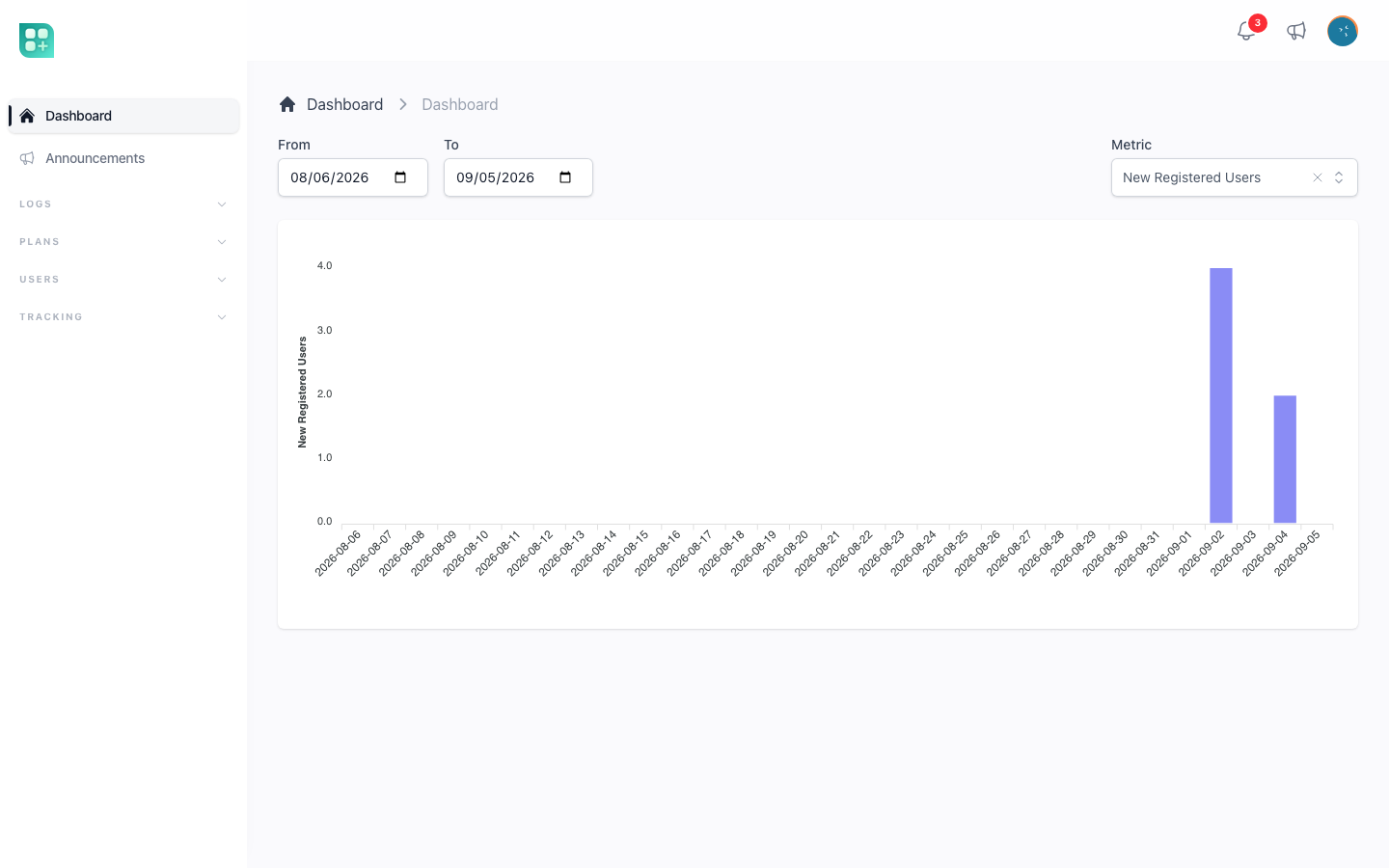
Dashboard. /admin is a Livewire component (App\Livewire\Admin\Dashboard) with a date range (default: the last 30 days) and a metric selector. The metrics always available are New Registered Users, Total Accumulated Users, Activity Log Events, Daily Logged Users and Users by Country. Tracking Events appears when FEATURE_TRACKING_ENABLED is on, Referral Subscriptions when FEATURE_REFERRALS_ENABLED is on, and the billing package adds its own when it is installed. The chosen metric is kept in the URL, so a dashboard view can be bookmarked. Each metric is described in /help/dashboard-metrics-and-visitor-tracking.
What ships with the panel
Every class in app/Front/Resources/ is a resource. All of them extend the local App\Front\Resources\Resource, which sets the defaults $section = 'admin', $showOnMenu = true and the circle-stack icon.
| Resource | URL | Menu group | What it manages |
|---|---|---|---|
User |
/admin/users |
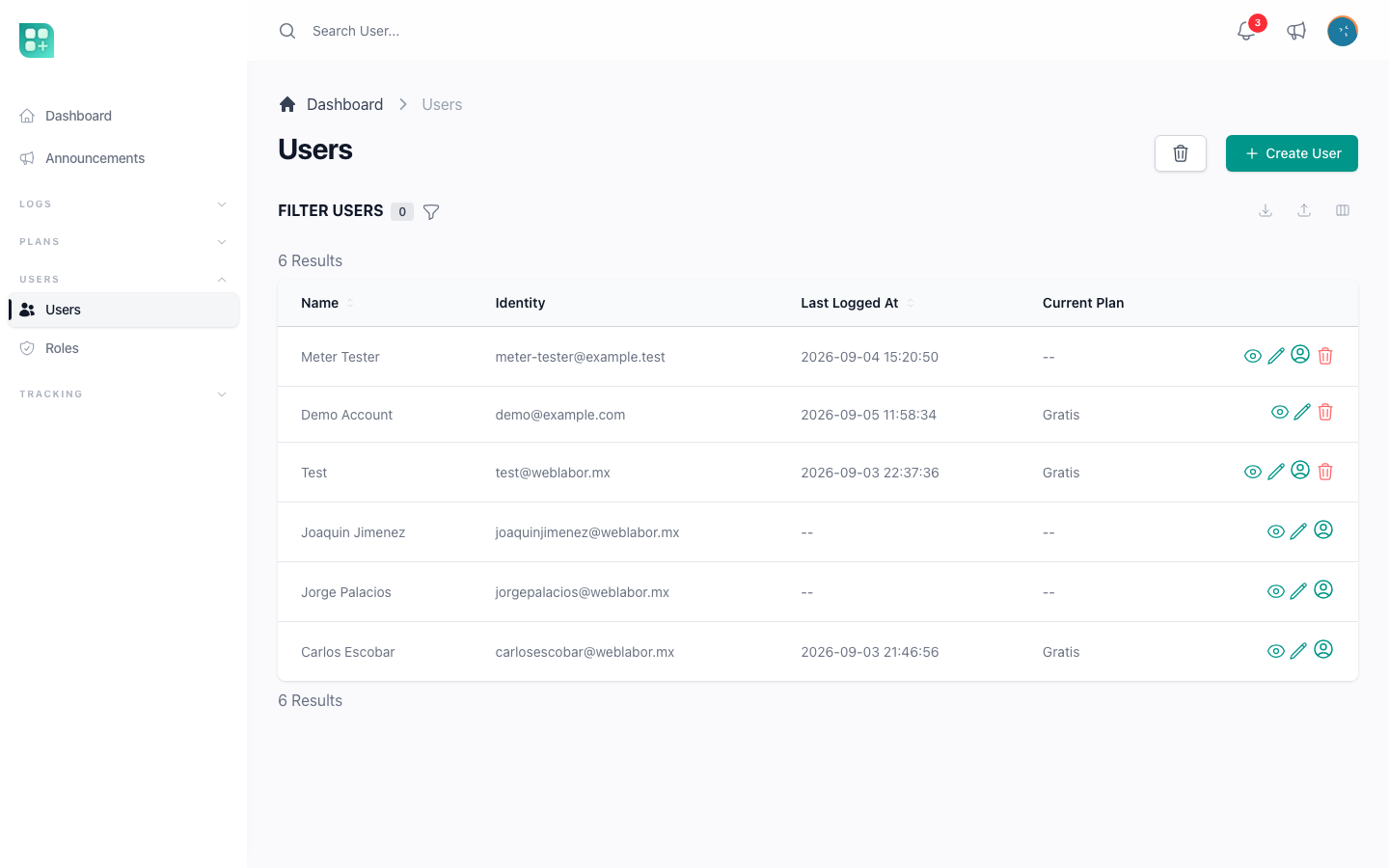
Users | Accounts: name, the identities enabled in config/auth.php (email, phone, username), PIN when auth.enable_pin is on, password with a generator button, roles, verification, detected location, block date, communication logs. Filter by plan when billing is active. Actions: Act as, Block User, Reset Pin. Email and Phone, when they are sign-in identities, are list columns hidden by default: switch them on in Columns and the Excel export carries them, as it carries every visible column. It never carries the password; importing it at /admin/users/import updates the rows with an ID, changing only the columns the file brings and the form can edit (the last login and the created, updated, verified and blocked dates are ignored), including Email Verified, and creates the rows without one, with the same rules as the form and a random password nobody sees. See Accounts created by an administrator. |
Role |
/admin/roles |
Users | Roles and their permission matrix. Action: Clone. |
Permission |
/admin/permissions |
hidden | Read-only list of permissions; showOnMenu is false and its policy denies create, update and delete. It exists so the role screen can load the list. |
Announcement |
/admin/announcements |
none | Announcements shown to every user. Visible only when FEATURE_ANNOUNCEMENTS is on. See /help/announcements. |
Activity |
/admin/activities |
Logs | The activity log written by the models (event, subject, causer, JSON properties). Index and detail only. Its policy requires the admin role and a sudo email. |
CommunicationLog |
/admin/communication_logs |
Logs | Every email and SMS the application sent or failed to send: recipient, notification class, subject, HTML body. Filter by type and status. No create or edit. |
TrackingEventType |
/admin/tracking-event-types |
Tracking | The named events the tracking module sends. Only when FEATURE_TRACKING_ENABLED is on. |
TrackingSession |
/admin/tracking-sessions |
Tracking | Visitor sessions with campaign, IP, Facebook identifiers and their events. Index and detail only. Same flag. |
TrackingEvent |
/admin/tracking-events |
Tracking | Individual events with payload. Filter by type, date range and session. Same flag. |
Six screens are plain Livewire components registered in the same file:
| URL | Component | What it does |
|---|---|---|
/admin/dev |
Admin\DevZone |
Deploy commands, .env editor, test buttons. Aborts with 405 unless the account is sudo. See /help/the-devzone. |
/admin/space |
Admin\Space |
How much room the whole installation takes up: every registered file, every table with its data and indexes, and the total, with the data space broken down by area. Open to every account with the admin role. See /help/the-space-pages. |
/admin/design |
Admin\Design |
The design components of the project, each in its states, and which layer supplies each one. Returns 403 unless the account is sudo. See /help/make-it-your-own. |
/admin/media |
Admin\Media\Directory |
Files that are not your own, in two folders. General holds what the panel uploads — category images and the files of custom fields — and counts against nobody's space. Users lists every account by its numeric ID; opening one shows that account's own files, and what you upload or delete there counts against that account. Needs the browse media_folder permission; deleting a folder also needs delete media_folder. Every level shows how much it weighs: Storage used at the top, and each card — General, Users, every account, every folder — its own size, 0 B when empty, leaving out deleted folders as the quota does. Following the biggest figure down leads to where the space went. Your own files stay at /app/media. Previewing a file here also shows its collection, disk, ID, UUID and the getMedia() line to use in code, and the disk icon names its disk on hover; at /app/media your customers see only the name, size and file type. |
/admin/webhook-events |
Admin\WebhookEvents |
Received webhooks with payload, response and error, filtered by source and event type. See /help/audit-trails-and-webhook-events. |
/admin/categories/{type} |
Shared\Category |
A tree editor for categories of a given type, opened from the Categories action of a resource that uses it. See /help/models-casts-and-building-blocks. |
Register a resource of your own
The example below adds a Plan resource. Replace the name with yours.
1. Generate the class
php artisan front:resource Plan -a
composer dump-autoload
-a also creates App\Models\Plan, its migration and App\Policies\PlanPolicy. Use -m for the model and migration only, -p for the policy only, or no flag when the model already exists. The command writes app/Front/Resources/Plan.php from a stub with $base_url = '/admin/plans'; the URL is the plural snake case of the class name under default_base_url (/admin) from the package configuration.
composer dump-autoload matters: the permission seeder discovers resources from Composer's class map, and the project's optimize-autoloader setting only refreshes that map when you dump it.
2. Describe the screen
<?php

namespace App\Front\Resources;

use App\Front\Filters;
use App\Models\Plan as Model;
use WeblaborMx\Front\Inputs;

class Plan extends Resource
{
    public $base_url = '/admin/plans';
    public $model = Model::class;
    public $title = 'name';
    public $icon = 'credit-card';
    public $menu_group = 'Plans';
    public $menu_order = 1;

    public function indexQuery($query)
    {
        return $query->latest();
    }

    public function fields()
    {
        return [
            Inputs\ID::make(),
            Inputs\Text::make('Name')->rules(['required', 'string', 'max:255']),
            Inputs\Money::make('Price')->rules(['required', 'numeric', 'min:0']),
            Inputs\Boolean::make('Active')->default(true),
            Inputs\Textarea::make('Description')->hideFromIndex(),
            Inputs\DateTime::make('Created At')->onlyOnDetail(),
        ];
    }

    public function filters()
    {
        return [
            (new Filters\BooleanFilter)->setTitle('Active'),
            (new Filters\TextFilter)->setTitle('Name'),
        ];
    }
}
The properties the resource understands:
| Property | Default | What it does |
|---|---|---|
$base_url |
required | The URL of the index. Its last segment becomes the route prefix and name. |
$model |
required | The Eloquent model behind the screen. |
$title |
'name' |
The column shown as the record's label in links, breadcrumbs and relationships. |
$search_title |
$title |
The column matched by the search box and by autocomplete fields. |
$icon |
'circle-stack' |
A Heroicons name for the sidebar. |
$menu_group |
null |
The sidebar heading the entry goes under. null puts it in the ungrouped block. |
$menu_order |
null |
Position inside the group. Entries without one go after the ordered ones. |
$showOnMenu |
true |
Set to false to keep the screen reachable but out of the sidebar. Override showOnMenu() to decide at runtime, as the tracking resources do with their flag. |
$section |
'admin' |
The sidebar the resource belongs to; it must match the first URL segment. |
$actions |
all seven | Which CRUD operations exist: index, create, store, show, edit, update, destroy. ['index', 'show'] makes a read-only log. |
$pagination |
50 |
Rows per page. |
$default_sort / $default_sort_direction |
null / 'desc' |
Initial order of the index. |
$enable_index_sorting |
true |
Click a column header to sort. |
$enable_column_preferences |
true |
Each user can hide, show and reorder index columns; the choice is remembered. |
$enable_export / $enable_import |
true |
Export the index to a spreadsheet, and import rows from one at {base_url}/import. |
$show_create_button_on_index |
true |
The Create button on the index. |
$custom_fields |
null |
The JSON column that keeps custom field values. Set, the index gets a Custom fields button. See /help/add-custom-fields. |
Fields. fields() returns inputs from WeblaborMx\Front\Inputs. The first argument is the label; the column is its snake case unless you pass a second argument (Inputs\Text::make('Sent At', 'created_at')). Available inputs: Autocomplete, BelongsTo, BelongsToMany, Boolean, Check, Checkboxes, Code, Date, DateTime, Disabled, File, HasMany, HasOneThrough, Hidden, ID, Image, ImageCropper, ImagePointer, Images, InputGroup, Money, MorphMany, MorphTo, MorphToMany, Number, Password, Percentage, Select, Text, Textarea, Time, ToastEditor (Markdown), Trix. The project adds its own under App\Front\Inputs: Password with a generator button, Pin, PermissionSelector and Categories.
Chain these on any input:
| Method | Effect |
|---|---|
rules(), creationRules(), updateRules() |
Validation for both forms, for create only, for edit only. |
hideFromIndex(), hideFromDetail(), hideWhenCreating(), hideWhenUpdating() |
Remove the field from one place. |
onlyOnIndex(), onlyOnDetail(), onlyOnForms(), onlyOnCreate(), onlyOnEdit(), exceptOnForms() |
Keep the field in one place only. |
show($bool) |
Show or hide by a runtime condition, such as a feature flag. |
default($value) |
Initial value of the form. |
help($text) |
A hint under the input. |
placeholder($text) |
The input's placeholder. |
options($array) |
The choices of a Select or Checkboxes. |
sortable() / unsortable() |
Whether the index column sorts. |
exportable() / unexportable(), importable() / unimportable() |
Whether the field takes part in export and import. |
hideWhenValuesSet() |
Hide the input when the value arrives in the URL, as when creating from a relationship. |
conditional("type=='normal'") |
Show the input only when another input has a value. |
Filters. filters() returns instances of the classes in app/Front/Filters/: TextFilter, SelectFilter (->options([...]), ->multiple()), BooleanFilter (->setTrueValue(...)) and DateFilter. setTitle($title, $field, $slug) names the filter and, optionally, the column and the query-string key; setOperator('>=') changes the comparison and setScope('byPlan') delegates to a model scope instead. A search filter is added for you when the model is searchable.
Actions. actions() returns classes extending App\Front\Actions\Action, one button per record. Set $title and $icon, put $show_on_index = true to offer the button on the list as well as on the detail page, return a boolean from hasPermissions($object) and do the work in handle($object). Return a redirect or nothing. When fields() returns inputs, the action first shows a form and receives its data in $this->data. An action with no fields — or only hidden ones — runs from its button, which sends a POST with the form token; opening its address with GET only shows the action screen and changes nothing, so a link or a prefetch never runs it. index_actions() does the same with classes extending App\Front\Actions\IndexAction, which act on the list rather than on one record. ActingAs, BlockUser, ResetPin and CloneRole in app/Front/Actions/ are working examples. GoToCategories is a ready-made action whose handle() takes no record: it redirects to the categories screen for the type you give it with (new Actions\GoToCategories)->setTitle('Tags')->setType('tag').
Cards. cards() returns cards rendered above the index table; the package ships WeblaborMx\Front\Cards\NumericCard, which you extend with a value() method and which caches its number for five minutes.
Pages. A screen that is not a CRUD — a report, a settings form — extends App\Front\Pages\Page, declares fields() for what it shows and post() for what it saves, and is registered with Route::page('Settings', 'settings'), which mounts App\Front\Pages\Settings at /admin/settings for GET, POST, PUT and DELETE.
Hooks. Override these to run code around the CRUD: indexQuery($query) to change the listing query, indexResult($result) to change the collection, processDataBeforeSaving($data) to edit the input before it is written, beforeUpdate($object, $request), store($object, $request) and update($object, $request) after a save, processAfterSave($object, $request) after either, destroy($object) before deleting (return false to stop it), and beforeRequest() to hijack any request after authorization.
The package's layout hooks are configured in config/front.php. The kit sets scripts_stack to scripts, the Blade stack the application layout already prints, so an input that needs JavaScript pushes it there.
3. Add the route
// routes/admin.php
Route::front('Plan');
Route::front registers the whole CRUD in one line. Inside routes/admin.php the routes take the admin.front.plans name family and the /admin/plans prefix:
| Route name | Method and URL |
|---|---|
admin.front.plans |
GET /admin/plans |
admin.front.plans.create |
GET /admin/plans/create |
admin.front.plans.store |
POST /admin/plans |
admin.front.plans.show |
GET /admin/plans/{id} |
admin.front.plans.edit |
GET /admin/plans/{id}/edit |
admin.front.plans.update |
PUT /admin/plans/{id} |
admin.front.plans.destroy |
DELETE /admin/plans/{id} |
admin.front.plans.import |
GET /admin/plans/import |
admin.front.plans.restore |
POST /admin/plans/{id}/restore, the soft-delete recovery when the model uses SoftDeletes. A GET answers 405. |
admin.front.plans.force-delete |
DELETE /admin/plans/{id}/force-delete, only for a record already in the trash. The trash asks for confirmation before sending it. |
admin.front.plans.index_action, .show_action |
GET /admin/plans/action/{action} and GET /admin/plans/{id}/action/{action}, the action screens, by action slug; the action runs on the .post route of the same URL. |
admin.front.planssort, .up, .down |
POST /admin/plans/{id}/sortable, /sortable/up and /sortable/down, the order arrows of a sortable model. |
A resource that is registered but not linked from anywhere is still reachable by URL and still protected by its policy.
4. Write the policy
<?php

namespace App\Policies;

class PlanPolicy extends BasePolicy
{
    protected string $name = 'plan';
    protected $requiredConfig = 'features.plans_enabled';
}
$name is the singular of the model's table, and it is the second word of every permission the resource needs. $requiredConfig is optional: when the config key it names is false, every check fails, the screen hides from the menu and its routes return 403. Laravel finds App\Policies\PlanPolicy for App\Models\Plan on its own; only a model outside App\Models needs Gate::policy() in AppServiceProvider::boot(), which is how ActivityPolicy is attached.
5. Create the permissions
php artisan db:seed --class=PermissionSeeder
php artisan db:seed --class=RoleSeeder
The first command creates create plan, retrieve plan, update plan and delete plan; the second grants them to the admin role. Until you run both, even the admin sees a 403 on the new screen. The full rules are in /help/roles-and-permissions.
6. Put it in the menu
Nothing to do: the sidebar reads $menu_group, $menu_order and $icon from the class, and hides the entry from anyone whose role lacks retrieve plan. To give a new group a fixed position, add it to the :groups list of resources/views/layouts/sidebars/admin.blade.php; to add a link that is not a resource, add it to :items with a name, url, icon, optional menu_group, order and a show boolean.